How can I change the language settings of Blog2Social?
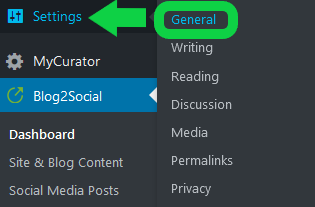
The language of the Blog2Social plugin depends on the language selected in the general settings of your WordPress blog. If you want to switch the language, please open "Settings" -> "General" in your WordPress dashboard and switch the language as needed.
Blog2Social is currently available in:
- English
- German
- French
- Portuguese
- Russian
- Spanish
- Italian
- Swedish
Please click on "Settings" in your WordPress dashboard and choose "General".
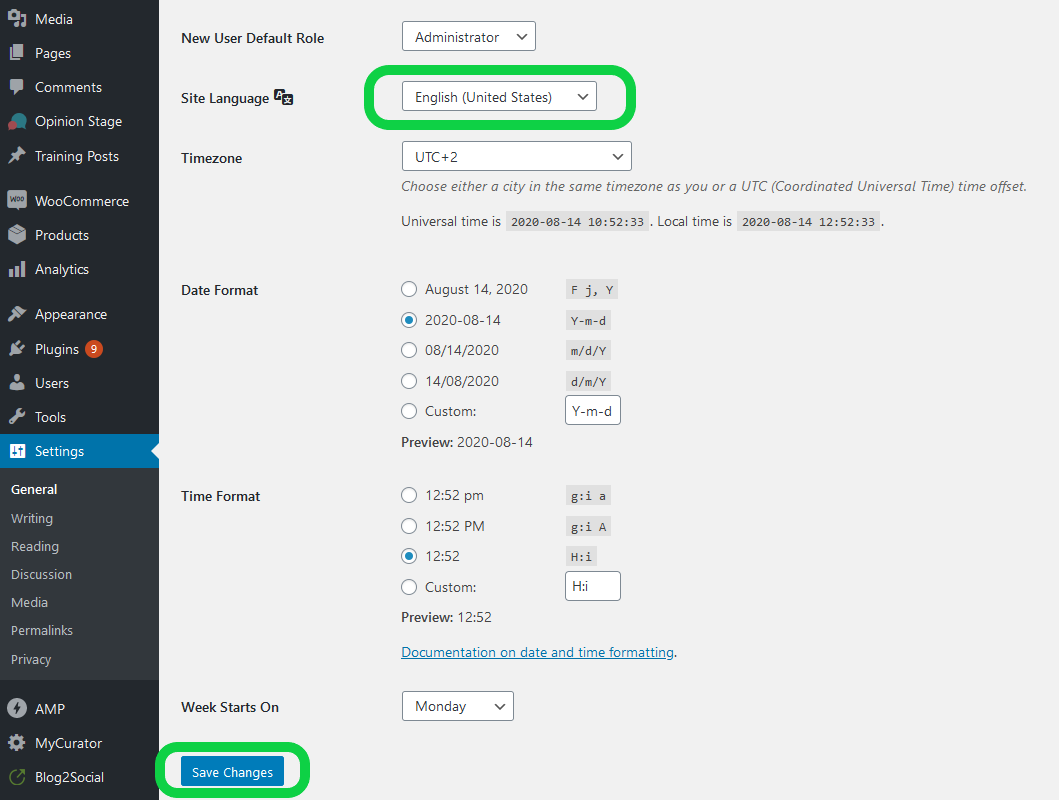
Here you can select the language you want to use by clicking on the dropdown menu.
Then you can confirm your changes by clicking on “Save Changes” on the bottom left. Done!
Tags: Installation, language
Most popular FAQs
System requirements for installing Blog2Social
How to auto post imported RSS feeds
How do I auto-post and auto-schedule blog posts
Solutions: Why does Instagram not publish my post/text?
How do I connect Blog2Social with Instagram?
The connection to the server failed.
How to connect and automatically post to Facebook
I cannot connect my Facebook page
How to automatically re-publish blog posts on Bloglovin’
How to share on Facebook Profiles with Facebook
How to auto post imported RSS feeds
How do I auto-post and auto-schedule blog posts
Solutions: Why does Instagram not publish my post/text?
How do I connect Blog2Social with Instagram?
The connection to the server failed.
How to connect and automatically post to Facebook
I cannot connect my Facebook page
How to automatically re-publish blog posts on Bloglovin’
How to share on Facebook Profiles with Facebook