Tag: Google+

  • Boost your Ranking in Google with a Google  Business Profile

    Boost your Ranking in Google with a Google Business Profile

    Looking for an easy way to catapult your ranking in Google without expensive Adwords campaigns? Ever thought of a Google Business Profile (formerly Google My Business) and Google Posts?

    A Google Business Profile can significantly increase your company’s visibility and let you reach more customers and prospects.

    In addition to general information about your business, the Google Post feature allows you to publish snack-sized content that can promote anything from company news, events, and campaigns to your latest blog post. Provided that your Google Business listing is relevant, complete,e and up to date, it will be displayed directly in the Knowledge Panel of the first page of the Google search results.

    Learn how to optimize your Google Business listing with updates of your latest blog posts – automatically.

    What is a Google Business Profile?

    Have you ever googled a company, a restaurant, a doctor, or a hairdresser? Then you may have come across their Google Business listing.
    >If a company has a business listing on Google, it will appear on the right side next to the top search results.

    When searching for a company with a mobile phone, the business listing is displayed even more prominently at the top position on Google.

    A Google Business listing is not only visible in the top search results, but also in Google Maps.

    Tip: Don’t miss out on this top-featured position on Google for your company – without even spending a dime. Google My Business is free of charge. Learn how to make the most of your Google Business listing.

    How to create an attention-grabbing Google Business Profile

    You can create and maintain your own Google listing for your company or service to improve your presence in the Google search results, Google services, and Google Maps.

    Any business, shop, or office with a valid business address can claim or create a business listing on Google.

    At http://business.google.com/, you can create or edit a business listing for your company.

    Google assigns your business listing to your address using Google Maps and displays your company’s listing more prominently for users in your area.

    A Google Business Profile allows you to publish company news and event announcements directly in your Google listing. This allows you to decide which content you want to show users who are searching for your business on Google before they even access your website.

    For many companies, Google creates a listing automatically. As an owner, you can claim a Google listing and sign in to Google My Business to edit it.

    Claim ownership of a business listing

    How to edit your business listing on Google

    If Google has not already created a business listing for your company, you can create a listing yourself.

     Sign up with Google and create your Google Business Profile

    Before you can manage your business information on Google Maps, Google Search, and other Google products, you have to verify your business listing first.

    Verify your local business listing on Google

    How to manage your Google Business Profile

    A well-maintained Google Business profile is a key foundation for local visibility and trust. After setting up or claiming your profile, carefully verify all basic details, such as

    • business name
    • categories
    • address
    • phone number
    • website
    • opening hours

    to ensure consistency across search results and maps.

    Keep this information up to date, especially when hours change due to holidays or special events. Enrich your profile with high-quality photos and short videos that show your location, team, products, or services, as visual content helps potential customers build confidence before making contact.

    Regular updates and posts can further signal activity and relevance.

    Finally, actively encourage satisfied customers to leave reviews and respond to them professionally—both to positive and critical feedback—as this demonstrates reliability, engagement, and customer focus, while also supporting your local search performance on Google Business Profile. Managing this process efficiently is key; a dedicated Google review generator and management tool can automate request campaigns and use AI to help draft thoughtful responses, saving significant time while ensuring consistent engagement.

    Keep your Google Business Profile up to date with your blog posts

    Your Google Business Profile is your digital business card and can be a primary touchpoint when clients and prospects search for your company. As soon as someone searches for your company on Google, your business listing appears at the top right-hand side of the search results and is the focus of attention. However, a verified Google Business Profile does not guarantee that it will appear in the Knowledge Panel. Relevance, distance, and the prominence of the business all contribute to its standing in local search results. Therefore, a Google Business Profile should always be complete and up-to-date.

    Exciting news and interesting content presented directly in your business listing are a great way to catch your customers’ and prospects’ attention, even before they visit your website. Google Posts are also visible in your Google Maps listing, which creates another touchpoint.

    Content posts on your Google Business Profile are meant to show your latest news and articles. Your current posts will be displayed directly in your business listing. This way, you can keep your business listing up to date with new interesting content.
    Google Busines

    What and when to share on your Google Business Profile

    Regular content updates will keep your Google listing interesting and drive traffic to your corporate blog. Company news, press releases, blog posts or announcements are great content for your Google Business Profile.

    Don’t underestimate the importance of Google Business for your content marketing and your Google ranking. Current posts on your Google Business listing can reach a large number of new readers. With current posts and updates about your company, you stand out from the crowd and draw more attention to special events or campaigns, and increase the visibility of your company significantly.

    Google Posts are meant for up-to-date content, as posts only stay in the overview of your business listing for 7 days.
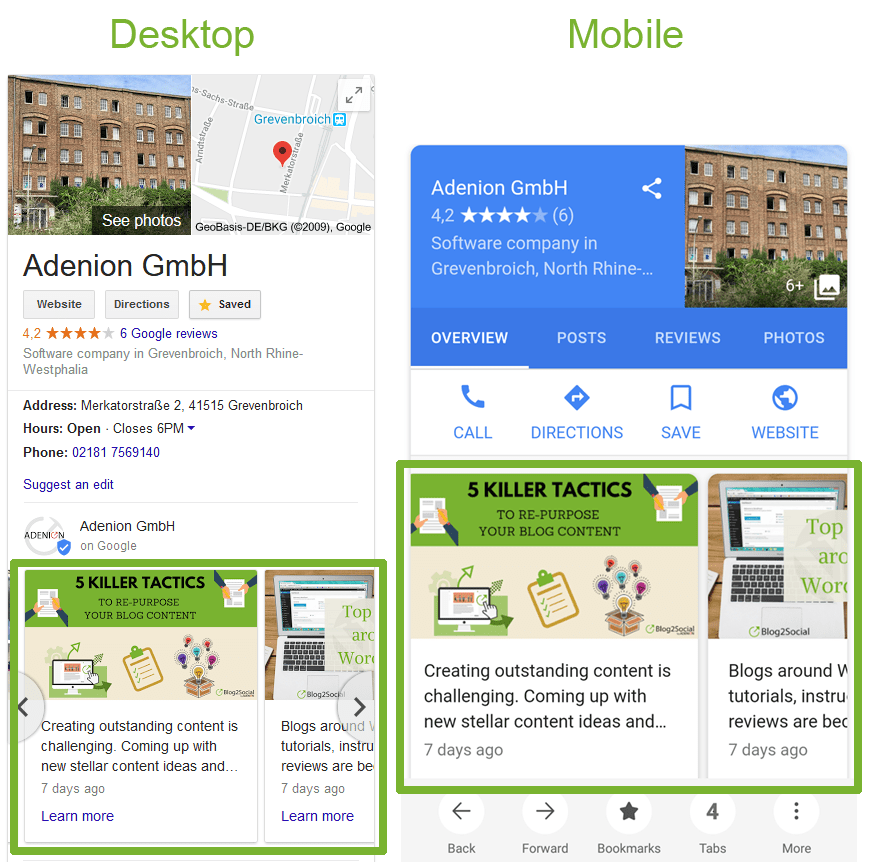
    Google Posts may contain a link that leads directly to your website, online store, corporate blog, event page, or a special landing page. This will take interested readers directly to the point-of-sale and help you generate new leads.

    Monitor the success of your Google Business Posts

    You can access your statistics in your Google Business dashboard. The statistics below each post show how many readers clicked on your Google My Business posts and how many link clicks have been achieved, thus expressing the success of your content.

    Google Statistics for a Google Business Profile

    The statistics show the success of your posts.

    How to connect your Google Business Profile to Blog2Social

    To connect your Google Business Profile to Blog2Social, go to “Blog2Social  Networks” and scroll down to “Google Business”. Click on “+Profile” on the right side to open a new window.

    Choose the Google account that is linked to your Google Business listing.
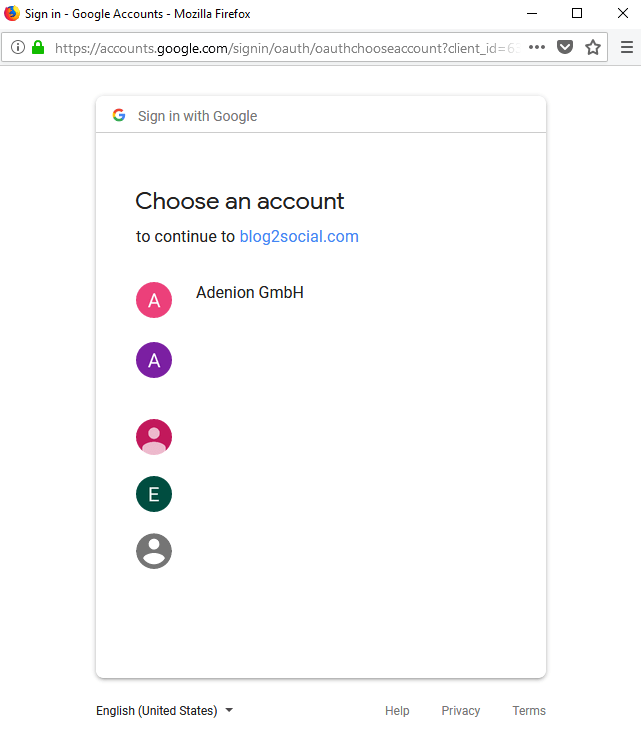
    Share your blog posts with Blog2Social on your Google Business profile

    Choosing your Google account will take you to the access confirmation page. Please make sure to click “allow” to grant Blog2Social the rights to publish on your Google listing.
    Connect Blog2Social to Google Business
    Afterward, select the location you want to publish your blog posts on.
    Please note that you need to have at least one verified location in Google Business.

    After you’ve successfully connected your Google My Business listing to Blog2Social, you can find the location listed in Blog2Social -> Networks.
    Post automatically with Blog2Social on your Google Business profile
    You can now share your blog posts on your Google Business Profile. This FAQ shows you how to share individually tailored blog posts.

    Your articles will appear as posts on the main page of your business listing on Google and link to your full blog post or landing page. This allows you to keep your business listing on Google up to date without additional work or time.

    Please note:

    Blog2Social uses the official Google API, with secure OAuth authentication to ensure your Google account is safe, to send your content to your business listing. You can connect your Google Business accounts with up to nine different locations to Blog2Social and choose which location you want to share your content on.

    Google currently allows access to the API for all companies with up to 9 locations connected to their Google Business account. However, Google plans to extend the API access in the future for companies with more connected locations.

    Conclusion

    Optimizing your Google Business Profile with updates of your latest news and posts will help you boost your visibility in Google. Make sure to keep your business listing interesting and refresh your Google posts with up-to-date content at least every 7 days to maximize your company’s reach. Share your company news, press releases, blog posts, or announcements in Google Business to repurpose your existing content for your Google business listing.

    Blog2Social helps you automate the updating of your Google Business listing with your current blog posts and news, saving valuable time and resources. Update your company pages on XING and LinkedIn in the same step to save even more time!

  • How Often to Share Your Blog Post on Social Media

    How Often to Share Your Blog Post on Social Media

    After having explored some general social networking rules for , let’s move to a more specific question: How often to share your blog content to social media for better blog promotion?

    Social Media are the best source to drive traffic to your blog. Social networks will bring your blog content to an engaged audience. So, social media should be a major part of your blog marketing strategy. However, as with content in general, there are different rules for each network. For each social network there is an optimal frequency of posting for maximum engagement. Exceeding this frequency may result in annoying fans and driving away followers.

    We have done some thorough research on the posting frequency for a better blog promotion that will help you to follow some basic guidelines for what might be best practice for your blog to social media scheduling.

    We have placed our results into a scheduling infographic as scheduling guide and checklist for your daily task.  Use these guidelines as a starting point for your own experiments and analytics. And please share your results and recommendations with us and with others. We’d be glad to know what works for you and what doesn’t. Please feel free to share the graphics to whomever you think may find them helpful.

    [Infographic] How often to share your blog post on social media?

    How Often To Post Your Blog Content On Social Media
    Infographic: How Often To Post Your Blog Content On Social Media

    Share this image on your blog and to your social media!

    Take this code to embed this Infographic on your side

    How often to post your blog content to social media?

    Twitter:

    • Boost your blog post up to 4 times per day for initial promotion
    • Re-post your content with different comments once a day over the next few weeks, then slow down to once a month for your evergreen content
    • Please Note: For every 3 pieces of creative or promotional content post 5 pieces of curated content from other sources and 2 pieces of personal content (that can also be replies and RTs with personal comments)
    • Remember: The best times for posting to Twitter are the morning hours from 8 a.m. – 10 a.m, middays from 11 a.m. – 1 p.m and after work from 4 p.m. – 7 p.m.

    Facebook:

    • Promote your blog post once for initial promotion
    • Also post to your page and relevant groups, but do so at different days and times and use different comments
    • Make your comments personal for more engagement
    • Re-post your evergreen content every 3-4 month on your profile or page
    • Remember: The best time for Facebook postings is in the afternoon from 1 p.m. – 4 p.m. and in the evening from 6 p.m. – 10 p.m., also on weekends

    LinkedIn:

    • Post your blog post once for initial promotion
    • Post recurring updates to your profile once a week, then slow down to every 3-4 month on your profile, but not on your page
    • Also post to your business page and / or your focus page depending on your content but do so at different days/times
    • Post your blog content in groups, but do not just copy & paste, but use different comments depending on the group and target audience and post on different days and times
    • Re-publish your blog content on LinkedIn Pulse
    • Remember: The best time for LinkedIn postings is during office hours from 8 a.m. – 10 a.m. and in the afternoon from 4 p.m. – 6 p.m.

    Pinterest, Instagram, Flickr

    • Post your featured image of your blog post for initial promotion
    • Then post all suitable graphics of your blog post over the following days
    • Remember: The best times to post on
      • Pinterest is around midday from 12 a.m. – 2 p.m. and in the evening from 7 p.m. – 10 p.m. and also post on weekends
      • Instagram is around midday from 12 a.m. – 2 p.m. and in the evening from 7 p.m. – 10 p.m.
      • Flickr is in the early morning hours from 7 a.m. – 9 a.m. and in the evening from 5 p.m. – 7 p.m.

    Medium, Tumblr, LinkedIn Pukse, Slideshare, Scribd, Issue, Quora, . . .

    • Re-Publish your blog content to other blogging networks and content sharing sites to give your content a wider outreach
    • You may vary your headlines and your copy

    Summary:

    Social Media can help your blog promotion tremendously, but sharing and scheduling your blog posts for the right frequency and at the best times to post on social media can be some pretty gruesome manual work and costs a lot of your valuable time.

    How Blog2Social Can Help

    Most people do not have the time to post all day, everyday. Planning and writing valuable content takes up enough of your valuable time. Monitoring and engaging with your community is not less time consuming and even more important. So how would you feel to reduce the time and work for your content promotion to a minimum of time?

    Blog2Social is a WordPress plugin that helps you to easily customize and schedule all your blog content and automatically cross-posts and cross-promote your content to social media. The plugin makes it easy to customize your posts with individual comments according to each networks posting options such as number of characters, hastags oder handles and to plan your posts to ensure they meet the ideal time and frequency for each network.

    Interested in trying out Blog2Social?
    Download and cross-promote your blog posts for free and even try out all advanced premium features for cross-posting and scheduling with your 30 day free trial today!

    The Complete Social Media Guide and Toolbox

    Get the Complete Guide to Social Media sharing & Toolbox for free!

    Social media is the most important source for driving traffic to a blog or website and generating reach. Readers and potential customers use social media channels to conduct targeted research, share information and discuss current topics.
    Click here to get the Social Media Guide

  • Cross-Promote, Don’t Crosspost On Social Media

    Cross-Promote, Don’t Crosspost On Social Media

    Social media marketing takes up a huge amount of time and a social media managers tasks are never done. To stay in touch with your community, you will need to share consistently or you will go down in the endless stream of social media noise. To keep up with the accelerating pace of social media, you will sometimes feel like a hamster in a wheel. If you’re running out of time for your daily social media management, automation might seem to be a good idea.

    There are several auto-posting and cross-posting tools available on the market. But there are several reasons why cross-posting isn’t the best choice, and why cross-promoting is a much better alternative. In this article, I will show you how you can bring both concepts together. Read on to find out, how to get the best out of your posts and still save a whole lot of time and work for sharing your content.

    The difference between cross-posting and cross-promoting

    I personally never thought of the difference between these two postings concepts of cross-posting and cross-promoting. Maybe it was because English is not my native tongue that I never really thought about the difference. There even is no equivalent term for cross-posting or cross-promotion in my language. Or, the very concept of cross-promotion is such a natural idea in my mind, that I never thought about stressing the difference. Then I stumbled upon an article written by Ben Donker of Link Human on the subject, that encouraged me to change my wording. However, after reading Bens article, it is time to catch up on this topic.

    So, what is the difference between cross-posting and cross-promotion and what is the impact of both on your social media strategy?

    Cross-posting vs. cross-promoting

    When people speak of cross-posting, they usually mean posting the very same content across multiple social networks. Cross-promotion also means, getting the same content to all of your networks, but there is a slight difference in approach. And that very difference may, however, have a great impact on your results and success. Cross-promotion basically means to promote your content in a way that fits each networks’ and communities’ characteristics and preferences.

    What are the cons of social media automation and cross-posting?

    Social Media Automation Pros and Cons_2
    Social Media Automation Pros and Cons

    Those who are against cross-posting often stress that your followers do not want to read the same content on every network. Well, I would not stress too much about this. If you think about it, this is very unlikely ever to be the case. You will have followers that follow you on multiple social networks. But what are the chances, that all of your followers are present at exactly the same time in all of your social channels and actually see your post? No, this won’t happen. If it does, you can call yourself a lucky guy. Fact is, that whenever you publish a post, only a fraction of your followers will actually see your post.

    If you promote your blog posts, I think it is extremely important that you do this across all of your channels. The biggest challenge of social media management is to get the right content on the right platforms at the right time. So, what is much more important is, that you do it exactly in the best way you may present your post on each network. And that differs from network to network.

    So what are the real cons of cross-posting?

    The human factor

    Social media users are the savviest audience you can have. If your posts sound robotic, your audience will quickly pick up you’re automating your stuff. This will give your account a negative perception. Successful social media posts are supposed to be personal and engaging to encourage interaction with your audience. Robotic posts will not achieve this goal.
    Social Media Automation: Don’t automate everything. Stay human.
    • Don’t send the same message over and over again.
    • Don’t just blast out the same message. Tell your audience why you’re sending them this, ask questions, aks for their opinion, ask for likes and shares and engage them.
    • Though you might automate posting content to your networks, respond and interact personally with your audience.

    [bctt tweet=”#SocialMedia Automation: Don’t automate everything. Stay human” username=”blog2social_com”]

    Network specific features

    Every network is different and every network provides you with different features for presenting your post. A few social networks are pretty similar. For example, Google+ and Facebook both offer unlimited characters for your post and both allow images and videos. But, whereas short comments work better on Facebook, Google+ followers react better to longer posts. Most networks allow #hashtags, but communities react very differently to posts with hashtags. Wheres Tweets work best with 2-4 hashtags, Facebook posts without #hashtags get more interaction than posts with hashtags. Instagram allows up to 30 hashtags and the more hashtags you use, the better they work.
    Despite the similarities in some platforms and their respective features, the audience will still react differently on those networks.
    • So don’t just blast out the same message in the same form to all of your networks.
    • Tailor your posts according to the network specific features and the preferences of your audience.
    • Don’t use auto-posting tools, that don’t allow you to customize your posts appropriately.

    Posting frequency

    How Often To Post on Social Media
    How Often To Post on Social Media
    There is an implicit rule for every network for . Whereas it is ok to post up to 4 times per day on Twitter, doing the same on Facebook might drive away your fans. Overdoing frequency will be counterproductive. Mastering posting frequency aims at sharing consistently and connecting better with your audience and not annoying them. Whereas you may promote your blog posts up to 4 times per day for initial promotion, you should promote it only once on Facebook and your evergreen content once every 3-4 month. But you may promote your blog posts with all of your blogs posts shareable images successively on Pinterest and Instagram or Flickr.
    So sharing the same content with the same frequency to all of your networks will probably cross that fine line between being informative and becoming an annoyance.
    • Don’t post the same content with the same frequency to each of your networks.
    • Post and re-post your content according to the frequency that is suitable for each network.

    .

    It’s all about timing

    Best Times to Post on Social Media
    Best Times to Post on Social Media

    [bctt tweet=”Your posts gain more outreach when your followers are online” username=”blog2social_com”]

    In social media, timing is a crucial factor for success. is when your audience is listening. And every network has its own rush hour for engagement. If you send out the same message at the same time to all of your networks, you might miss the right time to post. And the right time increases your chance of engagement with your community. Otherwise, your post might just go down in the endless stream of social media noise.
    The half-life of a Tweet is 24 minutes, four times shorter than a Facebook post, so your window of opportunity is tight. Whereas Facebook posts get the most engagement at midday and evenings, posts on LinkedIn get most reactions during business hours. Instagram and Pinterest posts get most engagement during evening hours.
    • Don’t share your posts at the same time on every network.
    • Schedule your posts for the best time to be noticed on each network.

    Not every content is suitable for every network 

    There are contents you might post across all of your social channels for example if you want to promote your blog post, you should share it to all of your channels. But there are contents that will not be suitable for all of your networks. For example, comments on live events might be suitable for Twitter, Facebook, and Google#, but not necessarily for networks like Medium or Tumblr. Curated content from other sources might be suitable for your Twitter, Facebook, Google+ and LinkedIn profiles, but not necessarily for your business page and not for networks like Medium or Tumblr. Whereas you will essentially promote an excerpt with a link to your post on most social networks, you may actually re-publish your complete post on networks such as Medium, Tumblr or LinkedIn Pulse.
    So don’t publish the same content on every network. Choose the appropriate networks wisely everytime you post.

    Cross-promote, don’t crosspost

    Now we understand the cons and risks of cross-posting, here is what I do: I often post the same content and links across multiple networks. But I not just cross-post the same message in the same way to all of my networks, I cross-promote my content tailored to each networks specifications.

    I have to manage 5 corporate blogs and a lot of social networks out there, my personal profiles as well as our business pages, focus pages and groups, such as:

    Twitter, Facebook (profiles, pages), Google+ (profiles, pages, groups), LinkedIn (profiles, pages), XING (profiles, pages, groups), Diigo, Delicious, to Tumblr, Medium, Torial for re-publishing, as well as for sharing images on Instagram, Flickr and Pinterest.

    I couldn’t manage this without a nitty-gritty strategy for cross-promoting and automation of my social media management.

    I tailor my posts based on the respective network and networks’ audience before sharing them. And I use tools that help me do so with a minimum of work, but optimum output, so it doesn’t feel like cross-posting anymore.

    My tools for crossposting and cross-promoting to social media

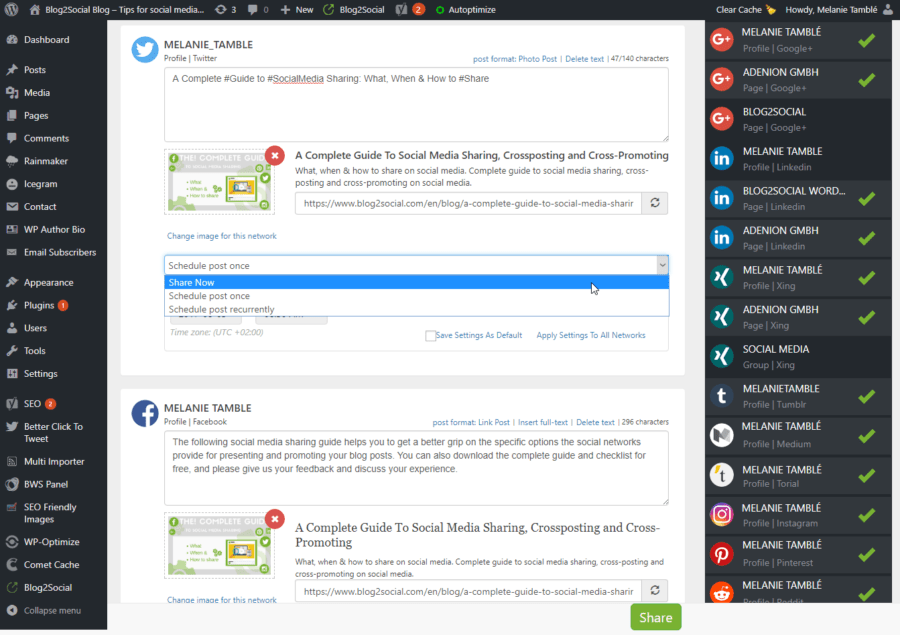
    For cross-promoting my blog posts I use Blog2Social. The Wordpress plugin allows me to schedule and cross-publish my post directly from the WordPress dashboard. The plugin turns my blog post into the suitable format for every network I select for sharing. It displays an excerpt of my posting text with the available number of characters on each network with an image and link. However, I can still edit and customize each of the posts with personal comments, hashtags or handles I wish to add. This takes me less than 5 minutes for all of my networks and I would always recommend spending this extra time. Blog2Social provides me with a simple one-step workflow for all of my networks. This still saves me the time consuming and tedious work of copy & paste my texts manually on each network. This is what I do for customizing my social media posts to cross-promote my blog posts:

    Add networks for sharing your blog posts with Blog2Social

    customizing social media posts
    customizing social media posts

    My cross-promotion strategy

    • Twitter: I add #hashtags to keywords (Blog2Social automatically adds hashtags from my blog post tags, so I only have to check on them). I also add @handles if I want to refer to a specific Twitter user for this post. If I post to more that one Twitter accounts, I use different tweets and schedule them at different times. I can also add more tweets to each Twitter channel if I want to schedule multiple or recurring Tweets.
    • Facebook profile: I add a personal comment to introduce my post. I ask questions or ask to comment on my post to encourage engagement.
    • Facebook page: I edit my text for my business page slightly to give it a more formal touch. And I schedule it for a different time (the Blog2Social Best Time Scheduler does that automatically).
    • Google profile: I use a slightly longer introduction to my post, as longer comments work better on Google+. And, I use #hashtags for keywords. (Blog2Social automatically adds hashtags from my blog post tags at the end of my comment. So I only have to check on them). Blog2Social already provides a slightly longer excerpt for Google+ and adds the tags from the blog post as #hashtags for keywords at the end of the comment. I sometimes add the same as for Facebook.
    • Google page: I take the same comment as for my profile, but I schedule it for a different time.
    • Google group: I do the same as for my page and I schedule the post for multiple groups on different days and times each.
    • LinkedIn profile: I do the same as for Facebook, but sometimes tune the text a bit more businesslike.
    • LinkedIn page or focus page: I do the same as for my Google page and I schedule my post for a different time or date from my profile
    • Instagram: I sometimes add personal comments or call-for-shares, if appropriate and check the #hashtags. (Blog2Social automatically turns the tags of your post automatically into #hashtags and places them at the end of the comment)
    • Pinterest, Flickr: I just check the comment and the #hashtags
    • Medium, Tumbr, Torial; Bloglovin: I re-publish my post as it is or as an abbreviated version with a link to my original post for further reading. I schedule my post with a 3-7 day delay to my original blog post and I schedule one network at a time. Sometimes I make a few changes to the headline and the introduction.  (Blog2Social provides a rich text editor to edit anything you want or even shorten the post)
    • Reddit: I choose the Subreddits that are suitable for my post. I check my title and comment, if it goes along with the specific rules and regulations of each Subreddit.

    The Blog2Social Best Time scheduler provides a ready-to-use time frame to automatically post at the best times for each network. You can also edit and save your own personal time settings and load them automatically for your future posts. You can always edit any time for any of your post or schedule your posts multiple times or recurrently.

    For sharing content from other sources I use my RSS-Reader to curate content, Pocket to save and tag and I use the Blog2Social Web App to tailor my post and cross-share and schedule them to my curated content across various social channels. I will describe this process in a future article.

    Set up your cross-promotion strategy

    Cross-posting may appear as a convenient, quick and easy way to save time posting. But if you care about your fans and followers, you should take some extra minutes to tailor your message. Customize your posts according to the respective platform you’re posting to and to their specific audience.

    There are several auto-posting and cross-posting tools available on the market. But beware of the tools that don’t give you the full control of your post. Choose a tool that allows you to customize your posts.
    I do recommend posting your content across all of your social networks. But cross-promote rather than just cross-post your content. Don’t push the same message to all of your channels.
    Whenever I publish a new blog post I do share it with all of my social channels. Whenever I find something great to share with my audience, I post it on as many networks as I find suitable for this specific content. However, I always choose my channels wisely and I always take the time to tailor the messages of my post.
    With a smart social media automation and cross-promoting strategy, you will get your work done much quicker and more effective than you might think.
    • Cross-promoting your content across multiple sites will give you more outreach and brings your content up front to a much wider audience than posting to single social networks.
    • When done automatically, cross-sharing and cross-publishing will bring your content much faster and easier to multiple accounts. Your content will reach more people in less time and with less effort than doing this manually by copy and pasting your content manually.

    Wrap up

    So, when you set up a social media automation strategy, don’t just fill your streams with any kind content. Always think about your audience first. Feel free to cross-share but make sure you tailor your posts according to the specific characteristics of the respective networks and their audience. Cross-promoting, rather than cross-posting will actually lead to more engagement, likes, and shares for your content.

    The Complete Social Media Guide and Toolbox

    Get the Complete Guide to Social Media sharing & Toolbox for free!

    Social media is the most important source for driving traffic to a blog or website and generating reach. Readers and potential customers use social media channels to conduct targeted research, share information and discuss current topics.
    Click here to get the Social Media Guide

  • Social Media Frequency Guide: How Often to Post on Social Media?

    Social Media Frequency Guide: How Often to Post on Social Media?

    Whenever you post your content to social media only a fraction of your potential target audience will actually see your post. So it might be wise to post your content more than once. But, there is a difference between sharing your promotional content, curating content from other sources and sharing your valuable evergreen blog content. So, how often should you post to social media to get the most outreach and maximum engagement?

    Before we dive into the specific frequency rules for each social network, let’s start with some general rules for sharing:

    1. If you have valuable content that will bring value to your audience, then share it.
    2. Never share the same content over and over again.
    3. Get the perfect content mix.

    The Perfect Social Media Content Mix: the 5-3-2 Rule

    Social Media Content Mix
    Social Media Content Mix

    In order to get the best content marketing mix,  the key thing ist not to talk about yourself all the time, every day with every post. Social media is about networking and engaging, so make sure your content stream reflects that. Talking just about yourself and your products will turn people off from your brand.

    This is where the 5 – 3 – 2 rule comes into play: With every 10 posts your should mix

    • 5 pieces of curated content: This is content from other sources that is relevant to your audience, but it should also be connected to your topics
    • 3 pieces of created content: This ist content you have created, that’s relevant to your audience.
    • 2 pieces of personal content: This should be content that goves your brand a human touch. This can be fun and entertaining content or personal statements

    Whenever you want to share something somewhere, allways make sure the content is relevant to your audience.

    Posting Frequency: How Often To Post On Social Media

    Every social network has different posting rules. For each social network there is an optimal frequency of posting for maximum engagement. This formula optimizes the ability to connect and engage with your followers. Exceeding this frequency may result in annoying and driving away followers. Figuring out what exact level of frequency is best for each network is deep science and requires a lot of experimentation. You will have to analyse your own results regularly to get a better grip of what is best for you. But to get a starting point you may refer to findings and recommendations based on other companies’ experience and analytics.

    We have done a bunch of thorough . We cross-checked your results with resarch from several other valuable sources and proven social media experts. We have placed our results into several scheduling infographics. The infographics will help you to get a baseline for what might be best practice for your social media scheduling and makes the question of “how often to post to social media” better to grasp.

    Please fee free to share the graphics to whoever you think may find them helpful.

    So let us now take a look at the general posting frequency rules for the following social networks and then move on further to what is best for your blog content.

    [Infographic]: How Often Should You Post on Social Media?

    There are differences between the various social media networks. While it is ok, to post as many as 3 times per day on Twitter, to do the same thing on Facebook could become pretty annoying and will probably result in losing followers.

    How Often To Post on Social Media

    Share this image on your site!

    Tipps for how often to share content on social media

    Blogs: 6-8 posts per month

    • Best blogging frequency is 6-8 times per month
    • Companies that increase their blogging frequency to 6-8 times per month may double their leads.
    • Best publishing days for corporate blogs are mondays, wednesdays and fridays, with an interaction peak on wednesdays

    Twitter: 3 posts per day

    • Best posting frequency is 3 posts per day, or more up to 20-40 posts, including RTs and replies
    • Engagement decreases slightly after the third tweet.
    • Please Note: For every 3 pieces of creative or promotional content post 5 pieces of curated content from other sources and 2 pieces of personal content (that can also be replies and RTs with personal comments)
    • The best times for posting to Twitter are the morning hours from 8 a.m. – 10 a.m, middays from 11 a.m. – 1 p.m and after work from 4 p.m. – 7 p.m.

    Facebook: 2 posts per day at most

    • Best posting frequency is 2 posts per day
    • Engagement decreases dramatically after the second post
    • The best time for Facebook postings is in the afternoon from 1 p.m. – 4 p.m. and in the evening from 6 p.m. – 10 p.m.
    • Post also on weekends

    LinkedIn: 1 post per day

    • Best posting frequency is 1 posts per day and 20 posts per month
    • Also post to groups regularly and engage with comments and replies
    • The best time for LinkedIn postings is during office hours from 8 a.m. – 10 a.m. and in the afternoon from 4 p.m. – 6 p.m.

    Pinterest: 5 pins per day

    • Best posting frequency is 5 posts per day and even more is ok
    • The more you post, the more engagement you get
    • The best times to post on Pinterest is around midday from 12 a.m. – 2 p.m. and in the evening from 7 p.m. – 10 p.m.
    • Also post on weekends

    Instagram: 1 posts per day

    • Best posting frequency is 1-2 posts per day and even more is ok
    • The more you post, the more engagement you get, but you have to keep up with your engagement
    • The best times to post on Instagram is around midday from 12 a.m. – 2 p.m. and in the evening from 7 p.m. – 10 p.m.

    Flickr:  1 post per day and more

    • Best posting frequency is 1-20 images per day
    • The best times to post on Flickr is in the early morning hours from 7 a.m. – 9 a.m. and in the evening from 5 p.m. – 7 p.m.
    Social Media Frequency Plan: How Often to Post on Social Media
    Social Media Frequency Plan

    Wrap up

    As you can see, social media success requires consistent posting. Use these guidelines as a starting point for your own experiments and analytics. And please share your results and recommendations with us and with others. We’d be glad to know what works for you and what doesn’t.

    Also read How Often To Share Your Blog Post on Social Media

    The Complete Social Media Guide and Toolbox

    Get the Complete Guide to Social Media sharing & Toolbox for free!

    Social media is the most important source for driving traffic to a blog or website and generating reach. Readers and potential customers use social media channels to conduct targeted research, share information and discuss current topics.
    Click here to get the Social Media Guide