
Looking for an easy way to catapult your ranking in Google without expensive Adwords campaigns? Ever thought of a Google Business Profile (formerly Google My Business) and Google Posts?
A Google Business Profile can significantly increase your company’s visibility and let you reach more customers and prospects.
In addition to general information about your business, the Google Post feature allows you to publish snack-sized content that can promote anything from company news, events, and campaigns to your latest blog post. Provided that your Google Business listing is relevant, complete,e and up to date, it will be displayed directly in the Knowledge Panel of the first page of the Google search results.
Learn how to optimize your Google Business listing with updates of your latest blog posts – automatically.
What is a Google Business Profile?
Have you ever googled a company, a restaurant, a doctor, or a hairdresser? Then you may have come across their Google Business listing.
>If a company has a business listing on Google, it will appear on the right side next to the top search results.

When searching for a company with a mobile phone, the business listing is displayed even more prominently at the top position on Google.
A Google Business listing is not only visible in the top search results, but also in Google Maps.

Tip: Don’t miss out on this top-featured position on Google for your company – without even spending a dime. Google My Business is free of charge. Learn how to make the most of your Google Business listing.
How to create an attention-grabbing Google Business Profile
You can create and maintain your own Google listing for your company or service to improve your presence in the Google search results, Google services, and Google Maps.
Any business, shop, or office with a valid business address can claim or create a business listing on Google.
At http://business.google.com/, you can create or edit a business listing for your company.
Google assigns your business listing to your address using Google Maps and displays your company’s listing more prominently for users in your area.
A Google Business Profile allows you to publish company news and event announcements directly in your Google listing. This allows you to decide which content you want to show users who are searching for your business on Google before they even access your website.
For many companies, Google creates a listing automatically. As an owner, you can claim a Google listing and sign in to Google My Business to edit it.
If Google has not already created a business listing for your company, you can create a listing yourself.
Before you can manage your business information on Google Maps, Google Search, and other Google products, you have to verify your business listing first.
How to manage your Google Business Profile
A well-maintained Google Business profile is a key foundation for local visibility and trust. After setting up or claiming your profile, carefully verify all basic details, such as
- business name
- categories
- address
- phone number
- website
- opening hours
to ensure consistency across search results and maps.
Keep this information up to date, especially when hours change due to holidays or special events. Enrich your profile with high-quality photos and short videos that show your location, team, products, or services, as visual content helps potential customers build confidence before making contact.
Regular updates and posts can further signal activity and relevance.
Finally, actively encourage satisfied customers to leave reviews and respond to them professionally—both to positive and critical feedback—as this demonstrates reliability, engagement, and customer focus, while also supporting your local search performance on Google Business Profile. Managing this process efficiently is key; a dedicated Google review generator and management tool can automate request campaigns and use AI to help draft thoughtful responses, saving significant time while ensuring consistent engagement.
Keep your Google Business Profile up to date with your blog posts
Your Google Business Profile is your digital business card and can be a primary touchpoint when clients and prospects search for your company. As soon as someone searches for your company on Google, your business listing appears at the top right-hand side of the search results and is the focus of attention. However, a verified Google Business Profile does not guarantee that it will appear in the Knowledge Panel. Relevance, distance, and the prominence of the business all contribute to its standing in local search results. Therefore, a Google Business Profile should always be complete and up-to-date.
Exciting news and interesting content presented directly in your business listing are a great way to catch your customers’ and prospects’ attention, even before they visit your website. Google Posts are also visible in your Google Maps listing, which creates another touchpoint.
Content posts on your Google Business Profile are meant to show your latest news and articles. Your current posts will be displayed directly in your business listing. This way, you can keep your business listing up to date with new interesting content.

What and when to share on your Google Business Profile
Regular content updates will keep your Google listing interesting and drive traffic to your corporate blog. Company news, press releases, blog posts or announcements are great content for your Google Business Profile.
Don’t underestimate the importance of Google Business for your content marketing and your Google ranking. Current posts on your Google Business listing can reach a large number of new readers. With current posts and updates about your company, you stand out from the crowd and draw more attention to special events or campaigns, and increase the visibility of your company significantly.
Google Posts are meant for up-to-date content, as posts only stay in the overview of your business listing for 7 days.
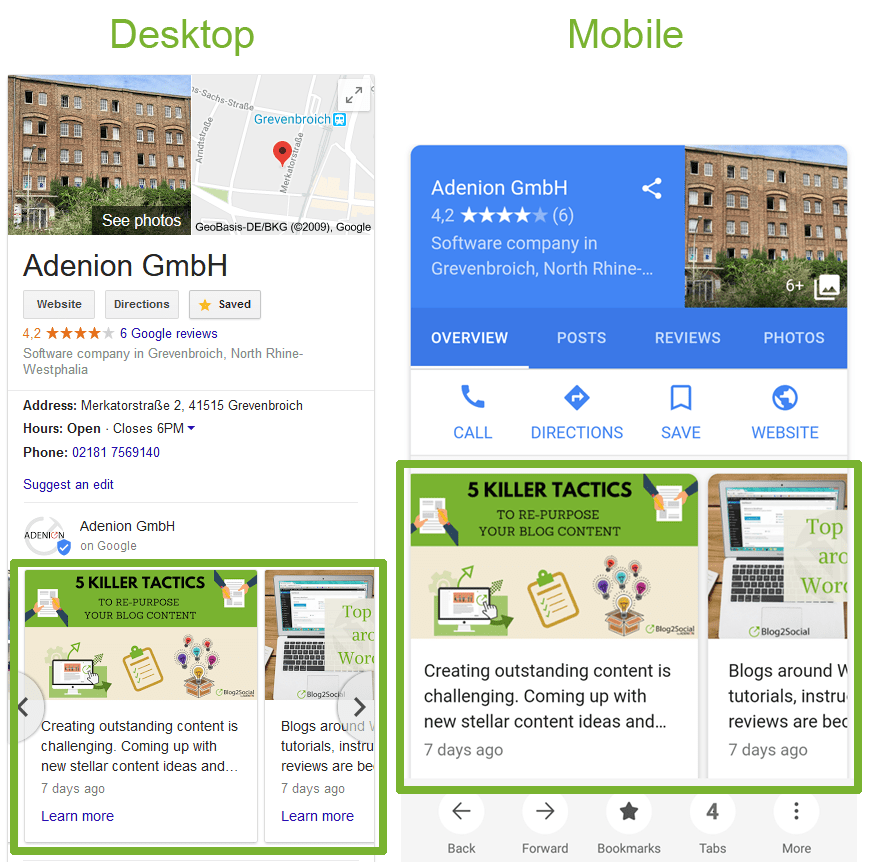
Google Posts may contain a link that leads directly to your website, online store, corporate blog, event page, or a special landing page. This will take interested readers directly to the point-of-sale and help you generate new leads.
Monitor the success of your Google Business Posts
You can access your statistics in your Google Business dashboard. The statistics below each post show how many readers clicked on your Google My Business posts and how many link clicks have been achieved, thus expressing the success of your content.

The statistics show the success of your posts.
How to connect your Google Business Profile to Blog2Social
To connect your Google Business Profile to Blog2Social, go to “Blog2Social Networks” and scroll down to “Google Business”. Click on “+Profile” on the right side to open a new window.

Choose the Google account that is linked to your Google Business listing.
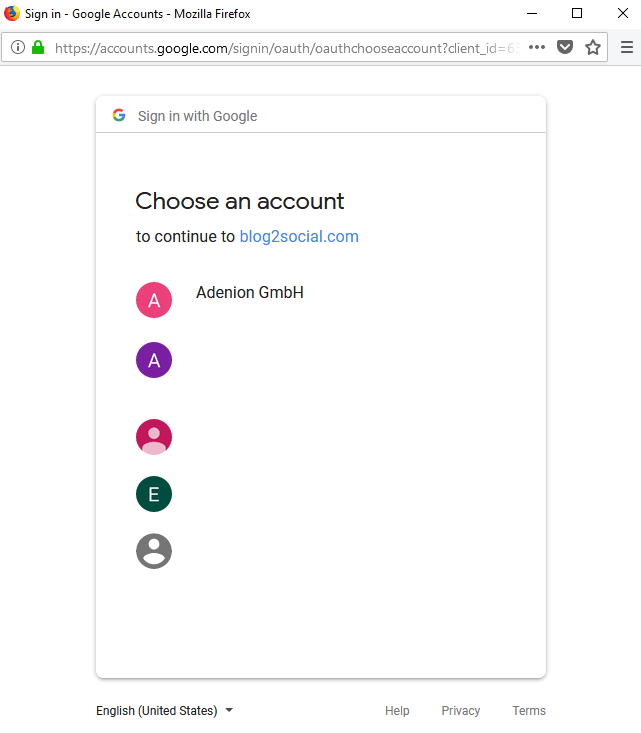
Choosing your Google account will take you to the access confirmation page. Please make sure to click “allow” to grant Blog2Social the rights to publish on your Google listing.

Afterward, select the location you want to publish your blog posts on.
Please note that you need to have at least one verified location in Google Business.

After you’ve successfully connected your Google My Business listing to Blog2Social, you can find the location listed in Blog2Social -> Networks.

You can now share your blog posts on your Google Business Profile. This FAQ shows you how to share individually tailored blog posts.
Your articles will appear as posts on the main page of your business listing on Google and link to your full blog post or landing page. This allows you to keep your business listing on Google up to date without additional work or time.
Please note:
Blog2Social uses the official Google API, with secure OAuth authentication to ensure your Google account is safe, to send your content to your business listing. You can connect your Google Business accounts with up to nine different locations to Blog2Social and choose which location you want to share your content on.
Google currently allows access to the API for all companies with up to 9 locations connected to their Google Business account. However, Google plans to extend the API access in the future for companies with more connected locations.
Conclusion
Optimizing your Google Business Profile with updates of your latest news and posts will help you boost your visibility in Google. Make sure to keep your business listing interesting and refresh your Google posts with up-to-date content at least every 7 days to maximize your company’s reach. Share your company news, press releases, blog posts, or announcements in Google Business to repurpose your existing content for your Google business listing.
Blog2Social helps you automate the updating of your Google Business listing with your current blog posts and news, saving valuable time and resources. Update your company pages on XING and LinkedIn in the same step to save even more time!

Melanie Tamblé is co-founder and co-CEO of Adenion GmbH. She is an experienced expert in content marketing and social media.
Adenion GmbH specializes in online services and tools for bloggers, businesses and agencies of any size to support their online marketing and content seeding tasks on the web.
Blog2Social as WordPress Plugin and WebApp enable fast and easy auto-posting, scheduling and cross-promotion of blog posts, articles, links, images, videos and documents across multiple social media sites.
Social media posts will be automatically turned into a customized format for each social platform and auto-scheduled for the best time. Social media post can be previewed and tailored with individual post formats, images or personal comments – all in one easy step.
About the author



Nice blog! Thanks for sharing it.
Hello Nagesh,
you are welcome. Thank you for your comment, we are glad you like this article.
Kind regards,
Bastian
This is an amazing article and I will try to follow the steps for my business page.
Thanks for sharing
Hello Sayli,
Thank you for stopping by! It’s great to hear you like this article.