

Social media is an essential part of any modern marketing strategy. For WordPress users and social media marketers, the ability to seamlessly share content across multiple social networks can save time and maximize reach. Auto-posting, the automatic sharing of blog posts to social media channels, offers a powerful and efficient solution. In this comprehensive guide, we’ll explore what social media auto-posting is, the benefits and challenges, essential dos and don’ts, and how you can leverage a social media auto-poster for WordPress to streamline your social sharing efforts.
Social media auto-posting means your blog posts are shared automatically on platforms such as Facebook, Twitter, LinkedIn, Instagram, and more, without requiring manual input each time you publish new content. Auto-posting directly from your WordPress dashboard reduces the need to toggle between tools, keeps your workflow smooth, and enables schedule-based sharing even before posts go live.
We’ll also dive into the pros and cons of auto-posting, practical tips on how to use it responsibly to avoid robotic-looking posts, and present Blog2Social, a leading WordPress plugin designed to make autoposting smarter and more customizable for real engagement.
What is Social Media Auto-posting?
Social media autoposting is the process of automatically publishing your blog’s content to one or more social media accounts. Instead of manually posting updates every time you publish a new blog post, auto-posting tools connect your WordPress site with your social media channels and push your content automatically according to your preferences.
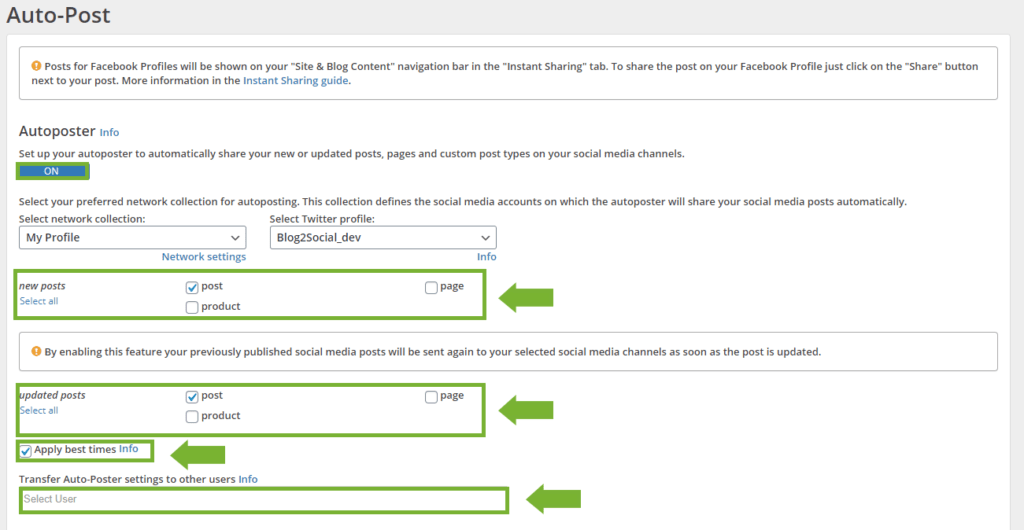
For WordPress users, this integration means managing social media sharing all within the familiar dashboard without switching apps or logging into multiple platforms. Newly published or even scheduled posts can be queued and shared on your social profiles at optimal times, increasing your content’s visibility with minimal effort.
Benefits of a Social Media Auto-Poster Sitting Directly in Your WordPress Dashboard
- Saves Time and Effort: Automation reduces the tedious task of posting manually across several social networks.
- Consistency in Posting: Scheduled autoposting keeps your social media feeds active, which is vital for audience engagement.
- Leverage Scheduled Posts: Even if your blog posts are scheduled for future publication, autoposting can prepare social media shares in advance.
- Centralized Management: Handle your blog and social updates from one place.
- Improved Workflow: By staying inside WordPress, you maintain focus and eliminate tool switching distractions.
- Enhanced Reach: Automated sharing at the right times can boost traffic and brand awareness.
Pros and Cons of a Social Media Auto-post Strategy
Pros
- Efficiency: Saves hours every week.
- Scalability: Easily manage multiple accounts and platforms.
- Better Planning: Schedule content for upcoming campaigns or product launches.
- Analytics Integration: Some tools offer insights, helping you optimize sharing times.
Cons
- Risk of Robotic Posts: Over-automation can make social media posts appear impersonal or spammy.
- Lack of Personal Engagement: Automated posts may lack the nuance or timely responses that boost interaction.
- Dependency on Tools: Technical issues or plugin conflicts can disrupt autoposting.
Learn more about pros and cons of social media automation.

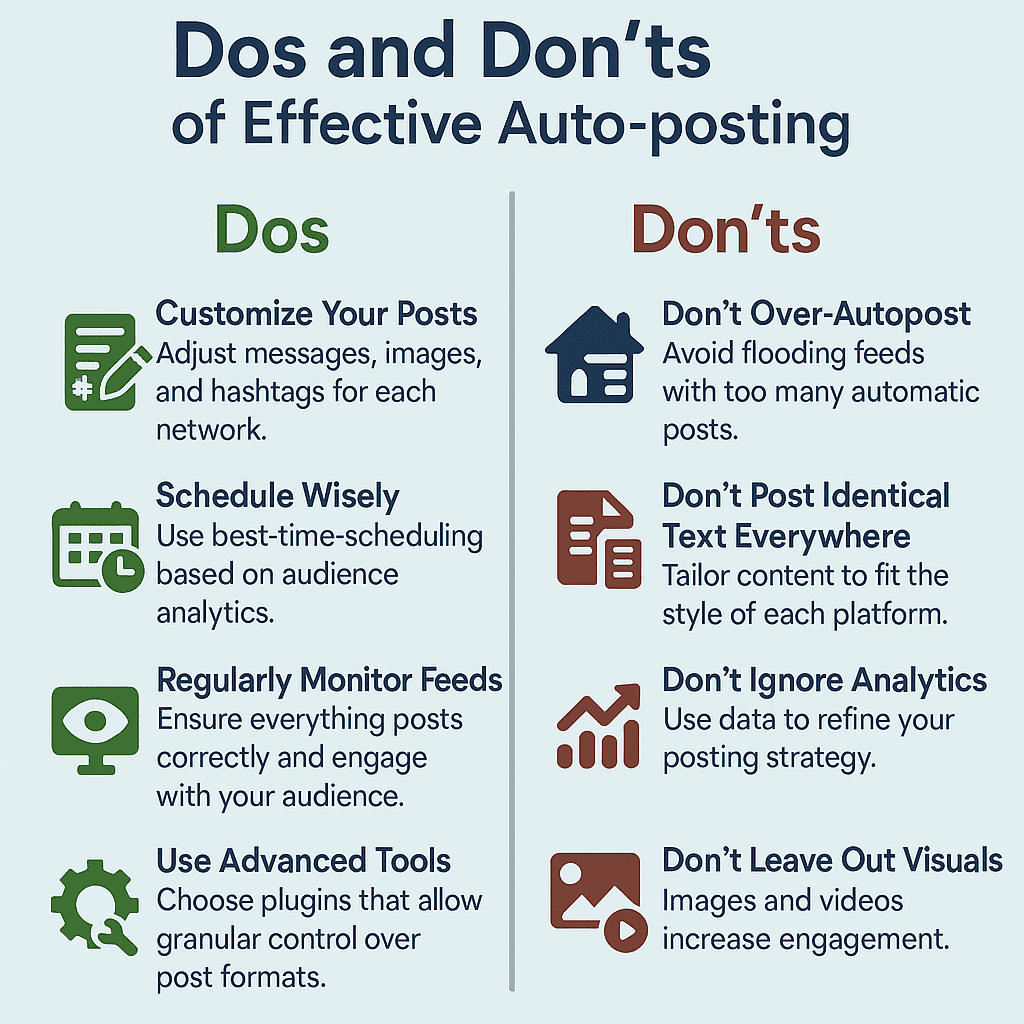
Dos and Don’ts of Effective Auto-posting
Dos
- Customize Your Posts: Adjust messages, images, and hashtags for each network.
- Schedule Wisely: Use best-time scheduling based on audience analytics.
- Regularly Monitor Feeds: Ensure everything posts correctly and engage with your audience.
- Use Advanced Tools: Choose plugins that allow granular control over post formats.
Don’ts
- Don’t Over-Autopost: Avoid flooding feeds with too many automatic posts.
- Don’t Post Identical Text Everywhere: Tailor content to fit the style of each platform.
- Don’t Ignore Analytics: Use data to refine your posting strategy.
- Don’t Leave Out Visuals: Images and videos increase engagement.
Learn more about dos and don’ts for social media automation.
How to Auto-post Scheduled Posts
WordPress allows creating scheduled posts that publish at a specific date and time in the future. Autoposting tools link directly to this feature so that social sharing can be prepared beforehand. When a scheduled post goes live, autoposting automatically spreads it across connected social channels without delay.
This synchronization helps maintain a consistent social presence without requiring last-minute manual shares. It also allows marketers to plan campaigns and social outreach alongside content publishing calendars cohesively.
Common Challenges in Auto-posting and How to Overcome Them
- Post Appearance Too Generic: Combat this by customizing captions and images per network.
- Poor Timing: Use data-driven scheduling, avoiding times when your audience is inactive.
- Missing Hashtags or Mentions: Automate hashtags thoughtfully and check for updates.
- Technical Glitches: Regularly update your WordPress plugins and monitor connectivity.
Introducing Blog2Social: The Advanced Auto-posting Solution
Blog2Social is a powerful WordPress plugin designed to elevate your social media automation strategy. Unlike generic autoposting tools, Blog2Social offers comprehensive customization features to keep your posts looking authentic and engaging rather than robotic.
Key Features of Blog2Social
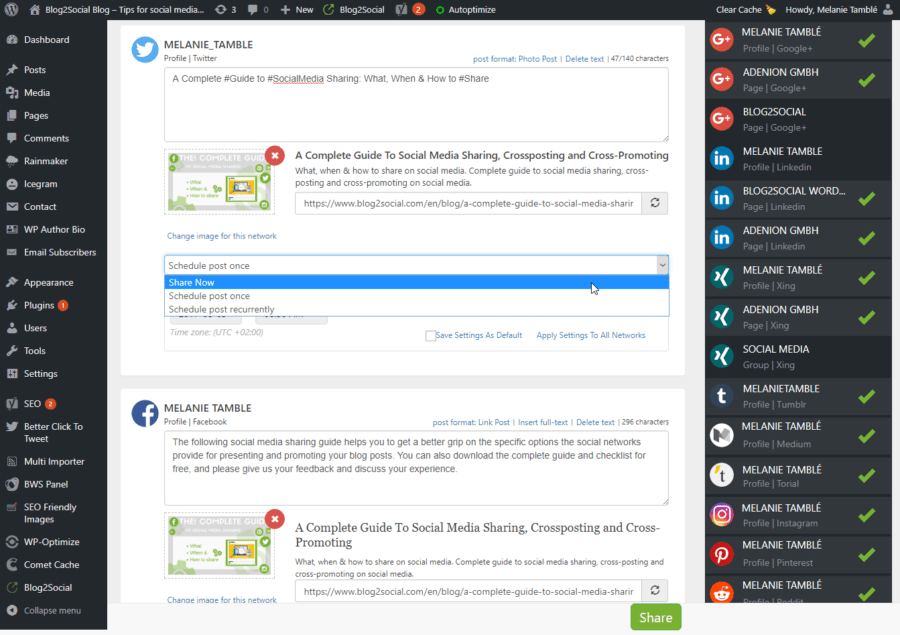
- Advanced Best Time Scheduling per Network: Schedule posts according to the optimal times for each social media platform, maximizing reach and engagement.
- Customizable Comments and Images: Tailor captions, comments, and images individually for each social channel, so you speak the right language to every audience.
- Individual Post Format Templates: Create and save distinct post templates to alter the format or style depending on the social network.
- Scheduled and Instant Sharing: Share immediately or plan months ahead directly from your WordPress dashboard.
- Multi-Profile and Network Support: Connect multiple accounts across Twitter, LinkedIn, Facebook, Instagram, and other platforms.
Benefits of Using Blog2Social
By offering professional-level customizability, Blog2Social ensures your auto-posted content feels personalized. This maintains your brand’s voice and authenticity across social media, all while saving you time.
Conclusion
Social media auto-posting for WordPress is a valuable strategy for users and marketers seeking to enhance efficiency and maintain a robust social presence. While automation saves time, it’s essential to customize and schedule posts wisely to avoid robotic and impersonal shares.
Blog2Social stands out as a versatile autoposting solution that allows you to automate smartly with full control over timing, content, and format tailored to each social network. By integrating Blog2Social with WordPress, you empower your social media strategy to work harder without sacrificing authenticity.
Ready to take your WordPress social sharing to the next level?
Consider exploring the Blog2Social WordPress social media auto-poster and scheduler plugin and watch your blog’s reach grow with smart, customized autoposting.

Melanie Tamblé is co-founder and co-CEO of Adenion GmbH. She is an experienced expert in content marketing and social media.
Adenion GmbH specializes in online services and tools for bloggers, businesses and agencies of any size to support their online marketing and content seeding tasks on the web.
Blog2Social as WordPress Plugin and WebApp enable fast and easy auto-posting, scheduling and cross-promotion of blog posts, articles, links, images, videos and documents across multiple social media sites.
Social media posts will be automatically turned into a customized format for each social platform and auto-scheduled for the best time. Social media post can be previewed and tailored with individual post formats, images or personal comments – all in one easy step.
About the author



Great explanation — practical and easy to apply.