Where can I enter my VAT Identification Number (VAT ID)?
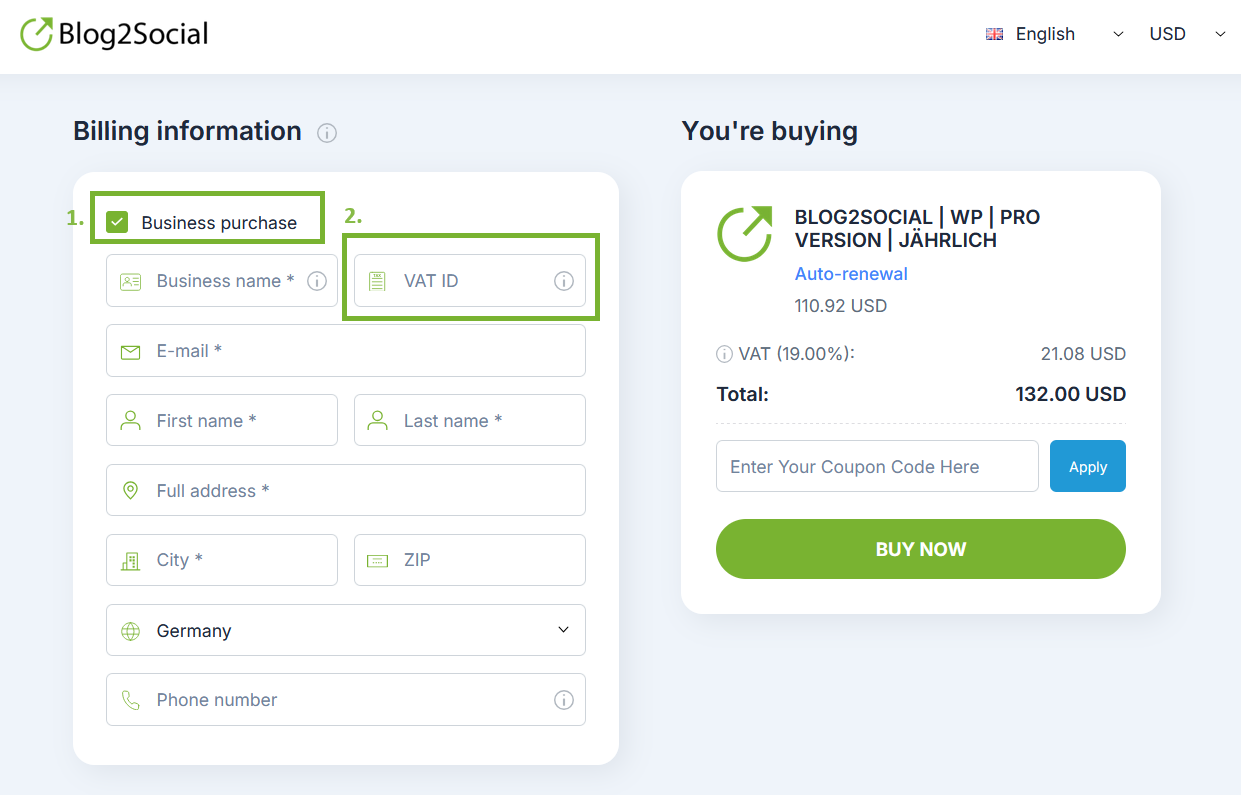
You can enter your VAT ID during checkout when purchasing Blog2Social.
The VAT ID field is located on the booking/checkout page in the “Business Purchase” section. If you enter a valid EU VAT ID, VAT is handled according to the applicable tax rules (e.g., reverse charge for eligible EU businesses).
If you need to add or update your VAT ID for an existing or future order, this is handled by PayPro Global, our authorized payment provider. In this case, please contact PayPro Global Customer Care directly:

If you would like to manage your personal data, payments, or subscriptions, you can do so at any time directly in your PayPro Global customer account.
Please log in to your PayPro Global account using the following links:
PayPro Global login:
https://cc.payproglobal.com/Customer/Account/Login
Password reset (if needed):
https://cc.payproglobal.com/customer/Account/ResetPassword
Most popular FAQs
How to auto post imported RSS feeds
How do I auto-post and auto-schedule blog posts
Solutions: Why does Instagram not publish my post/text?
How do I connect Blog2Social with Instagram?
The connection to the server failed.
How to connect and automatically post to Facebook
I cannot connect my Facebook page
How to automatically re-publish blog posts on Bloglovin’
How to share on Facebook Profiles with Facebook