How can I cancel my Blog2Social subscription?
If you no longer wish to use your Blog2Social license, you can easily cancel it yourself through your Blog2Social account management area. To cancel your subscription, please follow these steps:
- Access your account with your credentials here: https://service.blog2social.com/en/login/
- If you have forgotten your password, click on "Forgot password?" to reset it. Please remember to check your spam folder if you do not receive the reset email within a few minutes.
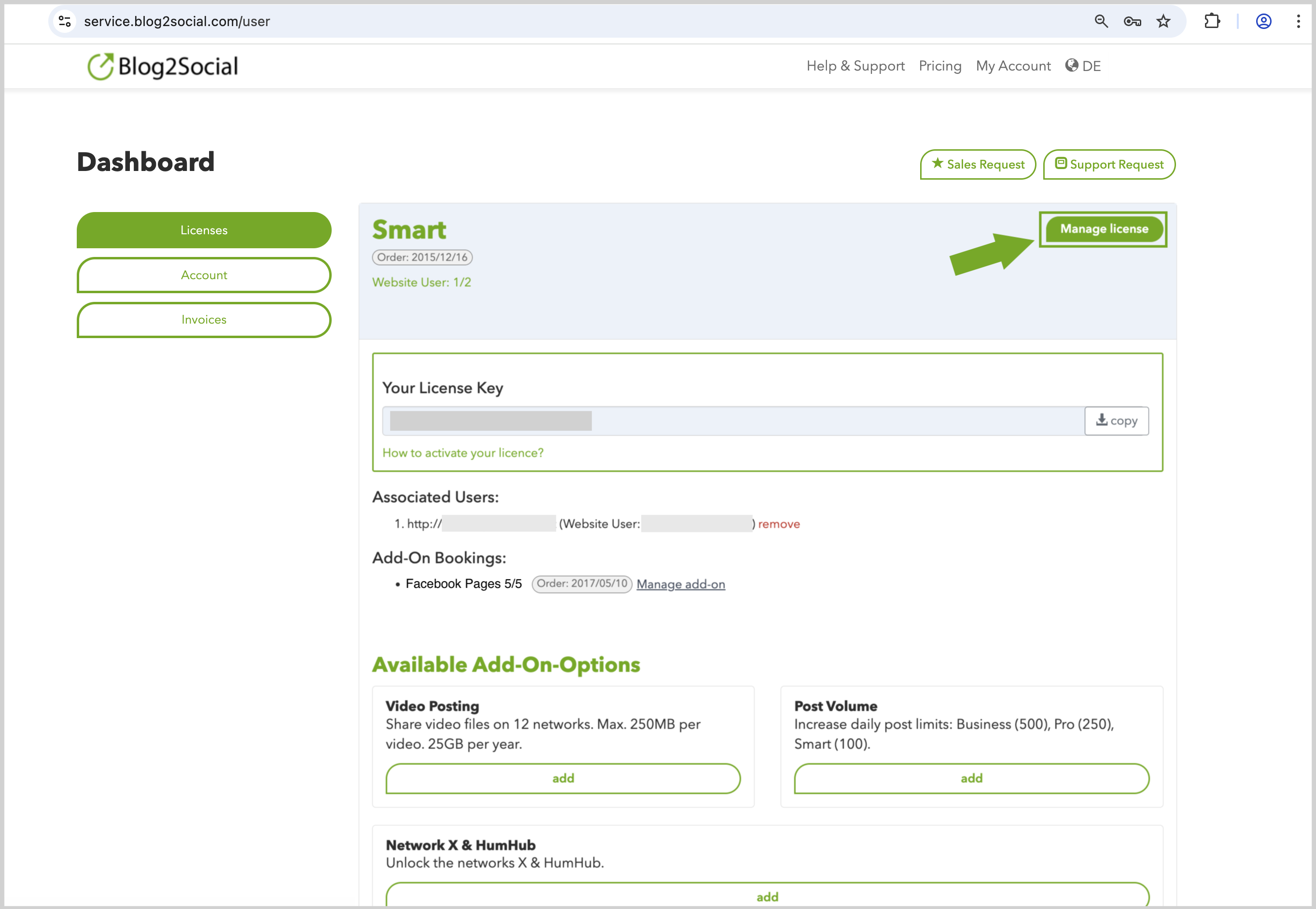
- Once logged in, go to the "Licenses" section. Here you will find an overview of your active licenses and add-ons.
- Click on "Manage license" -> "Cancel license" next to the subscription you wish to end and follow the on-screen instructions to complete the cancellation.
- You also have the option to cancel specific individual add-ons by clicking on "Manage add-on".
We Value Your Feedback
We would like to understand why you have decided not to use Blog2Social Premium anymore. Your feedback is important to us to continuously improve our service. We would appreciate it if you could leave us feedback.
>> Send your Feedback <<
Tags: cancel add-on, Cancel Blog2Social subscription, cancel license, cancel subscription
Most popular FAQs
System requirements for installing Blog2Social
How to auto post imported RSS feeds
How do I auto-post and auto-schedule blog posts
Solutions: Why does Instagram not publish my post/text?
How do I connect Blog2Social with Instagram?
The connection to the server failed.
How to connect and automatically post to Facebook
I cannot connect my Facebook page
How to automatically re-publish blog posts on Bloglovin’
How to share on Facebook Profiles with Facebook
How to auto post imported RSS feeds
How do I auto-post and auto-schedule blog posts
Solutions: Why does Instagram not publish my post/text?
How do I connect Blog2Social with Instagram?
The connection to the server failed.
How to connect and automatically post to Facebook
I cannot connect my Facebook page
How to automatically re-publish blog posts on Bloglovin’
How to share on Facebook Profiles with Facebook