How do I schedule blog posts for social media?
Want to schedule your blog post on social media and publish it stress-free?
With Blog2Social, you can easily plan and perfectly time your posts for social media. Customize your posts for each platform, optimize text and images, and reach your community at exactly the right moment — automatically and efficiently!
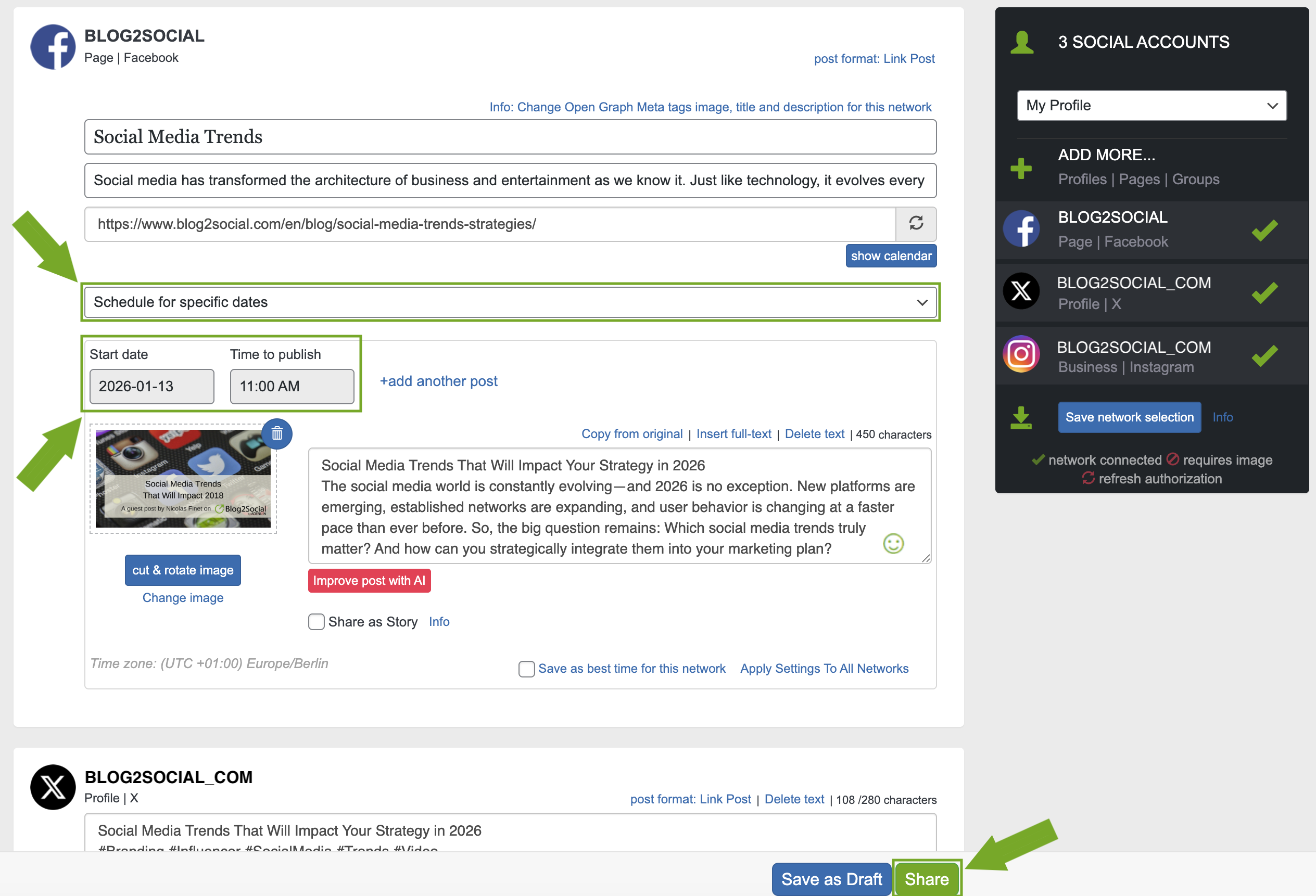
To schedule a blog post, click "Social Media Posts" in your Blog2Social dashboard and then select "Share on Social Media" next to the relevant post.

You will then be taken to the Blog2Social post preview. Here, you can schedule the post for publication on social media:
- In the drop-down menu, select "Schedule for specific dates" instead of "Share Now".
- Choose the day and time when the post should be published.
- Click the "Share" button.
Other helpful guides
- How can I save my Social Media Posts as Drafts or Favorites?
- How to use Post Templates for Social Media Posts?
- How do I auto-post and auto-schedule blog posts on Social Media with the Auto-Poster?
Tags: publish, scheduling
Most popular FAQs
System requirements for installing Blog2Social
How to auto post imported RSS feeds
How do I auto-post and auto-schedule blog posts
Solutions: Why does Instagram not publish my post/text?
How do I connect Blog2Social with Instagram?
The connection to the server failed.
How to connect and automatically post to Facebook
I cannot connect my Facebook page
How to automatically re-publish blog posts on Bloglovin’
How to share on Facebook Profiles with Facebook
How to auto post imported RSS feeds
How do I auto-post and auto-schedule blog posts
Solutions: Why does Instagram not publish my post/text?
How do I connect Blog2Social with Instagram?
The connection to the server failed.
How to connect and automatically post to Facebook
I cannot connect my Facebook page
How to automatically re-publish blog posts on Bloglovin’
How to share on Facebook Profiles with Facebook