How do I schedule social media posts using the Best-Time Manager?
If you want to boost engagement and get more attention for your social media posts, timing is everything.
With the Blog2Social Best Time Manager, you can use preset time settings to automatically publish your posts at best times. This ensures your content reaches the widest audience and gains maximum visibility.
How to set the best times in Blog2Social
To use the Best Time Manager and assign the recommended times to each of your social media accounts, go to "Networks" in Blog2Social.
If you want to use the preset best times, simply click "Load Best Times" in the top right corner. The predefined settings will then be applied automatically to all your networks.

Every social network has its own best times posting windows. By default, your posts are automatically scheduled for the next available time slot. If you prefer a different time, you can adjust these settings whenever you like—simply set the delay in days and choose your preferred time. You can apply these global settings to all future posts or customize them individually for each post.
How to schedule your posts with the Blog2Social Best-Time Manager
1) Go to ”Social Media Posts” in the Blog2Social dashboard.
2) Click on "Share on Social Media".
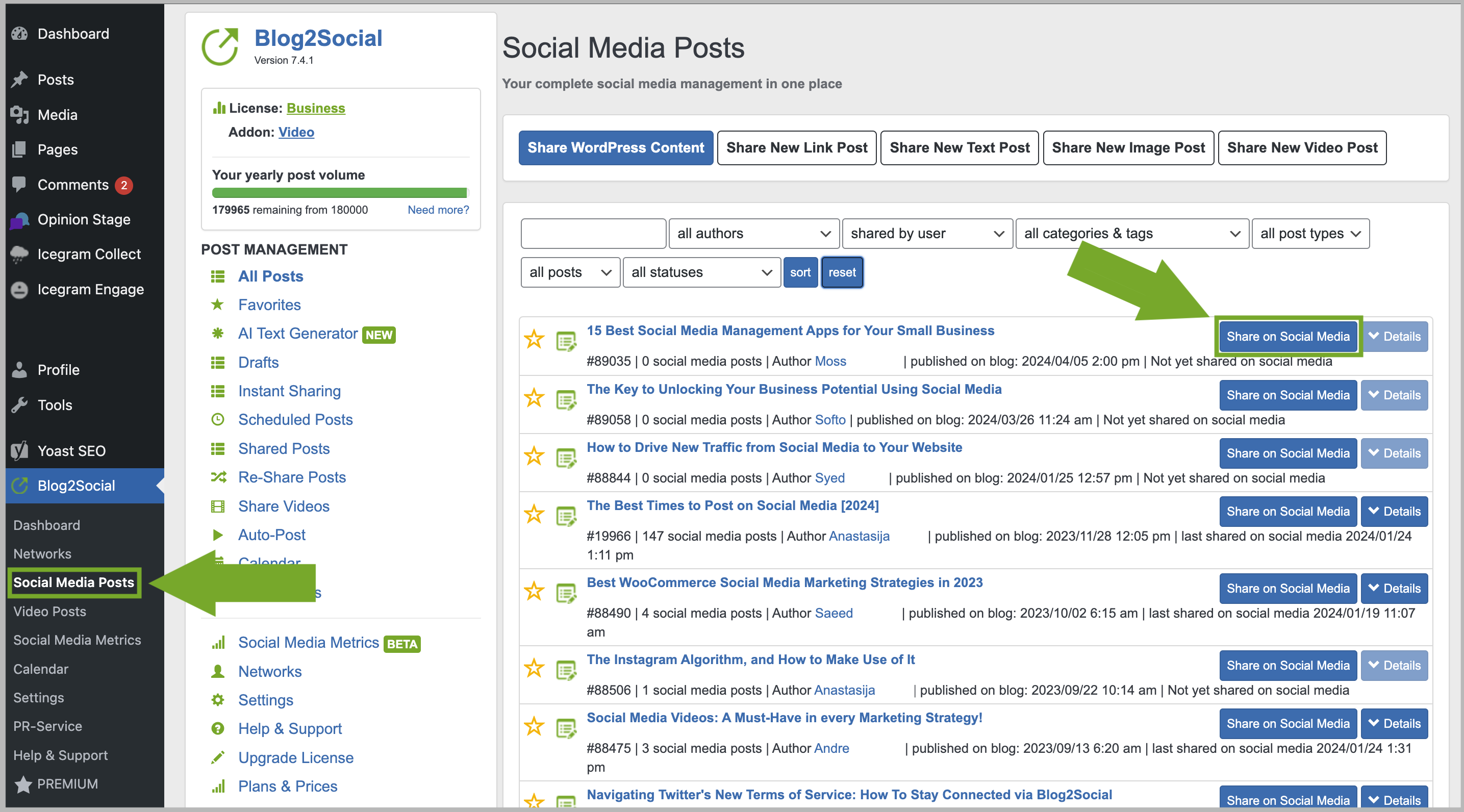
Select "Load best times" in the post preview.

Blog2Social automatically applies your time settings and switches from "Share Now" to "Schedule for specific dates".
You can also customize or change these preset best times. Simply select a different date and time, then scroll to the bottom of the page and click "Share".
How to apply the best times for the Auto-Poster
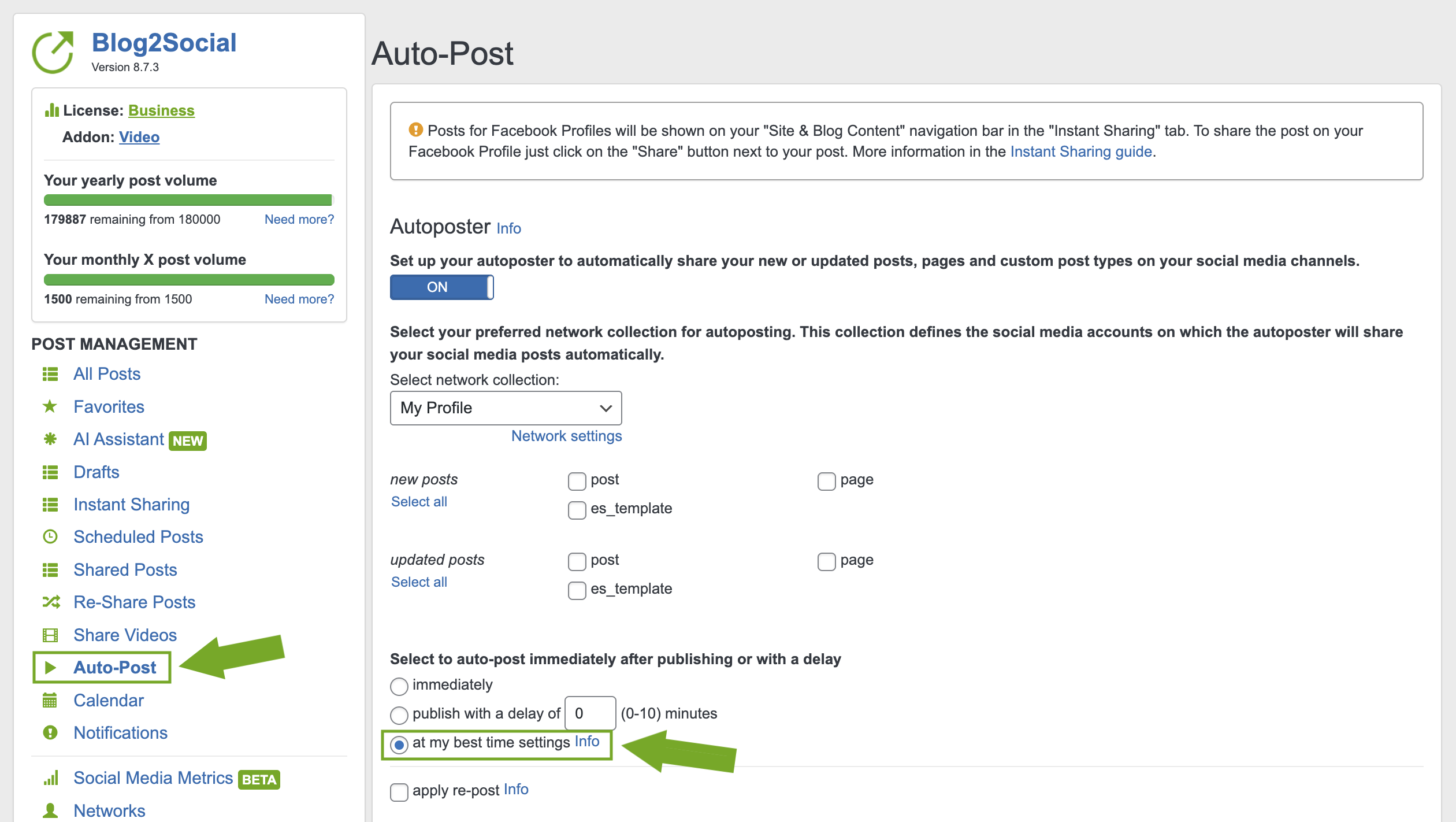
With Blog2Social, you can automatically share and schedule your blog posts by applying the Best Time settings to the Auto-Poster. Simply select "at my best time settings" within the Auto-Poster settings to get started.
How do I auto-post and auto-schedule blog posts on Social Media with the Auto-Poster?
How does Blog2Social determine the best times for each social network?
To identify the ideal time frames, we analyzed data from current studies as well as our own research involving thousands of social media posts. We looked specifically at when the community is most active and when they interact with content the most.
Social media communities use different platforms for different purposes. As a result, each network has its own unique peak times when most users are online.
Of course, you can customize these settings and define your own schedule for each of your social media connections. This ensures your content appears exactly when your specific target audience and followers are actually online.
Click here for more details about the graphic below:
The Best Times to Post on Social Media

More helpful guides
- How to auto-post imported RSS feeds and blog posts on Social Media
- How to create social media posts and share link, text, image or video posts
- How to share multiple images in one social media post?
Tags: best time manager, best time scheduler, scheduling
Most popular FAQs
How to auto post imported RSS feeds
How do I auto-post and auto-schedule blog posts
Solutions: Why does Instagram not publish my post/text?
How do I connect Blog2Social with Instagram?
The connection to the server failed.
How to connect and automatically post to Facebook
I cannot connect my Facebook page
How to automatically re-publish blog posts on Bloglovin’
How to share on Facebook Profiles with Facebook