

Managing multiple social media accounts can be time-consuming and complex—especially when you regularly publish content on your website and want to increase your reach efficiently. This is where social media management tools help you manage, organize, and optimize your workflows. They allow you to plan, automate, and coordinate posts across all platforms from one central dashboard.
For WordPress users, the most efficient solution is a social media management plugin, because it integrates scheduling, auto-posting, templates, AI assistance, and media workflows directly into the WordPress dashboard. This eliminates tool switching and helps you maintain a clear, organized publishing system.
In this guide, you’ll learn how social media management tools work, which features matter most, and how WordPress plugins streamline your entire content promotion process.
Quick Summary
Social media management tools help WordPress users centralize, organize, schedule, and automate posts across multiple networks directly from the WordPress dashboard. They simplify workflows, ensure consistent publishing, optimize posting times, and increase reach with automation features such as scheduling, auto-posting, and re-sharing.
Table of Contents
- What Are Social Media Management Tools?
- What Are WordPress Social Media Management Plugins?
- Why Social Media Management Tools Benefit WordPress Users
- Key Features of Social Media Management Tools
- Social Media Tools vs. WordPress Plugins
- How to Choose the Right Tool
- Social Media Management with WordPress Plugins
- Checklist: Select the Best Social Media Automation Tool
- Conclusion
What Are Social Media Management Tools?
Social media management tools are platforms that help you plan, organize, coordinate, and automate your social media activities. Instead of posting manually on each network, you can:
- Create and schedule posts in advance
- Manage multiple accounts from a single dashboard
- Maintain consistent publishing across channels
- Optimize posting times for higher reach
- Re-share evergreen content automatically
- Collaborate with team members
- Keep a clear overview of your strategy and workflows
This centralization not only saves time but also makes your social media management more structured and effective.
What Are WordPress Social Media Management Plugins?
Social media management tools also exist as powerful WordPress plugins, allowing you to manage your social media workflows directly inside your WordPress dashboard. With a WordPress social media plugin you can:
- Create and publish social media posts from the WordPress dashboard
- Organize and schedule content as part of your editorial planning
- Automate publishing and re-sharing of your posts
- Maintain a consistent online presence without switching platforms
Modern plugins include advanced features such as intuitive content creation, smart scheduling, drag-and-drop calendars, auto-posting for new blog posts, evergreen re-sharing, templates, native image and video workflows, and AI-assisted text generation.
Many tools now also support emerging networks and formats such as Bluesky, HumHub, TikTok videos and slideshows, and Facebook Stories, helping you keep your social media workflows up to date directly from WordPress.
Why Social Media Management Tools Benefit WordPress Users
Using a social media management tool that integrates with WordPress improves your organization, saves time, and centralizes your entire content workflow. You can:
- Plan and manage all posts from your WordPress dashboard
- Publish blog posts directly to your social media channels
- Coordinate schedules and campaigns with a unified calendar
- Automate recurring tasks such as re-sharing evergreen content
- Maintain a real-time overview of your social media activities
- Ensure consistency across platforms with templates and AI support
In short, you gain full control over your social media workflows—from planning and creation to publishing and optimization—without leaving WordPress.
Key Features of Social Media Management Tools
Social Media Management tools and plugins offer various features for social media automation. Let’s take a look at the most important features to streamline, organize, and optimize your social media management within WordPress.
1. Manage All Social Media Accounts from Your WordPress Dashboard
A centralized dashboard lets you administer all your social profiles in one place. You can:
- Connect multiple profiles, pages, and groups
- Create platform-specific posts for each network
- Control scheduling and re-sharing from a single interface
- Maintain a clear overview of your activity and content pipeline
This simplifies daily administration and reduces the time you spend switching between different tools and platforms.

2. Unified Workflow for Texts, Images & Videos
A good social media management tool offers a unified workflow for creating and customizing content for each platform:
- Edit and adapt text, images, and videos for all platforms in one step
- Adjust formats and aspect ratios for different networks
- Maintain consistent branding across all channels
- Collaborate efficiently with team members
Many tools support vertical formats such as Stories and TikTok videos and slideshows, making it easier to repurpose and organize your visual content across channels.
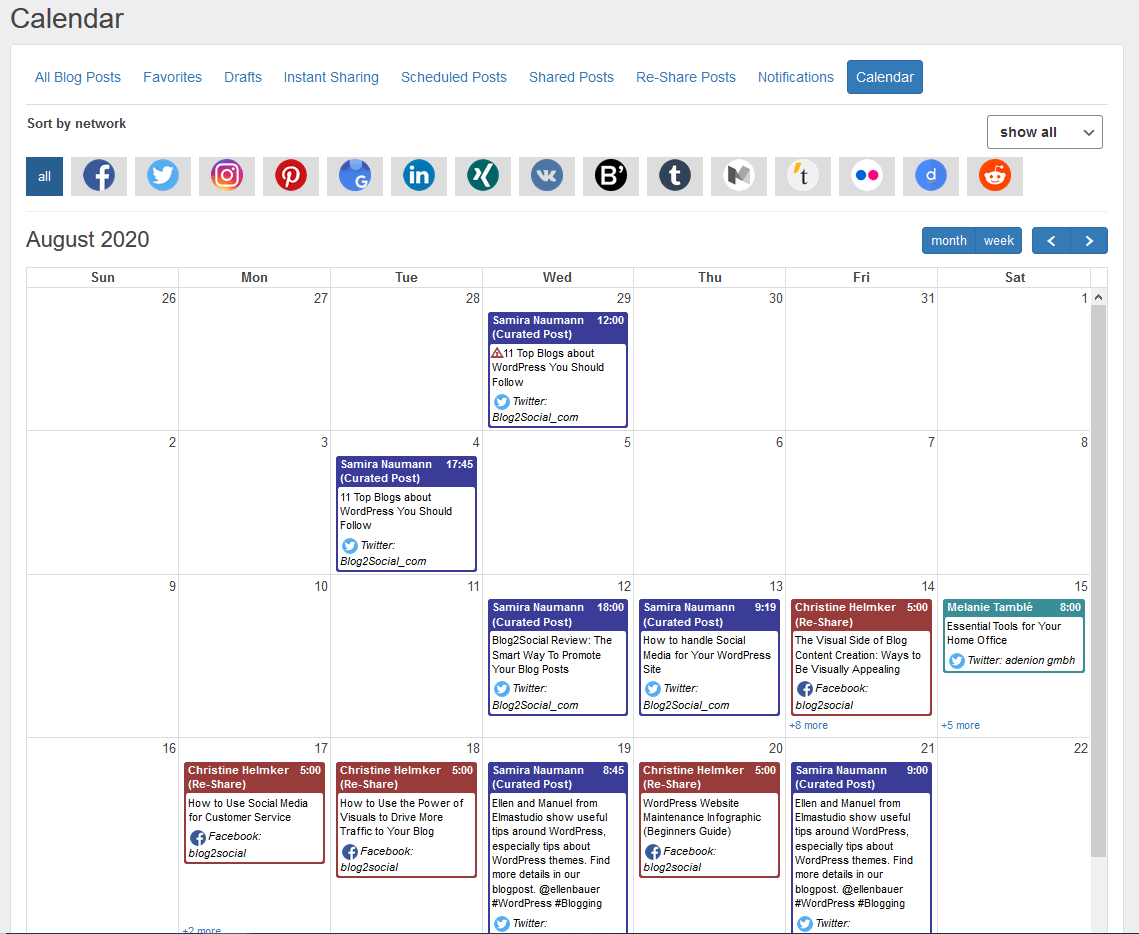
3. Social Media Calendar for Planning & Organization of your posts in WordPress
A visual social media calendar within WordPress helps you to:
- Coordinate campaigns and launches
- Organize your editorial planning across networks
- Use drag-and-drop to move posts to new dates
- Ensure a balanced and consistent posting rhythm
This improves your organizational overview and makes it easier to adapt your strategy in real time.
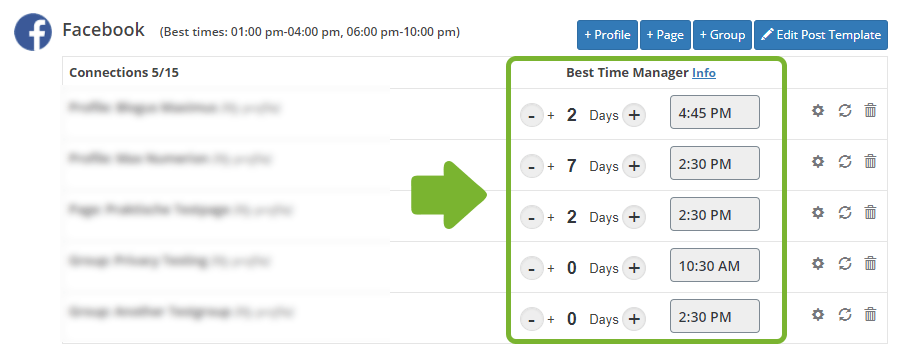
4. Smart Scheduling to Automate Publishing Times
Scheduling features allow you to plan your content days, weeks, or even months in advance. You can:
- Set individual best times for each post and platform
- Schedule recurring campaigns or series
- Ensure posts go live at peak hours for your audience
- Maintain activity even when you or your team are offline
This type of automation significantly increases workflow efficiency and helps maintain a steady presence.
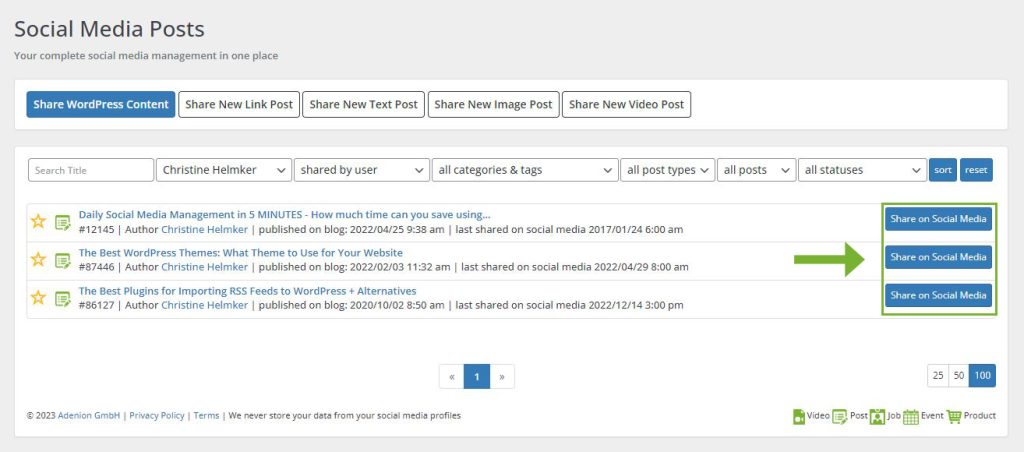
5. Auto-Posting for New WordPress Content
Auto-posting features automatically share your content as soon as you publish or update it in WordPress. For example, you can:
- Automatically share new blog posts to selected networks
- Trigger posts when content is updated or republished
- Apply different templates depending on content type or category
This ensures your channels are always up to date and minimizes manual posting effort.

6. Automatic Re-Sharing for Evergreen Content
Re-sharing tools help you maximize the value of your best posts. You can:
- Select content as evergreen and schedule recurring shares
- Reach new followers with proven posts
- Maintain a full content calendar even when you are not creating new content
This is a powerful way to keep your channels active and your top-performing content visible.

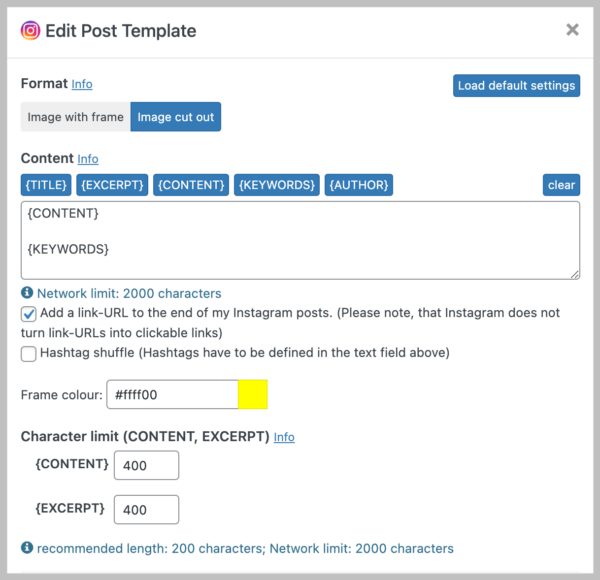
7. Templates for Consistent Social Media Posts
Post templates and reusable text blocks ensure consistent brand communication across networks. You can:
- Define default structures for intros, hashtags, and calls to action
- Use different templates per network or campaign type
- Combine templates with AI-generated variations
This makes it easier to manage your brand voice across multiple networks and team members.
8. Automatic Image Resizing for Optimal Display
Automatic image resizing helps ensure your visuals look great everywhere. Tools can:
- Adjust images to recommended sizes for each platform
- Prevent cropping issues and low-quality scaling
- Maintain consistent visual presentation across channels
This saves time in image preparation and ensures a professional brand appearance.
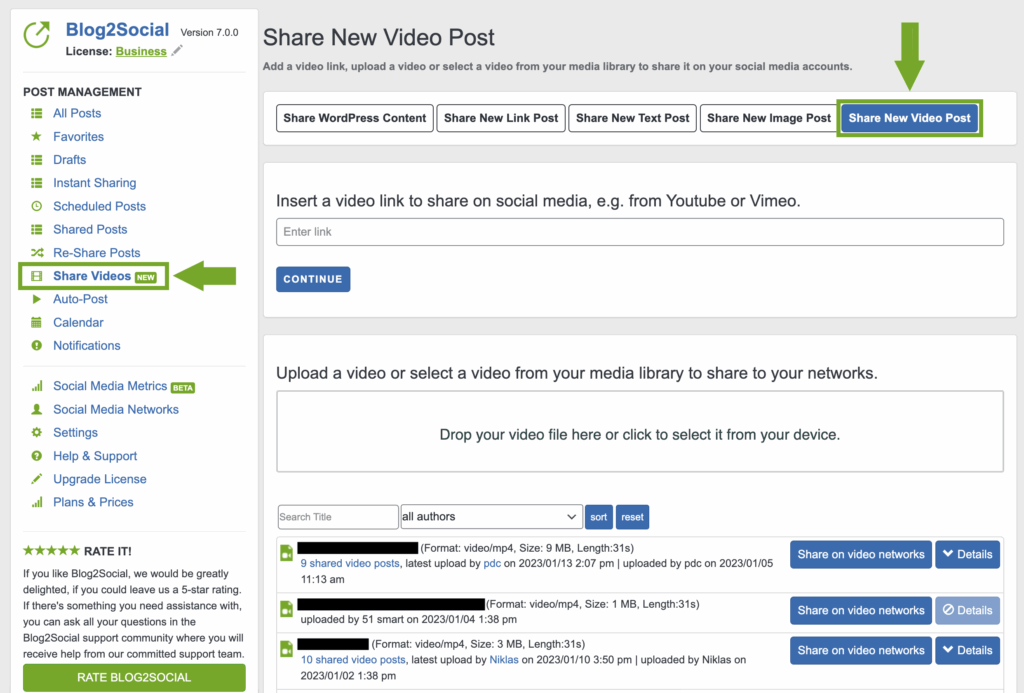
9. Native Video Posting & Modern Formats
Video is one of the most effective content formats for engagement and reach. Modern social media management tools support:
- Native video uploads for key platforms
- Vertical formats such as Stories and Shorts
- TikTok videos and multi-image slideshows
- Centralized scheduling for cross-platform video campaigns
Centralizing video publishing inside WordPress simplifies your overall media management and supports more advanced content strategies.
10. AI Text Assistance for Faster Content Creation
AI text assistants integrated into WordPress help you create tailored social media texts faster. They can:
- Generate platform-specific captions and descriptions
- Suggest hashtags and emojis
- Create alternative text versions for testing and personalization
- Adapt posts to different tones and audiences
Combined with templates and scheduling, AI support can significantly accelerate your content creation process without sacrificing quality or consistency.
Social Media Tools vs. WordPress Plugins
Both standalone social media tools and WordPress plugins can support your social media organization and automation. The following comparison gives you a quick overview.
For many bloggers, agencies, and businesses that already work heavily in WordPress, a dedicated plugin is often the more efficient and integrated solution.
How to Choose the Right Social Media Management Tool
When selecting a social media management or automation tool for your WordPress site, consider the following aspects:
- Core features: Do you need scheduling, auto-posting, re-sharing, AI assistance, team roles, analytics, or all of the above?
- Supported networks: Does the tool support all platforms that are relevant for your business?
- Ease of use: Is the interface intuitive, and can your team adopt it quickly?
- Integration with WordPress: Can you control everything from your WordPress dashboard?
- Pricing and scalability: Does the pricing fit your current needs and future growth?
- Support and documentation: Are there FAQ, video tutorials, guides, and fast customer support available?
Social Media Management with WordPress Plugins
A social media management plugin for WordPress allows you to manage and automate nearly all aspects of your social media workflows directly where your content lives. With the right social media plugin, you can:
- Share blog posts and pages across multiple networks in one go
- Customize posts per platform with dedicated captions, images, and hashtags
- Plan campaigns with a visual social media calendar
- Coordinate your team with roles and approval workflows
- Reuse evergreen content with automated re-sharing
- Leverage AI to create and optimize social media texts
- Schedule and post videos, Stories, and modern formats like Reels or Shorts
In practice, this turns WordPress into a full social media control center for your website or blog.
Checklist: How to Select the Best Social Media Management Tool for Your WordPress Website
Checklist: Social Media Management for WordPress
Use this checklist to evaluate whether a social media automation tool is a good fit for your WordPress website:
- ✓WordPress integration: Can you control your social media workflows directly from the WordPress dashboard?
- ✓Supported networks: Does the tool connect to all social platforms that matter for your audience?
- ✓Scheduling & auto-posting: Can you schedule posts in advance and automatically share new blog articles?
- ✓Evergreen re-sharing: Is there a way to reuse and re-share your best-performing content on a regular basis?
- ✓Templates & AI assistance: Does the tool offer templates and AI support to speed up content creation while keeping your brand voice consistent?
- ✓Media workflows: Can you easily manage images and videos, including modern formats such as Stories, Reels, or Shorts?
- ✓Team management: Are roles, approvals, and collaboration features available if you work in a team or agency?
- ✓Analytics & reporting: Can you track performance and optimize your content strategy based on data?
- ✓Pricing & scalability: Does the pricing model fit your budget and can it grow with your website and team?
- ✓Support & resources: Are there tutorials, documentation, and responsive support if you need help?
Conclusion
Social media management tools help you streamline, organize, and optimize your social media activities—especially when they are integrated directly into your WordPress workflows. By centralizing content planning, scheduling, publishing, re-sharing, and AI-assisted optimization, you can significantly improve your efficiency and boost your online visibility.
Whether you are a blogger, agency, entrepreneur, or business owner, using a structured social media management system saves time, ensures consistency, and strengthens your brand presence across all major platforms. With the right WordPress social media plugin, your website becomes the central hub for your entire social media strategy.
About the author



Great post! I really appreciate the thorough breakdown of how social media management tools can benefit WordPress users. The detailed explanations of key features like scheduling, auto-posting, and analytics are incredibly helpful. It’s great to see how plugins can simplify and streamline social media strategies. What would you recommend as the most important feature to look for when selecting a social media management plugin for a small business?
Hello Epoddar,
thank you for your positive feedback! We are happy to hear that you found the breakdown helpful and that the post gave you valuable insights into streamlining social media with WordPress plugins.
For small businesses, we’d recommend prioritizing ease of use and scheduling capabilities — a tool that saves time while keeping your content consistent can make a big difference.
Be sure to check out our other blog posts and Blog2Social for more tips and tools!
Wishing you much success with your social media strategy,
Simon
Awesome guide! This article gives a really thorough overview of social media management tools for WordPress — from scheduling and auto-posting to analytics. Very useful for anyone looking to streamline their social strategy.
Thank you so much for your positive feedback, Declan! We’re glad to hear that you found the guide helpful.
Really enjoyed reading this. Straightforward and useful.