Category: Social Media Strategies

  • Best WooCommerce Social Media Marketing Strategies in 2026

    Best WooCommerce Social Media Marketing Strategies in 2026

    Only wrote the word “share” on the WooCommerce product page and expecting social media shares from your audience? Well, this isn’t how social media marketing strategy works. It would help if you created an incentive for users to share your products with others. Here are six ways to do this.

    1. Automate your Social Media Marketing Strategy Efforts
    2. Enable social share or login button
    3. Add user-generated content to your website
    4. Create giveaway programs for social media shares
    5. Include loyalty rewards for social media shares
    6. Ask customers to share post-purchase experiences


    1. Automate your Social Media Marketing Strategy Efforts

    I’ve used a lot of social automation tools in the past, and some are better than others. On the other hand, social media strategies that are fully automated seem to lose the human, spontaneous aspect of posting.

    The problem is that it takes so much time to post by hand.

    What do you do then? Do you use social media as a way to get your message out, and how much of it do you automate?

    Social media automation vs. manual effort

    To be honest, I and the majority of people I know who have done “quite well” on, say, social media automation lose the spontaneity, and much of social media is about sharing what is happening right now. It’s what distinguishes it from, say, reading a blog.

    Perhaps scheduling will make more sense after the individual in charge of the account learns what resonates. Then you’ll be able to get ahead of it. But scheduling before you’ve figured out what works on the platform sounds like busywork to me — it feels productive, but you’re not making progress on the KPIs that matter?

    I agree that it takes time, but I also believe that less is more. One excellent post is worth more than a dozen mediocre ones.

    How to Automate Social Media Marketing Strategy efforts?

    No matter which social media you are focusing on, the following ideas are going to help you automate your social media marketing strategy with a new point of view.

    Targeted Audience Engagement

    You can interact more widely with your target audience by using social media automation solutions. You may reach a larger audience that fits your desired consumer profile by automating actions like liking, following, and commenting.

    This focused interaction enhances the likelihood that potential leads will find your social media presence. For simple lead generating, you may simply add a link to your store in your bio. You can obtain some ideas for improved social media bios using a free tool provided by Ahrefs.

    Efficient Content Scheduling and Sharing

    You may schedule and publish your Social Media posts in advance using automation technologies. Even if you don’t have the time to manually post, this function ensures that you remain active on the site. Building brand awareness and engaging potential leads who frequently interact with your content depend heavily on consistency.

    Blog2Social social media automation:
    With Blog2Social, you can automatically share your WooCommerce product posts, blog posts, or video posts on multiple social media platforms—right from your WordPress dashboard. In this tutorial, we’ll guide you through using this powerful WooCommerce social media plugin to streamline your marketing workflow.

    Blog2Social Post Preview

    From your WordPress dashboard, you can schedule and share your website content, product posts, blog posts, imported RSS feeds, and any other text, links, images, and videos.

    Special features for WooCommerce:

    • Rich product link previews (Open Graph product data)
      When you share product links, Blog2Social can add more product-specific Open Graph details—such as currency, availability, and stock status. This improves the prerequisites for more accurate previews on platforms that generate link cards from your page metadata.
    • Dynamic product data in post templates (shortcodes)
      Bring key product details into your templates automatically—ideal for offers, updates, and promotions. Use shortcodes to insert product attributes so your social posts stay current without constant manual edits.

    Hashtag and User Discovery

    Finding relevant hashtags and user accounts in your specialty might be aided by automation technologies. You may find prominent hashtags that your target audience uses and interact with users who are interested in your sector by using tools like hashtag research and user discovery.

    The likelihood of getting leads who are truly interested in your goods or services rises thanks to this tailored strategy.

    With the Blog2Social customization feature, you can easily change your social media posts by editing the text and adding different comments, hashtags, and handles for each network.

    This lets you automatically post on social media in the best way for each platform’s audience.

    Learn more about special automation features for WooCommerce

    Direct Messaging Automation

    Direct message automation functionalities may be available in social media automation systems. When starting conversations with possible leads, this can be quite helpful. You may initiate meaningful dialogues, share information about your offers, and ultimately turn interested prospects into leads by creating personalized and targeted communications.

    Bonus Tips

    Automation is great, but, as I think you’re getting at, it can make your followers feel less connected to you. When it comes down to it, publishing is just laziness, so you shouldn’t expect much. People want content that is interesting and useful, and that’s what gets their attention.

    • Bonus tip #1
      Automating for your users is another way to look at social media automation if you have a platform. A combination of personal curation and automation.
      For example, a real-world use case is a platform for car dealerships that lets them manage their stock and make marketing materials like videos, images, and ads. Each dealership needs to download all the created media and then post it on their own social media networks multiple times a day. Yuck!
      So, the automation part is when the platform posts a dealership’s media to their social networks automatically. The dealership customizes the content for their audience, but the automation comes from the way the platform connects to and posts to social networks.
    • Bonus tip #2
      This is a simple trick you can use to grow 5+ Instagram accounts at once:
      Using YT shorts and downloading them with a tool (vidloder.com NO-ADs & Free)
      Editing them a bit with Filmora
      Posting them as Instagram Reels
      Enjoy!

    It’s critical to note that while automation can streamline lead generation on social media, it’s crucial to strike a balance. Maintain a human touch by regularly monitoring and engaging with your audience manually, responding to comments and messages personally. Authenticity and genuine interaction play a vital role in building trust and converting leads into customers.


    2. Enable social share or login button

    A visitor likes your product and wants to share it with other friends. What is he/she looking for on your website? A button that says: “Hello! I’m here. Click to connect to any social media you want.”

    The time between decision and action is very short. When users decide to share, they should be able to log in to their account immediately from your site. This will lead to a great first impression and a better comment on your products on social media.

    How to include social media icons on WooCommerce

    Basically, adding share icons on WooCommerce is just using HTML codes to display a button. However, coding needs too much effort, but social media shares plugins made it easier. Just search for the word “share button” on the WordPress website and see how many social media plugins are available. The following plugins are the most favorite in the WordPress plugins directory.

    WordPress social media plugins

    Best placement for social media icons

    There are 3 main spots you can place the social media shares button.

    • Footer: Users will often scroll to the bottom of your site when they are looking for social media icons. So this is the most common location.
    • Header: Over half of the users may share content after reading the page title. Putting the share buttons at the top of your page will attract the eye of site visitors first.
    • Sidebar: The floating social media icon bar has been popular recently. The sidebar always stays in the screen’s visible area as visitors scroll the page. This option works better for blog posts.

    Be careful not to use social media buttons on pages that include a buy or sign-up. These pages increase the site’s conversion rate, but you don’t want to distract the user and lose the sale, right?


    3. Add user-generated content to your website

    Anything users publish about your business on websites or social media is user-generated content (UGC). Using UGC, your customers become your advertisers, and sometimes they can creatively introduce your product or service to others.

    Effects of UGC on your website

    The most obvious advantage of UGC is that your brand does not pay to create content. But there is more than that. We have listed the three main advantages of user content for your website below.

    Original content creation

    Making creative content is difficult. UGC can take some pressure off you for developing content. You can add customers’ photos, videos, or comments on social media to your website whenever you need new content.

    Time on site increases

    Time On Site is directly related to the quality of website content. Adding customers’ comments and photos on your website encourages your other customers to share content about your products, making them stay longer on your site.

    Conversion rate improvement

    People pay more attention to the POV of the people who used your product than to the item features on the product page. So, UGC affects the customers’ opinion and trust more than the content produced by the brand itself.

    How to feature customers’ content on your website

    If we ask you how many types of content there are on the internet, you’ll probably need both hands and fingers to count. But photos, videos, and tweets are more common. Let’s see how to put each of these contents on your website.

    Instagram photos

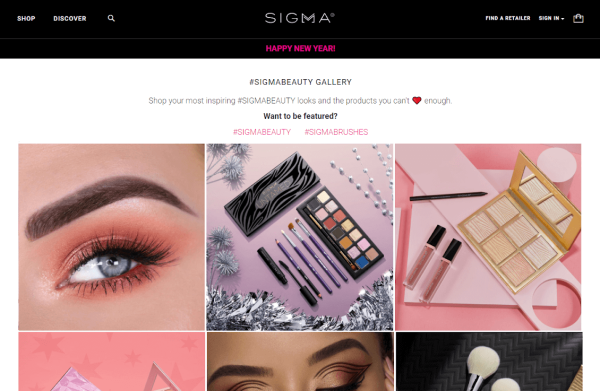
    You can create a separate gallery for customers’ images, like Sigma Beauty did on its site.
    Sigma Beauty social media gallery
    Sigma Beauty’s social media gallery

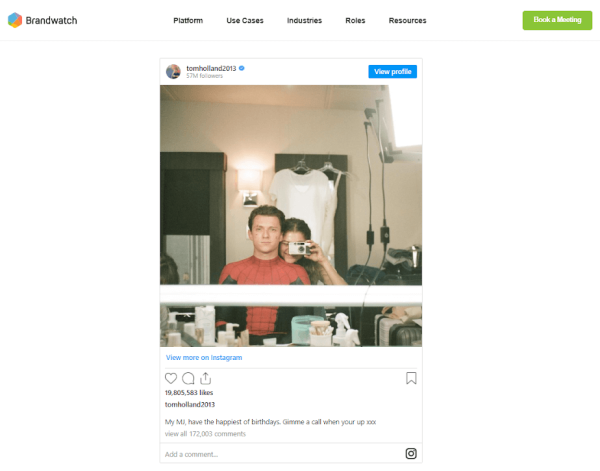
    Or put each photo in Instagram’s original template as the picture below.
    Using the Instagram original template on WooCommerce for social media shares
    Using the Instagram original template on WooCommerce for social media shares

    Instagram/ TikTok/YouTube videos

    You can use each social media template to share users’ videos too. WordPress enables you to copy the HTML link for any video and place the original content on your website. However, if you want more videos shown in less space, you should use plugins like Envira Gallery Plugin for WordPress to organize content.

    Tweets

    Fortunately, most tweets only contain text. So with a simple copy and paste and adding the tweet link, you can feature user comments on your website. But some people use photos or videos with the text. For these tweets, you have two options.

    You can just take a screenshot of each tweet and add it to your website. Or use plugins to add X/Twitter templates to get the best result.

    Using the Twitter original template on WooCommerce for social media shares
    Using the Twitter original template on WooCommerce for social media shares

    4. Create giveaway programs for social media shares

    Everyone loves free stuff, and product giveaways are always a successful marketing strategy. A great way to encourage users to share products is to offer a giveaway for introducing your items to others.

    But the giveaway strategies of most businesses are similar and no longer attractive to people. You need to come up with new ideas for promoting your giveaway program.

    Ideas to promote your giveaway plan

    Here are some social media marketing strategy ideas for promoting the giveaway plan on WooCommerce. You should perform the same or similar ideas based on your business.

    Find attractive templates for a giveaway landing page

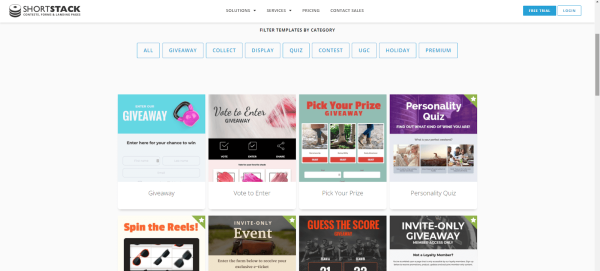
    A good promotional giveaway landing page has certain elements proven to perform well. So, you don’t need to go through all the webpage design steps on WordPress. ShortStack is a library of successful templates you can use to find the best giveaway landing page options for your WooCommerce store.
    Shortstack landing page template library
    Shortstack landing page template library

    Use social media just to boost the giveaway plan’s reach

    With the random changes to social media algorithms and useful WooCommerce plugins, it makes more sense to host your giveaway plan on your website. However, you can use social media to boost its reach. This way, the success of your giveaway plan is not dependent on another platform.

    Limit the promotion time

    You can create urgency with users by restricting the giveaway promotion time. This sense gets them to do what you want faster. Visual elements like countdown timers or expiring offers on your landing page induce users to share your products quickly.

    Enable different channels to target users

    Don’t think social media alone is enough to promote the giveaway program. You should include any promotion channel, like pay-per-click campaigns, remarketing ads, blog posts, and emails, to get the most out of the least.

    Best giveaway items

    Now the fun part. The giveaway prize you provide for users is a critical part of your plan’s success. Your prize should have a high value and persuade your prospects to engage with your social media marketing strategy plan. Let’s look at the best items you can use as giveaways.

    Free products

    Your customers are interested in your products. Your products are also readily available. So why not do the easiest thing and consider your products as gifts?

    Branded items

    These products are a good opportunity to increase your brand value among people. Try to choose products that are involved in the daily lives of customers. Mugs, shirts, bags, and pens always make an impact.

    Coupons and gift cards

    Discounts are a win-win offer. You sell your product, and the customer feels good about receiving a reward. You can also partner with other businesses to donate collaborative gift cards.


    5. Include loyalty rewards for social media shares

    Aren’t you happy if you get rewarded for a small job? This is the logic of loyalty programs. Social media shares rewards won’t cost you a lot, but the results they bring are notable. Now, the question is, what loyalty program is suitable for a social media marketing strategy?

    Which loyalty program should you pick?

    There are many strategies for loyalty, but social media shares can’t be applied to all of them. Two factors are important to the success of a WooCommerce loyalty program in social media marketing strategy: rewards and enjoyment, leading us to the following three plans.

    Reward-based

    This program rewards customers based on defined activities. Shopping is the easiest activity that includes points. But you can add tasks like referring a friend, writing a product review, and social media shares.

    Level-based

    The base of this program is to divide customers in proportion to loyalty level. You can increase the customer level for the number of product shares or produce UGC on different social media platforms.

    Gamification

    Social media is full of fun. If you start an entertaining contest in this space, definitely a lot of users will engage. Instagram photography contests and TikTok video challenges are the most popular choices. Again, don’t forget to add users’ content to your site.

    Social media shares reward plugins for WooCommerce

    Obviously, managing each customer’s status and activity is not manually possible. So you can use loyalty plugins to let WooCommerce do it for you.

    Social Boost

    As its name shows, Social Boost is designed for social media management. By enabling the growth of email lists, running social media contests, and increasing referrals, this plugin is a good choice for gamification.

    Social boost WooCommerce plugin
    Social boost WooCommerce plugin

    Points and Rewards for WooCommerce

    The plugin offers points on signup, referrals, purchases, and social media shares to engage customers. You can create a membership program to reward loyal customers with exclusive offers and manually update the level of your customers.


    6. Ask customers to share post-purchase experiences

    Which one impacts you deeper: David Beckham talking about the benefits of a shampoo brand, or a random Twitter user saying that shampoo causes hair loss? Definitely the second one. Because he isn’t paid for his comments, and you can believe his words.

    Ok, we got it. People’s comments spread faster. But how to motivate customers to write about our products? We have some social media marketing strategy tricks.

    To encourage more UGC, you can use accessible channels to ask customers and offer incentives that get them to share their experiences.

    Channels

    When customers complete their purchase from your store, it means they trust you. So this is the best opportunity to use this trust and ask them to introduce your product to others. There are 2 communication channels proven to have good results.

    Confirmation pages

    You can put the social share button after the final purchase with phrases like “Tell your friends” or “Let’s make our family bigger”.

    Email

    Your WooCommerce store is full of customers’ email addresses. Use these emails to ask for feedback and offer incentives we will show next.

    Motives

    Now that we know communication channels, we need to find out how to persuade customers to share their comments on social media.

    Include rewards

    You need to know what your customers are looking for. Discounts, free shipping, and gift cards are usually enough motivation to publish a post on social media. It would be great if you could personalize these rewards based on each customer’s interests.

    Offer a value

    Sometimes you have to go beyond money and show that you are doing a valuable activity for every new customer to your store. Like what Leesa does for children in poverty. Remember that promoting value is easier than promoting a product.
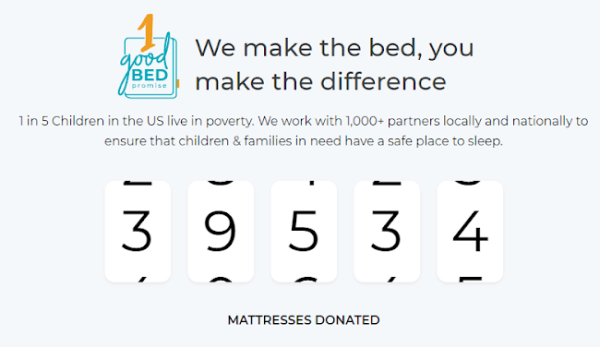
    Leesa donation program
    Leesa donation program

    Dive into emotions

    If you own a new business, you have to show how much customers can affect your growth by introducing your products to others. Tell customers that they are the first supporters of your business, and you will never forget them.

    However, if you have a big and relatively famous store, the story is short. Just tell customers how much they can show off with your brand.


    Which social media fits your business?

    Now that you are familiar with social media marketing strategy ideas to encourage users to share content, you need to run hashtag campaigns based on your business field. The table below lists the most popular social platforms with their features. Find the most suitable option based on your business context and follow us.

    PlatformEnabled MediaSuitable for
    InstagramPhoto/ VideoEvery business
    TwitterText/ Photo/ VideoRetail/ Services
    YouTubeVideoRetail/ Online Education
    TikTokVideoRetail/ DIY store/ Services
    LinkedInText/ Photo/ Video/ FileProfessional Affairs/ Services
    PinterestPhoto/ Video/ InfographicDIY store/ Retail

    Learn more about social media platforms, users, and demographics

    Best campaign for each social platform

    Once we have picked the right social network, we need to find out which campaign on each social media will bring us a better engagement rate.

    • Instagram: The main Instagram audience is between 18 and 35 years old, which means they have enough energy to come up with interesting ideas. Photography contests are still the best campaign for this platform. However, after creating Reels, it is possible to share entertaining videos too.
    • Twitter/X: X is based on short message posts, and users of this platform are very creative in making funny situations. You can award a prize to the most liked tweet containing your campaign hashtag, whether it is an admiration or a negative comment.
    • YouTube: There are two exciting ideas for the YouTube campaign. Videos of unboxing your products and solving a problem using your products. For unboxing, you can use popular streamers to reach a larger audience.
    • TikTok: What do you think made TikTok so popular? The challenges! You can design a challenge related to your business and invite others to do it. Fortunately, the TikTok algorithm is not as complicated as Instagram’s, and everyone has a chance to be seen.
    • LinkedIn: This is the place to go in formal clothes. You can encourage users to write inspirational text. This way, you offer value to the audience, and your campaign hashtag will contain a lot of motivational content.

    Conclusion

    You can use customers’ personal information for exclusive offers. For example, on customers’ birthday, you can ask them to create a wishlist and share it on social media. Either social media shares or wishlist plugins could become handy in this situation.

    When customers see your greeting, they feel important to your business, and their loyalty increases. On the other hand, when they share this list with their friends, several potential customers will be added to your store. Even if they do not buy from you, they will remember you as a trusted brand.

    By giving customers the right motivation, they will easily share your products with others. Just remember to keep a warm and friendly tone in your request. Customers have no responsibility to promote your products. But if they did, you have to thank them.

    Have you ever used these social media marketing strategy ideas on your WooCommerce store? If yes, what was the result, and if not, which method do you want to try? Please share this with your friends, so we know their opinions.

  • The First Comment Strategy on Social Media: How to Boost Reach, Engagement and Clicks

    The First Comment Strategy on Social Media: How to Boost Reach, Engagement and Clicks

    The First Comment Strategy enhances social media posts by keeping captions clean, boosting engagement, improving visibility, and encouraging meaningful interaction. Learn about how to apply a First Comment strategy to your social media posts to boost visibility and engagement.

    (more…)
  • The Success Formula for Your Social Media Content

    The Success Formula for Your Social Media Content

    Social media has undergone a fundamental transformation. To create successful social media content today, you need to understand one essential truth: it’s no longer about collecting the most followers. It’s about producing content that is genuinely relevant to as many people as possible. The algorithms of major platforms have rewritten the rules—and with them, the success factors for creators and brands.


    From Relevance 1.0 to Relevance 2.0: A Fundamental Shift

    Social media used to operate on a simple principle: brands and creators built communities and posted regularly, with content primarily reaching their own followers. This model is known as the Social Graph. Users saw content only from accounts they chose to follow.

    Those days are over. Today, the Content Graph dominates: users see content recommended by algorithms based on their interests, regardless of whether they follow the account.

    TikTok pioneered this shift, and Instagram has fully embraced it. As a result, follower counts matter far less. Platforms reward content that drives engagement.

    What does this mean in practice?

    Small accounts with few followers can now achieve massive reach, if their content is relevant. Conversely, large communities no longer guarantee visibility if the content fails to resonate.


    The Core Challenge: Maximum Relevance for Maximum Reach

    The rise of the Content Graph introduces a new strategic challenge for marketers. It’s no longer enough to create content for your existing community. Today, your content must be relevant to as many people as possible.

    • Only then will the algorithm distribute it widely.
    • Only then will it generate engagement and further reach.
    • Only then will it deliver the impact brands and creators expect.

    So how do you create content that meets this new standard? How do you identify topics, formats, and angles that truly resonate with your audience? This is where Intermate’s Content Design Framework comes into play.


    The Foundation: Understanding Your Audience Through Social Listening

    Before applying the framework, you must answer a crucial question:
    How do you know what is relevant to your audience?

    The answer is simple—but often overlooked: social listening.

    Relevance emerges when you address your audience’s needs, desires, dreams, and problems. To understand these, you must listen closely.

    Social listening means observing:

    • What content creators and communities share
    • What people comment on
    • Which themes appear repeatedly
    • Which trends matter
    • How topics are visually presented
    • How brands, products, and themes are contextualized
    • What online shop or Amazon reviews reveal—what problems your product solves

    Only by truly listening can you create content that resonates.


    The Content Design Framework: Your Formula for Successful Social Media Content

    With insights from social listening, you can create content that achieves maximum relevance. The Content Design Framework provides a clear structure built on four core elements: Framing, Hooking, Surprising, and Activating.

    The Content Design Framework - Success Formular

    1. Framing: Maximize Relevance and Relatability

    Framing defines the context of your content. This is where your understanding of your audience’s goals, desires, fears, and challenges becomes essential.

    Find an entry point that captures attention and fits authentically with the platform. Use protagonists your audience can identify with. Make them feel seen and understood. Speak their language and use their cultural codes.

    Two birds with one stone:
    The more precisely you tailor your content to your audience, the more effective it becomes, not only in impact but also in helping the algorithm understand who might find it relevant.


    2. Hooking: Start With a Bang

    Even the best framing is useless if your content doesn’t stop the scroll. Attention spans on social media are extremely short — you have only seconds to capture interest. That’s where the hook comes in.

    Proven hook elements include:

    • Visual hooks: Show people expressing strong, authentic emotions in the first frame.
    • Verbal hooks: Use statements that spark curiosity or address a problem directly.
    • Text overlays: Communicate the core message instantly and clearly.

    3. Surprising: Be Truly Unique

    Once you’ve captured attention, you must keep it. That only works if your content is genuinely surprising, not generic.

    Your goal is to find a unique, creative angle on your topic or trend, something fresh, unexpected, or rarely seen.

    But one surprise isn’t enough. To keep users watching until the end, your content must deliver creative twists throughout, not just at the beginning.

    Why is this so important?

    Social media users have seen almost everything. Trends are copied and recycled within days. To stand out, you must be different. To drive engagement, you must offer something new, unexpected, and creative.

    This doesn’t mean reinventing the wheel. It means finding your own take: a fresh perspective, a clever execution, or a twist that delights your audience.


    4. Activating: Use Engagement Triggers

    After connecting with your audience through strong framing, grabbing attention with a hook, and keeping them engaged with surprises, it’s time to spark interaction, because engagement fuels the algorithm.

    Activating means intentionally embedding elements that encourage users to comment. This works best through subtle irritation.

    Two proven methods:

    • Visual irritation: Place incongruous or puzzling objects in the background or in a protagonist’s hands.
    • Content irritation: Promise “3 finance hacks” but deliver only 2, or skip number 4 in a list of 5 tips.

    Why does this work?

    People can’t ignore inconsistencies. When something feels off or incomplete, they feel compelled to point it out. These comments signal to the algorithm that the content is engaging—resulting in even greater reach.

    Important: Activation must be subtle. It should enhance engagement, not overshadow the main message.


    The Social Media Content Success Formula

    Create relevant social media content that uses framing, hooks, surprises, and engagement triggers to achieve maximum reach.

    Tip: Cross-post your content across multiple platforms to reach more people, gather more feedback, and increase engagement.


    Conclusion: Putting the Success Formula Into Practice

    The era when social media success depended primarily on follower count is over. In the age of the Content Graph, relevance is the decisive factor.

    The Content Design Framework provides a systematic approach to creating content that meets these new demands. By combining deep social listening, strategic framing, strong hooks, and creative differentiation, you produce content that is not only seen but remembered. Engagement triggers ensure your content sparks interaction and is rewarded by the algorithm.

    The key insight: successful social media content is not a matter of luck. It’s the result of a structured, strategic process that centers your audience’s needs and blends them with creative excellence.

  • How to Set Up a Solid Social Media Strategy for 2026

    How to Set Up a Solid Social Media Strategy for 2026

    A successful social media presence in 2026 requires more than consistency and visibility. It requires adaptability, speed, AI-supported workflows, and community-centered thinking.

    (more…)
  • The Best Times to Post on Social Media 2026

    The Best Times to Post on Social Media 2026

    Looking to maximize your impact on social media? Discover the complete guide that reveals the best times to post across all the top social networks. This resource will help you pinpoint when your audience is most active and engaged, so your posts get noticed and generate more interaction. Whether you’re managing a personal brand or running a business account, knowing these optimal posting windows can make a big difference in your reach and engagement. Fill out the form below to access the full guide and start timing your posts like a pro! 

    Get the complete guide on the best times to post on the most popular social networks.

    Get the best times for your social media posts now!

  • The Best Social Media Image Sizes for 2026

    The Best Social Media Image Sizes for 2026

    In the bustling world of social media, captivating visuals are your secret weapon. But with each platform having its own unique preferences, it can feel like a minefield trying to ensure your images look their best everywhere.

    This guide is your roadmap to visual success. We’ll break down the ideal image dimensions and formats for top platforms like Instagram, Twitter (X), Facebook, and more. From profile pictures to eye-catching posts, you’ll find the exact specs you need to make a lasting impression.

    But that’s not all! We’ll also share clever strategies to repurpose your visuals across different platforms, saving you time and effort while maximizing your reach. Let’s get started and make your content truly shine on social media!

    Get the perfect image sizes for your social media posts!

    Why are the best image sizes for your social media posts so important?

    • Visual Appeal: Images are attention-grabbers. They instantly break through the scroll and capture user interest.
    • Emotional Impact: Visuals evoke emotions and tell stories more effectively than text.
    • Brand Storytelling: High-quality images help build brand identity and leave a lasting impression.

    The consequences of incorrect image sizes

    • Blurry/Pixelated Images: Look unprofessional and detract from your message.
    • Cropped Images: Miss important information or lose visual impact.
    • Incorrect Formats: Appear distorted and unprofessional.
    • Non-Display: Your content simply won’t be visible to your audience.

    By using the correct image sizes for each platform, you ensure your content looks its best, maximizing engagement and driving results.

    The Best Image Sizes for Your Social Media 2026

    Images for Your Social Media Profile

    Profile Pictures:

    • Your profile picture is your visual identity across all your social media activities.
    • Whether it’s you, your brand logo, or a representative image, it appears with every post, comment, and message.
    • Choose a high-quality image that clearly and professionally represents you or your brand.

    Cover Images:

    • Cover images enhance your profile page, providing a visual backdrop for your brand or personal identity.
    • Use this space to showcase your brand aesthetic, highlight key messages, or display important information.
    • Ensure your cover image is the correct size for each platform to prevent cropping or distortion.

    Images for Your Social Media Posts

    Image Posts:

    • Image posts prioritize visuals to convey your message.
    • The image itself should be impactful and self-explanatory, with optional supporting text in the caption.
    • Be aware of platform-specific cropping behaviors, especially when posting multiple images.

    Link Posts:

    • Link posts share external content with your audience.
    • Platforms automatically generate previews, often featuring a thumbnail image.
    • Choose a visually appealing thumbnail that entices clicks and accurately represents the linked content.
    • Experiment with both image posts and link posts to determine the most effective format for your content.

    What are the best image sizes for Facebook?

    Facebook is still the #1 social network with 3,22 billion monthly active users as of 2026. Among them are also more than 200 million businesses that address their target audience through profiles, pages, groups, and ads. Facebook offers entrepreneurs, self-employed, and private individuals a large potential reach to spread their topics, content, news, and events. You can post images as image posts and link posts in your newsfeed. When posting an image, your image will be added to your photo album on your profile at the same time.

    These are the best image sizes for Facebook

    • Cover image: 851 x 315 px
    • Profile picture: 196 x 196 px
    • Image post (portrait): 1080 x 1350 px
    • Image post (landscape): 1200 x 630 px
    • Link post: 1200 x 630 px
    • Multiple images: 1200 x 1200 px
    • Aspect ratio: 1:1 (square), 4:5 (portrait) or 1.91:1 (landscape)
    Best Social Media Image Sizes for Facebook Infografic

    What are the best image sizes for Pinterest?

    Pinterest, unlike other social media, works like a search engine and online pinboard. The platform is designed to redirect to your websites, which is why many bloggers and businesses post blog articles, information about products, or infographics on Pinterest. Companies use Pinterest for their e-commerce to offer their products and services. With more than 600 million monthly active users, Pinterest is a traffic generator whose users spend 80% more money than users of other networks. Posts, profiles, and pins also rank well in Google searches and generate good visibility. Video pins, story pins, and collection pins offer new opportunities to present your offerings comprehensively and vividly.

    These are the best image sizes for Pinterest

    • Cover image: 1440 x 810 px
    • Profile picture: 165 x 165 px
    • Standard & Carousel Pin: 1000 x 1500 px
    • Long Pin: 600 x 1260 px or 1000 x 2100 px
    • Story Pin: 1080 x 1920 px
    • Square Pin: 1000 x 1000 px
    • Board Thumbnail: 600 x 600 px
    • Aspect ratio: 2:3, 16:9 (for cover image), 9:16
    Best Image Sizes for Pinterest Infografic

    What are the best image sizes for X (Twitter)?

    X (formerly known as Twitter) is a fast-moving social network that focuses on the ongoing flow of information. According to X’s (Twitter’s) internal data, people are three times more likely to engage with a tweet when it contains an image. Through short and concise tweets, companies and self-employed people can position themselves well on current topics and contribute to discussions that are relevant to them and their target group. There are even corporate influencers from companies who share personal experiences and adventures from their everyday work. The success is also reflected in the user figures. With 611 million monthly active users worldwide, X (Twitter) continues to be one of the most popular social media networks.

    What are the image sizes on X (Twitter)?

    As with all social media, the profile and header image play an essential role on X (Twitter). Your profile image is attached to every post you create, be it an original one or a reply to someone else’s. Your header image – as the name implies – is shown prominently at the top of your profile. It gives you the chance to display ongoing promotions, for example. You can add up to four images or GIFs to your tweet. These visuals will enlarge when a user clicks on them, and they are added to your profile’s media tab in your profile. Since 2021, X has shown single in-feed images in full without cropping them. You don’t have to painstakingly make sure that the preview image shows what’s most important anymore. However, stick to the recommended sizes as aspect ratios for the best X (Twitter) experience.

    These measurements are best for your X (Twitter) posts

    • Cover image: 1500 x 500 px
    • Profile picture: 400 x 400 px
    • Image post: 1600 x 900 px, 1080 x 1080 px, 1080 x 1350 px
    • GIFs: 1280 x 1080 px
    • Cards (Link Previews):
      • for Videos: 350 x 196 px (minimum, better more, but keeping in line with the aspect ratio 1:1 or 16:9)
      • for Links: 4096 x 4096 px (max.), aspect ratio 1:1 or 3:1
    • Aspect ratio: 3:1 (for cover images and links), 1:1, 1.91:1 (landscape)
    Best Image Sizes for X (Twitter) Infografic

    What are the best image sizes for Instagram?

    Instagram has been part of Facebook since 2012 and, with more than 2 billion monthly active users, is the third-largest social media network worldwide. As a visual network, Instagram’s focus is on videos and images. Many companies use Instagram for their corporate communications to generate more awareness for their products and services, and – more recently – to set up shops.

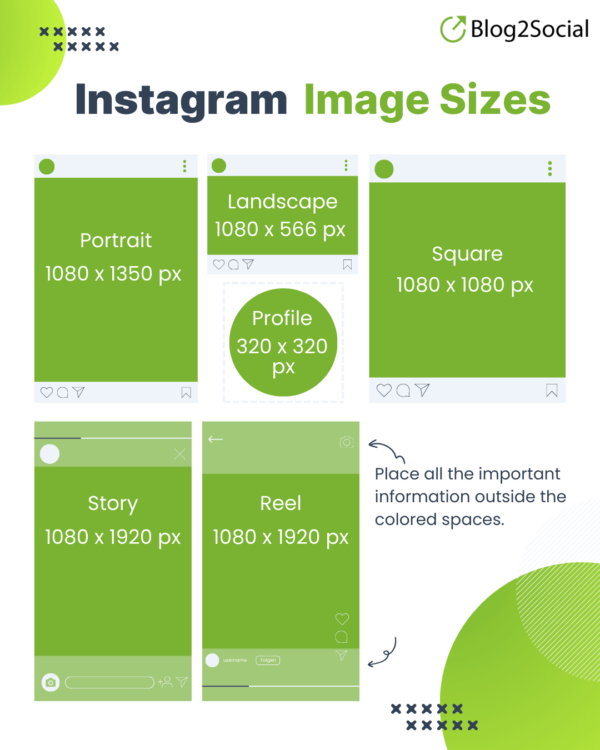
    These are the most advantageous measurements for your Instagram posts

    Although Instagram has been testing a vertical grid preview in users’ profiles, the majority of accounts still have the square grid. So keep centering all your important messaging in your images so it is seen even in the grid preview on your profile.

    • Profile picture: 320 x 320 px
    • Image post (square): 1080 x 1080 px
    • Image post (portrait): 1080 x 1350 px
    • Image post (landscape): 1080 x 566 px
    • Story: 1080 x 1920 px
    • Live & Reels: 1080 x 1920 px
    • Aspect ratio: 1:1 (square), 4:5 (portrait), 1.91:1 (landscape), 9:16 (reels/stories)
    Best Image Sizes for Instagram Infografic

    What are the best image sizes for LinkedIn?

    LinkedIn has reached more than 1 billion members worldwide.  On LinkedIn, you will find private profiles, company pages, various groups on different topics, ads for job offers, and many online events and seminars for which you can register directly via LinkedIn. All of this makes it the go-to network for B2B marketing and business networking.

    These are the best measurements for LinkedIn

    The profile picture has special significance on LinkedIn. Since LinkedIn is primarily used for networking with business contacts, your profile picture is like a job application photo. Regardless of whether you are actually applying for a job or trying to acquire new leads or customers, your profile picture is the first impression your business contacts have of you. On your profile page, you can also choose a cover photo on LinkedIn that, in the best case, represents you as a person or your brand. In addition to the profile pictures, there are the pictures that are displayed to your followers and contacts in the feed. Your page can quickly appear unserious due to distorted images or incorrectly displayed graphics. A real no-go in business networks. Therefore, pay attention to the optimal image sizes for LinkedIn.

    • Cover image: 1128 x 191 px (for companies), 1584 x 396 px (for personal profiles)
    • Profile picture: 400 x 400 px
    • Link post: 1200 x 628 px
    • Image post: 1104 x 552 px
    Best Image Sizes for LinkedIn Infografic

    LinkedIn is somewhat flexible when it comes to the height of your image. Square images like on Instagram, work on LinkedIn just as well. So feel free to try different formats to see what works best for you.

    What are the best image sizes for Tumblr?

    Tumblr is a blogging site that focuses on sharing text and content. You can create text posts and add images to them, you can post images with no text at all, or you can share video and audio files. There are 519 million – half a billion! – blogs on Tumblr as of 2024. This makes Tumblr an interesting social media for businesses and entrepreneurs, such as bloggers, to showcase their content, services, and products and provide content.

    These are ideal measurements for your Tumblr posts

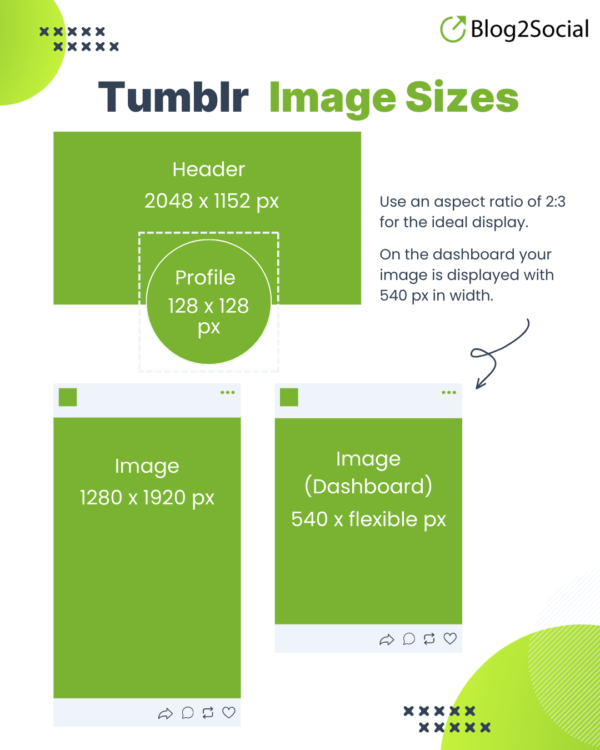
    • Profile picture: 128 x 128 px
    • Cover image: 2048 x 1152 px
    • Image post: 1280 x 1920 px (in-feed view: 540 px in width)
    Best Image Sizes for Tumblr Infografic

    Generally speaking, Tumblr is flexible when it comes to the height of your image. You can work with landscape, portrait, and square images; they will all look fine. Keep in mind, however, that on your dashboard, images are shown with a width of 540 px. The image will enlarge to its original size when the user clicks on it.

    What are the best image sizes for Google Business Profiles?

    Granted, a Google Business Profile isn’t really a social media network, but it’s still a tool where you can use impressive visuals to generate more reach for your business. A Google Business Profile is a business listing for your company and is the direct way into Google’s search index. In addition, your Google Business Profile entry is displayed in Google Maps. With the new features of Google Business Profile and Google Posts, you can publish your blog posts, pictures, videos, news, events, and announcements directly through Google and place them prominently on Google Search. With active use and regular posts, your site will rank for your relevant keywords on page 1 at the top right of Google. This makes your Google Business Profile an important part of your website marketing and complements your marketing activities via Google Adwords. A Google Business Profile is available to you free of charge.

    These are the optimal measurements for Google Business Profiles

    Similar to other social networks, you can add a profile picture or logo to your Google Business Profile, as well as a supplementary background picture, which is similar to a cover image. As a profile picture, you should choose your company logo. The background image can be found at the top of your profile and should contain additional content about your business. Google may not display your background image as the first image. Using the new Google Business Profile features, you can now post image posts, videos, news, blog posts, events, and announcements. You can upload different image posts and highlight different aspects of your business that will appeal to your customers and provide information. According to Google, this is the best size for your images:

    • Image post: 720 x 720 px
    • Cover image: 1024 x 576 px
    Best Image Sizes for Your Google Business Profile Infografic

    What are the best image sizes for Meta Threads?

    Meta launched its micro-messaging app Threads on July 5, 2023, so just a little over a year old. By now, Threads has reached 175 million monthly active users – and it’s still growing. Threads is a messaging service like and an alternative to X (Twitter). Users can share text posts with up to 500 characters, post images, links, and videos. Unlike most of the other social networks, Threads doesn’t crop or cut off images within the feed.

    These are optimal measurements for Meta Threads

    • Profile picture: 320 x 320 px
    • Images: 1440 x flexible
    Best Image Sizes for Threads Infografic

    Seeing as Threads doesn’t change your images within the in-feed display, the height of your image can be whatever you want or need it to be. However, keep in mind that images wider than 1440 pixels will be scaled down to that size.

    How to optimize your images for your social media posts

    To help you take advantage of visual content for your content marketing on social media, here’s an overview of how to optimize your images: 1. Choose images with strong visual language

    • Pay attention to good image quality and the optimal image sizes on social media
    • Choose image elements with a recognition value
    • Add a watermark or your company logo
    • Add your most important keyword in the image description. Use different image formats

    2. Use different image formats

    • Create and share infographics
    • Make smart use of memes and GIFs
    • Add supplementary images of products and processes at the right place

    3. Use the optimal size for the different social media

    • Mind the different aspect ratios and (preview) crops of each network
    • Be sure to center the most important information

    How can I create images with an optimal image size?

    There are many tools you can use to create images and graphics for social media. One advantage of using such tools is that the optimal image sizes for social media are already stored and predefined. You can also crop your existing images to the perfect size. Here you can find an overview of the most popular tools for images and image editing:

    • Canva: Canva is the ideal tool for everyone who can’t or doesn’t have the time to work with big creative suites. The tool offers a huge selection of templates for different formats and content types. You can also upload your own graphic elements to Canva and incorporate them into your graphics. Make use of a selection of AI tools to craft the visual you need.
    • Giphy: With Giphy, you can easily and quickly create animated GIFs and memes. Also, GIFMaker.me is a good alternative for short animations.
    • TinyPNG: TinyPNG helps you reduce the file size of your image without losing quality. This is helpful when you’ve got an especially large image file that you may not be able to upload to some networks.

    Practical Tip: Choose the Right Image Format Before You Create

    Don’t have a suitable image yet? The Blog2Social AI Image Generator lets you create individual visuals for your social media posts directly in WordPress. Start with your own image idea or use existing post content as a starting point, then choose a suitable image format.

    Consider where you want to publish the visual before generating it: 1:1 works for square posts, 4:5 for many portrait feed posts, 9:16 for stories and vertical formats, and 1.91:1 for common link previews. Exact requirements depend on the platform and placement.

    Keep the composition flexible: Leave enough space around important elements and check the final crop, aspect ratio, and presentation before publishing your post.

    create image, finish the post

    Share images on social media quickly and easily

    Many different networks and accounts with many different image sizes means having to spend a lot of time uploading and publishing each post. But it doesn’t have to be!

    Here’s your time-saver: Blog2Social, your tool for social media automation.

    Share all your images quickly and easily on all your social media channels from a single space – your Blog2Social dashboard. You can schedule your posts and let the tool auto-publish them for you at the best time. Whether you want to share an image or a link post, whether it’s a TikTok or an Instagram story, Blog2Social simplifies your social media workflow and saves you valuable time every day.

    Get the perfect image sizes now!

    Get the perfect image sizes for your social media posts!

  • Social Media Users 2026: All Numbers, Trends & Facts for Your Marketing

    Social Media Users 2026: All Numbers, Trends & Facts for Your Marketing

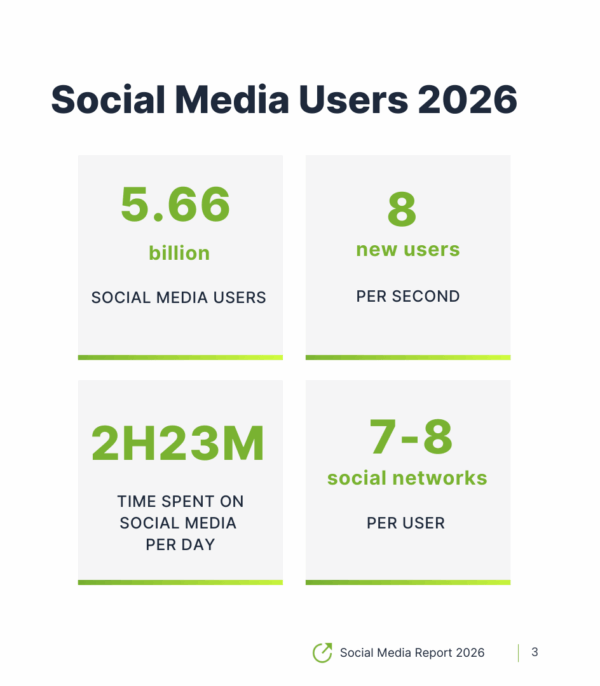
    The social media world has reached new maturity in 2026: 5.66 billion social media users – that’s 69% of the global population – use social networks. Eight new users join every second, and the average user spends 2 hours and 23 minutes daily across 7–8 different networks.

    This comprehensive report shows you the current monthly active users (MAU), demographics, usage behaviors, and 2026 trends – perfect for your marketing strategy, content planning, and audience targeting.

    Get the complete Social Media Report 2026 now – featuring the latest user statistics, trends & tips!


    The Social Media Landscape 2026: The Big Numbers

    Social media is no longer a trend – it’s a core part of digital life. As of early 2026, there are an estimated 5.66 billion social media users worldwide, representing roughly 69% of the global population. Over the previous 12 months, social platforms added around 259 million new user identities, an annual growth rate of about 4.8%.

    People spend an average of about 2 hours and 23 minutes per day on social platforms and are active on roughly 7–8 different networks.

    Social Media Report: Social Media Users in Numbers 2026

    Ranking: Monthly Active Users (MAU) 2026

    Below is an overview of the largest global platforms by (approximate) monthly active or regularly active social media users in 2026:

    PlatformMonthly active users (2026)Diff. 2025-2026
    Facebook3.22 billions+2.2%
    YouTube2.85 billions+5.5%
    Instagram2.2 billions+10%
    TikTok1.7 billions+7.5%
    LinkedIn1.0 billions+8%
    X (Twitter)660 millions-5%
    Pinterest520 millions+4.4%
    Threads (Meta)380 millions+20%
    Discord250 millions+8.5%

    Facebook remains the world’s largest platform with 3.22 billion MAU. YouTube follows with 2.85 billion as the video heavyweight, while Instagram (2.20 billion) and TikTok (1.70 billion) are the most dynamic growth drivers.

    Social Media Report: Social Media User and Platform Growth 2026 and Difference to 2025: Winners and Loosers

    Overall, the Meta portfolio (Facebook, Instagram, Threads, WhatsApp) and YouTube continue to dominate reach, while TikTok remains a major driver of growth in attention, engagement, and creator‑led commerce.

    Growth Champions: Instagram (+10%), Threads (+9.38%), Discord (+8.70%)
    Declines: Reddit, LinkedIn, Pinterest


    Global Platform Profiles in 2026:

    Facebook: The Established Giant

    Facebook remains one of the world’s largest social platforms, with around 3.2 billion monthly active users. While growth has slowed compared to newer entrants, its reach across older demographics and many regions remains unmatched.

    Key characteristics:

    • Strong in community‑building through groups and events.
    • Increasing share of time spent on video formats, especially Reels.
    • Important for cross‑generational communication and broad‑reach campaigns.

    YouTube: The Video Powerhouse

    YouTube, with roughly 2.8 billion active users, is the global reference platform for video content. It covers everything from music and entertainment to education, tutorials, and long‑form commentary.

    Key characteristics:

    • Massive daily watch time and deep engagement.
    • YouTube Shorts serves as a direct competitor to short‑form video apps and drives incremental reach.
    • Ideal for evergreen content, how‑to videos, product explainers, and long‑form storytelling.

    Instagram: Visual Storytelling and Social Shopping

    Instagram hosts around 2.2 billion monthly active users and remains a central hub for visual storytelling and lifestyle content. It combines feed posts, Stories, Reels, and shopping features into a single ecosystem.

    Key characteristics:

    • Almost entirely mobile usage.
    • Reels now represent a major portion of user time and algorithmic reach.
    • Strong in influencer marketing, brand building, and in‑app shopping.

    TikTok: The High‑Growth Short‑Form Leader

    TikTok, with an estimated 1.7 billion users globally, continues to drive the short‑form video revolution. Engagement levels are extremely high, with users often spending well over an hour per day in the app.

    Key characteristics:

    • Algorithm‑driven feed that surfaces highly engaging content regardless of follower count.
    • Particularly strong among Gen Z and younger Millennials.
    • Crucial for brand discovery, viral trends, and Creator‑driven campaigns, including social commerce.

    Why People Use Social Media 2026

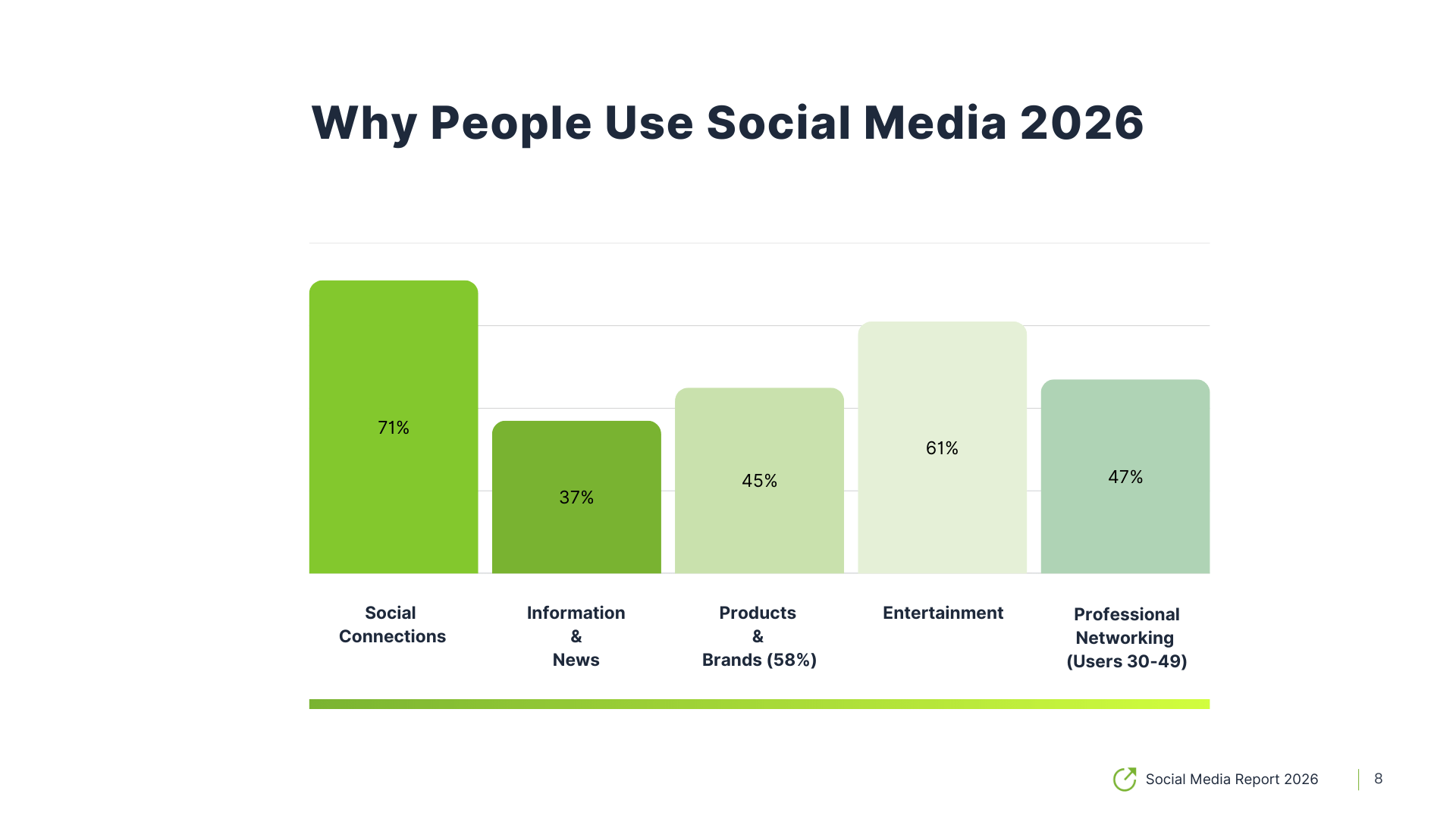
    Social media has become the modern search engine: Users research products, tutorials, and inspiration directly on platforms like YouTube, TikTok, and Instagram. The multi‑platform behavior shows that users now assign different roles to different apps – from news and entertainment to product discovery and professional networking.

    Why People Use Social Media

    The main motivations are clearly defined by numbers:

    • Staying connected: 71%
      Users want to maintain relationships with friends, family, colleagues, and communities wherever they are.
    • Entertainment and inspiration: 61%
      Short videos, live streams, memes, stories, gaming content,t and creator‑led formats dominate attention and watch time.
    • Information and news consumption: 45%
      A significant share of adults get news and current affairs updates through social platforms, following both media brands and individual experts.
    • Product discovery and research: 37%
      A large proportion of internet users rely on social channels to discover new brands, compare products, read reviews, and watch product demos before buying.
    • Career and professional networking: 47%
      Professionals use dedicated platforms to build personal brands, share expertise, network, and stay up to date on industry trends.

    Who Uses Which Platform: A Demographic Breakdown of Active Social Media Users

    Social Media Demographics by Age

    Generational Usage and Platform Preferences of Social Media Users

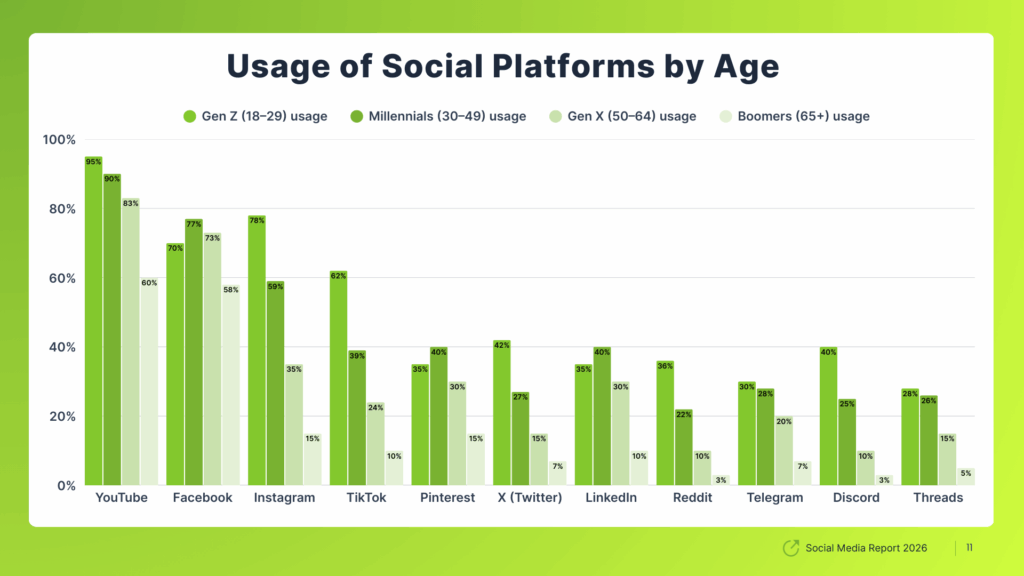
    Different age groups use social platforms in distinct ways and tend to cluster around particular apps and formats:

    • Gen Z (approx. 11–26 years): 30%
      • Make up a large share of global social users.
      • Prefer highly visual, mobile‑first, short‑form content.
      • Spend most of their time on platforms centered on video, trends, and creators.
    • Millennials (approx. 27–42 years): 35%
      • Use social media both socially and professionally.
      • Active across visual platforms, video apps, and professional networks.
      • Open to social commerce, brand content, and educational formats.
    • Gen X (approx. 43–58 years):
      • Use social media more for information, news, and professional networking.
      • Engage with video, groups, and communities that align with their interests.
    • Older users (approx. 59+ years): 9%
      • Rely heavily on established, general‑purpose platforms and video.
      • Use social media to stay informed and keep in touch with family and friends.

    The Universal Giants

    These platforms boast the largest user bases and act as the primary “utilities” of the internet.

    • YouTube: Continues to be the undisputed leader in cross-generational reach. As of 2026, it is the top video platform for all age groups, reaching over 90% of adults under 50. It is increasingly serving as a primary search engine and an educational hub.
    • Facebook: Remains the strongest platform for Millennials, Gen X, and Boomers. While Gen Z continues to shift their time elsewhere, Facebook’s “Groups” and “Marketplace” features keep it relevant as a community and utility tool for over 3 billion monthly users.

    The Visual & Viral Drivers

    These platforms define modern culture through short-form video and high-aesthetic content.

    • TikTok: Still heavily skewed toward Gen Z and Gen Alpha, though the “aging up” effect is visible as the 25–34 demographic now represents its largest growth sector. In 2026, TikTok has solidified its role as a discovery engine, with many younger users bypassing Google to search for products and news here.
    • Instagram: A staple for Gen Z and Millennials. While there is a significant age gap compared to older users, Instagram’s pivot to “Reels” and social commerce has maintained high engagement. It is currently the preferred platform for brand discovery and shopping inspiration.
    • Pinterest: While historically popular with Millennials and Gen X for “planning and inspiration,” 2026 data shows a surprising surge in Gen Z adoption (now nearly 46% of its user base). It remains the go-to space for shopping intent and creative projects.
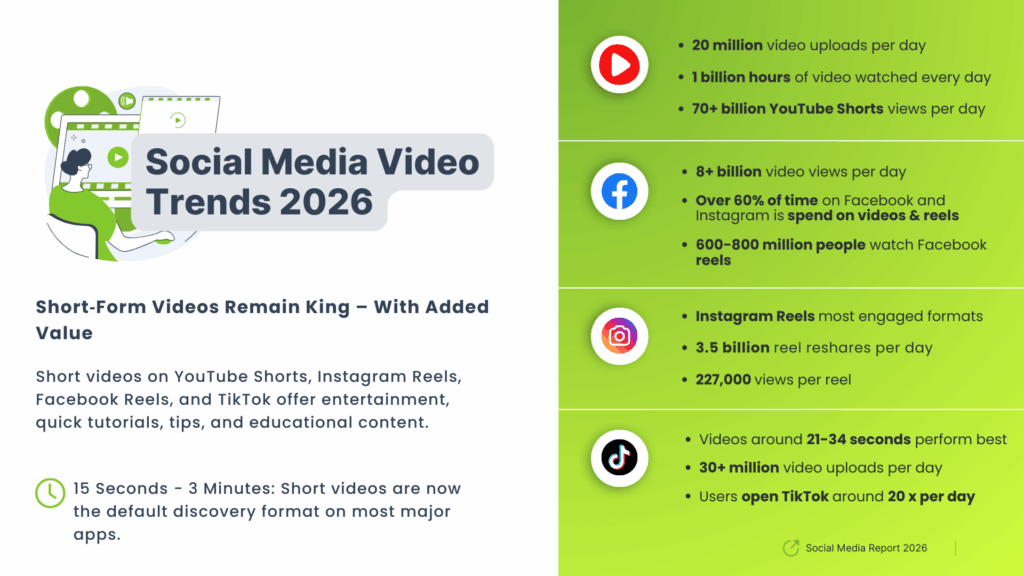
    Social Media Video facts and trends 2026

    Social Media Community & Discussion Engines

    These platforms prioritize conversation, privacy, and niche interests over “the feed.”

    PlatformCore AudienceFocus
    RedditGen Z & Young MillennialsNiche communities & high-trust product reviews.
    DiscordGen Z & GamersReal-time chat, private servers, and hobbyist groups.
    TelegramGlobal/YoungerPrivacy-oriented communication and large interest channels.
    LinkedInWorking-age (25–54)Professional identity, B2B marketing, and “thought leadership.”

    The “Real-Time” Battle: X vs. Threads

    The landscape for short-form text and news has become highly fragmented over the last year.

    • X (formerly Twitter): Still the “news desk” of the internet, but usage continues a gradual decline. It remains discussion-driven and popular among a younger, news-hungry audience, though it faces heavy competition from growing alternatives.
    • Threads: Now in its mature growth stage, Threads is closing the gap with X in daily mobile users. It leans heavily toward the 18–34 demographic and positions itself as a “friendlier” alternative for mobile-first social discourse.

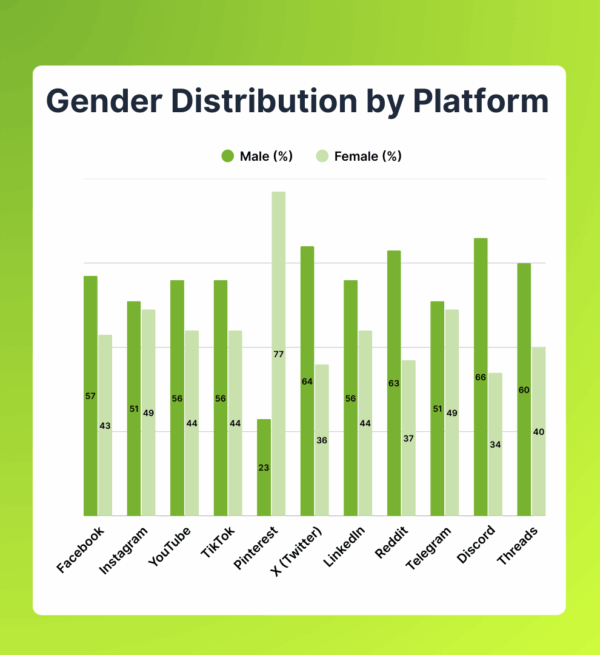
    Gender Distribution of Social Media Users Across Social Platforms

    Globally, the gender split among social media users is relatively balanced, at roughly 53% male and 47% female. However, individual platforms skew more strongly in one direction:

    • Visual inspiration and planning platforms are predominantly female.
    • Discussion‑ and forum‑type platforms lean male.
    • Professional networks still show a slight male majority.
    • Large general‑purpose networks are closer to parity overall.

    Understanding how age and gender distributions differ per network helps you decide where to focus your content and ad budgets for specific segments.

    Demographics by Gender

    Companies are not using social media “on the side” anymore – these channels are tightly aligned with concrete business goals.

    Social Networks Used by Companies

    Why these networks are prioritized

    Facebook (83%) and Instagram (78%) form the backbone of most companies’ social presence.​

    • Facebook offers huge reach, diverse formats (posts, Reels, groups, events) and mature ad targeting, making it ideal for broad awareness and community management.​
    • Instagram is the flagship channel for visual storytelling, influencer collaborations and social commerce, helping brands stage products emotionally and build lifestyle‑driven brand worlds.​

    LinkedIn (69%) is almost non‑negotiable in B2B, employer branding and recruiting.​
    Here the focus is less on entertainment and more on expert positioning, thought leadership, and attracting talent, so companies share industry insights, case studies and culture content.

    YouTube (53%) acts as a video content hub.​
    Long‑form explainers, product demos, tutorials and webinars live here and can be discovered via search for years, which gives YouTube a special role in education, onboarding and complex purchases.

    TikTok (27%) and X/Twitter (26%) are used more selectively.​

    • TikTok is favored when brands want to tap into younger audiences, trends and viral reach, but it demands a fast, creative, native content style.
    • X/Twitter remains important for real‑time communication – news, commentary, crisis communication, and quick customer support in certain industries.​

    Threads (12%) is still in an experimental phase for most companies.​
    Brands are testing it as a text‑ and discussion‑oriented extension of Instagram, but it is rarely a core channel yet.

    What goals sit behind this platform mix

    Overall, this platform priority supports three main corporate objectives:​

    1. Brand awareness
      • Facebook, Instagram, YouTube and TikTok are best for reach and mental availability.
      • Visual and video formats (Reels, Shorts, Stories, thumbnails) ensure the brand is repeatedly seen and remembered.
    2. Recruitment and employer branding
      • LinkedIn is the primary driver here, with Facebook and Instagram as supporting stages for behind‑the‑scenes and team stories.​
      • Companies showcase culture, benefits and career paths to position themselves as attractive employers.
    3. Customer insights and feedback
      • Comments, DMs, reviews, polls and Q&As provide continuous input on products, services and campaigns.
      • X/Twitter, Facebook groups, Instagram Stories (polls, question stickers) and community platforms help brands listen and react quickly.​

    In short, the numbers don’t just show where companies are present – they reflect a deliberate division of roles: broad reach and storytelling on Meta and YouTube, authority and talent attraction on LinkedIn, trend and speed on TikTok and X, and experimentation plus community depth on emerging networks like Threads.


    Several macro‑trends define the social media environment in 2026:

    1. Short-Form Video Dominates

    Vertical clips (15 seconds to 3 minutes) are prioritized across all major platforms – Reels, Shorts. Clips around 20-34 seconds perform best on TikTok.

    2. Community & Niche Platforms Boom: Creators at the center

    Brands increasingly partner with creators, and invest in building their own communities rather than relying solely on algorithmic reach. Threads (380M), Discord (250M), Mastodon and Bluesky show the shift to interest-based, decentralized spaces.

    3. AI-Powered Content & Automation

    Generative AI supports ideation, content production, localization, captioning, and moderation, while recommendation systems get more personalized.

    4. Social Commerce Growth

    Purchases move closer to content, with native shops, product tags, and live‑shopping formats gaining traction. In-app purchases and creator commerce expand rapidly.

    5. Authenticity Over Polish

    Users react more strongly to honest, relatable and behind‑the‑scenes content than to highly polished, traditional ad creatives.

    Your Social Media Action Plan for 2026

    In this mature but fast‑moving ecosystem, success requires a multi‑platform approach that respects each network’s unique strengths while aligning with overarching goals. Brands that thrive are those that adapt quickly, experiment continuously, and keep genuine, meaningful engagement with their audiences at the center of everything they do.

    Match platforms to audience: Use the age/gender matrices to pick your top 3–5 networks


    How to Turn Social Media Metrics into Real Results – with Smart Social Media Management

    The social media landscape in 2026 demands a strategic, cross-platform approach. Anyone aiming for long-term success needs to stay flexible, continuously adapt, and keep a close eye on emerging trends.

    Engagement is the key to growth on social networks – but posting regularly across multiple platforms can eat up countless hours. Time you could be spending far more effectively elsewhere.

    With Blog2Social, you can automate your social media planning and save valuable time. Manage all your networks from one central dashboard, schedule posts using the Best Time Manager, and keep everything under control with the social media calendar.

    Use your time more wisely – and focus on creating content that truly resonates with your audience.

    Looking for deeper insights into this year’s monthly active social media users?

    This Social Media Report 2026 is your complete data toolkit – with all charts, numbers, and strategic insights ready for your blog posts, presentations, and client pitches. Download for free!

    Get the complete Social Media Report 2026 now – featuring the latest user statistics, trends & tips!

  • The Best Times to Post on Social Media 2026

    The Best Times to Post on Social Media 2026

    When is the best time to post to social media? The answer to this question might easily be considered the Holy Grail of social media knowledge. Good thing is we’re here to share that knowledge with you! So get ready to unlock the potential of perfect timing for your social media success.

    Table of Contents

    Get the best times for your social media posts now!

    Why is posting to social media at the best time so important?

    Picture this: You worked hard to create a great post. Your copy is near perfect, your hook is a banger and your CTA is irresistible. It’s packed with highly relevant and impactful information for your audience. Excitedly, you post it, and… crickets. People barely engage with it and your post gets lost in the throes of the algorithm. It’s easily one of the most demotivating and disappointing things to happen, right? Right. This is why posting at the best time on social media can significantly impact the success of your posts (and your strategy overall). It should never be just a mere afterthought but a careful consideration and observation. A well-timed post has the potential to reach a larger audience and drive engagement. Many social media algorithms consider early engagement on a new post to decide whether or not it should be pushed to more people. Posting at just the right time ensures that your audience sees and interacts with your content. Early engagement then leads to the algorithms showing your post to even more people. This is why it’s crucial for you to know your target audience’s preferred social networks and the peak hours of their online activity. Getting them to see your content will not only drive engagement and promote your post. It will, ultimately, help you form meaningful connections with your audience, grow brand awareness and loyalty, and convert them from fans to clients.

    What is the best time to post on social media?

    As convenient as it would be to have a universal best time for all social platforms, the solution isn’t that simple. Each social media site caters to different audiences with different interests, preferences, and active hours. Therefore it’s best to look at each network individually to determine what posting time works best. However, the easiest way to find out what the best time to post on social media is to take a look at your account insights. Every social media network offers business and creator accounts the option of monitoring their engagement. That includes an overview of your audiences’ peak hours and most active days. So to get the best results, study your insights, experiment to see when you get the most engagement, and develop your own schedule. If you’re new to social media and are still growing your account, it’s difficult to determine the best times and the active hours of your audience. On most platforms, you need to hit a certain amount of followers before you get shown data on it. This is why the times below are a good starting point. Now let’s take a look at the best posting times on each network!

    The best time to post on Facebook

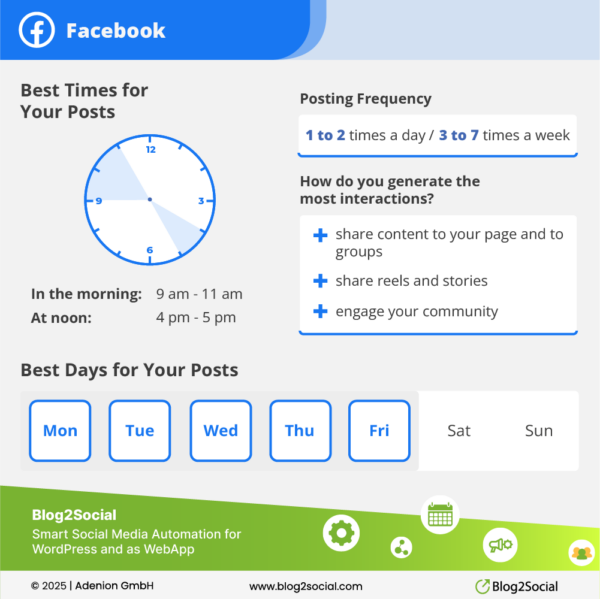
    The best time to post on Facebook is Mondays to Friday, 9 am to 11 am and 4 pm to 5 pm. Those are the hours with peak engagement. best times to post on facebook Facebook in numbers:

    • In 2024, Facebook is used by 3.07 billion monthly active users.
    • 2.11 billion people use Facebook every day. This corresponds to almost 70% of their monthly active user base.
    • On average, users spend just under 31 minutes a day on Facebook.
    • The 25-34 age group is the largest on Facebook (30.8%), followed by 18-24 (22.1%) and 35-44 (20.4%). Together, they make up over 70% of Facebook users.

    These numbers prove that Facebook provides an immense reach that – with a solid strategy – can boost brand awareness and visibility. With a variety of content formats, including text, images, videos/reels, stories, and live streams, Facebook allows for versatile marketing approaches to build and foster community engagement.

    Tip: 1.8 billion people use Facebook groups each month. Consider engaging in a group or even building one up yourself for your community. It can help build a long-lasting relationship with your audience, grow trust, and thus drive revenue. Groups have their own insights helping you to determine when the best times and days are to post.

    The best time to post on Instagram

    The best time to post on Instagram is Monday to Thursday from 10 am to 2 pm and on Friday from 11 am to 12 pm. Instagram in numbers:

    • Instagram has 2 billion monthly active users, making it one of the four most popular social platforms worldwide.
    • On average, users spend almost 34 minutes a day on Instagram.
    • The largest age group on Instagram is 18-24 (31.3%), followed by 25-34 (31.0%). In contrast, the 35-44 age group is only represented around half as often.

    The key to success on Instagram is understanding how its algorithm works. Posting at the right time is only one aspect that you need to consider. But don’t worry! Our blog post about the Instagram algorithm will help you set up your strategy and grow your account easily!

    Tip: Posting consistently will help your growth. Instagram offers a great variety of content types to engage with your community and draw in more people. But how often should you post these different post types? Here’s a quick overview:
    • Stories: 2-8 per day
    • Reels: 1-3 per week
    • Carousels: 1-2 per week
    • Single post: 3-5 per week
    Like the best posting times, these numbers are relative. Find a schedule that works for you and always keep in mind: quality before quantity! It’s better to post one or two high-quality pieces of content per week than to post inconsistently or a lot of irrelevant information.

    The best time to post on Threads

    The best time to post on Threads is Tuesday to Thursday from 8 am to 12 pm and Sunday from 7 pm to 9 pm. Threads in numbers:

    Threads is a social media platform from Meta that serves as a text-based complement to Instagram. Users with an Instagram account can use Threads and create posts, called “threads,” that contain text, images or videos. The app enables discussions in real time, similar to X (formerly Twitter).

    The best time to post on LinkedIn

    The best time to post on LinkedIn is Tuesdays through Thursdays from 9 am to 12 pm. Considering that LinkedIn is a business network, the worst days to post are the weekends. So be sure to share your content during weekdays at the peak times. LinkedIn in numbers:

    LinkedIn is perfect for business networking, lead generation and industry-specific insights. With its focus on B2B marketing, you can easily reach business professionals, decision-makers and key stakeholders by sharing your expertise and driving engagement with thought leadership. This helps you build trust and credibility.

    The best time to post on Pinterest

    The best time to post on Pinterest is Sunday to Tuesday between 11 am and 2 pm and from 7 pm to 10 pm. Pinterest in numbers:

    Pinterest is a search engine for images and an idea catalog that people often use as a scrapbook (Pinterest boards) to collect inspiring, creative, or helpful content. Therefore, it is the ideal social network for businesses and brands to inspire and engage their audience visually. Through visual storytelling, DIY projects, How-To guides, and lifestyle content you can connect with your audience on a personal level. You can easily use Pinterest to turn inspiration into action and drive engagement.

    Tip: Pinterest’s image and video sizes are unique to the social media landscape. Check out our cheat sheet for the different social media image sizes to create the perfect pins for your boards!

    The best time to post on Twitter (now X)

    The best time to post on Twitter (now X) is Tuesdays through Thursdays from 9 am to 2 pm. Twitter/X in numbers:

    Despite recent changes, Twitter/X remains a social network predominantly for short messaging. Due to its dynamic nature, Twitter/X is perfect for quick, concise communication, such as sharing updates, promotions, and otherwise engaging and informative content. Hashtags as well as trending topics help with discoverability and staying up-to-date with niche-specific content. Twitter/X is about real-time engagement and participation which allows you to stay close to your audience and communicate with them immediately. This in turn grows your relationship with them, effectively building your community.

    The best time to post on TikTok

    The best time to post on TikTok is Wednesday to Thursday from 9 am to 10 am, as well as Tuesday to Friday from 4 pm to 5 pm. best times to post on tiktok TikTok in numbers:

    TikTok has taken the social media world by storm and only keeps gaining traction. With the right strategy, you can easily market to a younger demographic by showcasing products, services, and brand personality with the diverse and creative editing option TikTok offers. Engage, interact with, and reach a wider audience by using the duet and stitch features, participate in popular TikTok challenges, and make use of the template and music integration to craft compelling videos.

    The best time to post on YouTube

    The best time to post on YouTube is Monday to Friday from 9 pm to 11 pm, and on Saturday to Sunday from 2 pm to 5 pm. YouTube in numbers:

    • YouTube has over 2.5 billion monthly active users, making it the second most popular social network, just behind Facebook.
    • On average, users spend 28 hours and 5 minutes per month on YouTube. In terms of usage time, YouTube is therefore used the second longest per month. Only on TikTok do users spend more time.
    • More than a quarter of the world’s population uses YouTube every month.
    • The 25-34 age group is the most active on YouTube with a share of 21.5%. This is closely followed by 35 to 44-year-olds with 17.90%, followed by 18 to 24-year-olds, who make up 15.70% of YouTube users.

    YouTube is not only one of the most popular social media networks. It’s also the second most popular search engine after Google. The platform acts as a media library, which means that videos remain relevant and visible months and even years after their upload. YouTube’s versatility allows different types of content to thrive. Connect with your audience with videos with immersive storytelling experiences, guide them with tutorials, or introduce them to a new addition in your portfolio with a product showcase, to name a few ideas.

    Tip: YouTube takes 2-3 hours to index your video after you’ve uploaded it. Only then will it be suggested to watchers and appear in searches. So upload your video a few hours before peak active hours on YouTube to ensure that your audience sees it.

    The best time to post on Telegram

    The best time to post on Telegram is Monday to Friday from 1 pm to 4 pm and from 6 pm to 10 pm. best time to post on telegram Telegram in numbers:

    With features like encrypted messaging, large group capacities, and multimedia sharing, Telegram offers a secure and engaging environment for connecting with your audience. Creating and promoting your own channels allows you to get in direct contact with your audience, thus building a dedicated community and growing brand loyalty. Telegram’s file-sharing capabilities make it a great tool for sharing your content. Customizable bots help you to streamline your customer service and engagement strategies.

    The best time to post on Reddit

    The best time to post on Reddit is Monday to Friday from 7 pm to 9 pm and on Saturday to Sunday from 2 pm to 4 pm. Reddit in numbers:

    Users on Reddit participate in various niche communities (subreddits) which provides you with the unique chance to tap into specific demographics and interests. Up- and downvotes by users determine which content is shown at the top. This allows you to conduct informal market research while engaging with your audience at the same time. Participating in discussions and building a community on Reddit can help you establish credibility and trust, share your expertise, and create a genuine connection with your audience. Its user-driven nature makes it a great network for user-generated content as well.

    The best time to post on Google Business Profile

    The best time to post on Google Business Profile is Thursday to Sunday from 9 am to 11 am. Google Business Profile in numbers:

    • Almost 80% of local searches on mobile turn into purchases.
    • Users are 2.7 times more likely to believe your business is reliable when your Google Business Profile is complete.
    • A Google Business profile with photos achieves on average 35% more clicks on links that lead to the company website.
    • 87% of people use Google to search for local businesses.

    Google is the most visited website worldwide. Having an optimized business profile ensures that people searching for your business online will find all the information they need. More importantly, it helps display your business prominently in the SERPs. Inform users about essential details such as business hours, contact information, reviews, and images. Moreover, share news from your website, update offers, or invite visitors to events. A Google Business Profile helps users find your business quickly and easily while supplying them with enough information to follow up on their inquiries.

    Is there a tool that can help me manage and schedule posts at the best times?

    With the variety of best times to post on social media, it can become tricky to keep track of it all. Even with cheat sheets and reminders you still need to pull up the file or document, double check and put it on for every single network you want to share content on. Tedious, isn’t it? Blog2Social’s Best Time Manager can take this painstaking task off your hands and save you not only time but nerves as well. This feature comes pre-programmed with the best times for each social media network. It allows you to schedule your posts for just the right moment with just a few clicks. Better yet: you can edit and save any other times convenient for your audience in the manager to automatically apply for your posts. Why deal with the hassle of manual settings when you can save so much time and energy with Blog2Social? Blog2Social Free 30-Day-Trial

    Wrapping up

    On social media, you’re always in competition with others who want your audience’s attention. This makes it all the more important to stand out to stop the user’s scroll and to make them engage with your posts. But it’s not just your content that matters. Timing is another important aspect you have to consider when you want to grow on social media. You can only start growing relationships with your audience when they see you. So posting when they are online is a crucial step toward more awareness, reach, and visibility. Social media automation tools like Blog2Social can help you manage your best times to post on social media. This way, you can save them in one place and simply schedule all your posts for the right time with a single click. Save time and resources by managing your social media schedule in one spot. Keep in mind that fluctuations are normal and that sometimes a post shared at the right time might not get the response you hoped for. Don’t be discouraged by that! Continue sharing high-quality content, engage with your community, keep a close watch on your metrics, and always stay up to date with new developments, and your social media marketing efforts will pay off.

  • How to Create Perfect Social Media Posts

    How to Create Perfect Social Media Posts

    Social media in 2026 is driven by individualized, channel-specific communication, powered by smart workflows and AI rather than one-size-fits-all posting.

    Social media is not one-size-fits-all

    Every platform has its own formats, features, and expectations – and every community reacts differently to tone, length, hashtags, emojis, and calls to action. Treating social media as a single, uniform channel leads to mediocre results.Social Media Report 2026: Active Social Media Users, Statistics, Facts, and Trends

    Successful social media communication means cross-promoting rather than cross-posting, that is tailoring each post to the specific platform, context, and audience instead of pushing identical content everywhere at once.

    1. Content is king – and AI is your co-pilot

    Content saturation has never been higher, while feeds are increasingly personalized and algorithmically filtered. Relevance, clarity, and genuine value are the main levers for reach and engagement – supported, not replaced, by AI.

    How to create truly valuable content:

    • Focus on your audience’s real problems and goals with how-tos, checklists, comparisons, and practical examples.
    • Use long-form content (blog posts, whitepapers, videos) as your content hub and break it down into snackable social snippets.
    • Give each post one clear primary intent: inform, inspire, entertain, or convert – not all at once.
    • Add social proof (case studies, reviews & ratings, testimonials, data) to build trust and boost conversion.

    AI tools for ideas, copy, and headlines:

    2. Visuals, Reels & video: attention-drivers in the feed

    90% of the information our brain digests is visual. Visual content consistently outperforms plain text on most platforms, especially short-form video (Reels, Shorts, TikToks) and carousels. Visuals are also crucial for storytelling, branding, and memorability. People remember visual information 65% longer than text or audio information.

    Videos can even outshine the most intriguing infographic. Social video generates 1200% more shares than text and images combined.

    Make the most of visual content:

    • Follow a “create once, repurpose often” approach:
      • One blog post can become 1–2 Reels, 1 carousel, 2–3 graphic snippets, and several Stories.
    • Upload videos natively instead of only sharing links to increase visibility and watch time.
    • Use carousels for step-by-step guides, before–after stories, mini lessons, or FAQs.
    • If your blog post contains multiple images, share them over several days with different hooks and angles to extend content lifespan without repeating yourself.
    LET'S GET VISUAL- Why visual content is so important

    Modern tools for visuals & video (including AI):

    • Canva for social graphics, infographics, carousels, and short videos with templates, brand kits, and simple AI helpers.
    • AI image generators: Tools such as DALL·E, Midjourney, and Adobe Firefly help you create custom illustrations, visual concepts, and original scenes. If you work with WordPress, you can also generate images directly while preparing your social media posts. The Blog2Social AI Image Generator lets you describe your own image idea or use existing post content as a starting point. Always review generated images for quality, usage rights, and applicable disclosure requirements before publishing.
    • Video editors like CapCut, Descript, or VEED for fast editing, subtitles, and hook templates for short-form video.
    • Stock libraries such as Pixabay, Prexels or Unsplash for high-quality photos, combined with a consistent visual style.

    Practical Tip: From AI Image to Published Social Media Post

    You can turn an image idea into an individual visual directly in WordPress using the Blog2Social AI Image Generator. Combine the generated image with suitable post copy, adapt it to your selected network, and schedule it for publication.

    Keep your visual identity consistent by using recognizable colors, similar illustration styles, and clear compositions. Choose an appropriate aspect ratio for each network so important elements remain visible and your images look good across different post formats.

    Step-by-Step Guide: Create AI Images with Blog2Social

    create image, finish the post

    3. Choose the right post format

    Platforms differ not just in character limits but in which formats their algorithms currently favor: feeds, Stories, Reels, Shorts, carousels, document posts, newsletters, and more. Even on the same platform, native image, video, or carousel posts often outperform simple link posts.

    Practical format rules:

    • For blog content:
      • Share once as a classic link post with a short teaser.
      • Share multiple times as image or carousel posts with a strong hook, key insights, and a short CTA.
    • For video:
      • Use long-form video on YouTube or as native video on LinkedIn (especially in B2B).
      • Create short versions for Reels, Shorts, TikTok, and “snackable” formats.
    • For Stories:
      • Use them for behind-the-scenes, quick tips, polls, Q&A, and time-sensitive offers.

    Scheduling tools that support multiple post types per platform help you define and automate different formats (link, image, video, carousel, Stories) from the same core content.

    4. Hashtags: fewer, smarter, and platform-specific

    Hashtags still help discoverability, but their impact is highly platform-dependent. “More is better” is no longer a universal rule; relevance, search intent, and consistency matter more than sheer volume.

    Current hashtag guidance by platform (tendencies):

    • Instagram: Around 5–10 highly relevant hashtags (mix of niche, brand, and topic tags).
    • LinkedIn & Facebook: 2–4 laser-focused hashtags that clearly match the content.
    • TikTok: Keyword-rich captions plus a small selection of topical hashtags, treating the platform as a video-first search engine.

    Best practices:

    • Only use hashtags that accurately reflect your content; hijacking unrelated trends can harm trust and performance.
    • Combine:
      • Topic tags (#socialmedia, #digitalmarketing)
      • Audience tags (#b2bmarketing, #saasfounder)
      • Brand and campaign tags (#yourbrand, #yourcampaign)
    • Review hashtag performance regularly and refine your sets over time.

    Hashtag research tools:

    • Tools like Flick, IQHashtags, or RiteTag provide suggestions and performance data.
    • Try Top-Hashtags for Instagram hashtags.
    • Check out Tagdef to search for the meaning of trending hashtags or add your own.
    • Check out Trendsmap for finding more popular hashtags on a world map.
    • Also check the list of popular hashflags to see if they can complement your Twitter message.
    • Blog2Social automatically turns post tags into hashtags for your social media posts.

    5. Use emojis with intention – not decoration

    Emojis can convey emotion, increase readability, and boost click-through and engagement when used thoughtfully. In more formal or B2B contexts, however, overuse or the wrong style of emojis can reduce perceived professionalism.

    There are currently almost 4,000 emojis in the Unicode Standard. 92% of people use emoji and more than half of the messages (56%) sent by mobiles include emojis. In fact, emoji-based marketing messages have increased by 775% year-over-year. Emojis in a Facebook post lead to 57% more likes, 33% more comments, and 33% more shares.

    Guidelines:

    • Let emojis support your message, not replace it:
      • Use them to highlight key points, list items, or CTAs – ideally 1–3 per section.
    • In B2B communication, keep to neutral, professional symbols (e.g. ✅📈💡) rather than romantic or overly playful ones.
    • Consider international audiences and choose emojis that are widely and clearly understood.

    Helpful emoji resources:

    • Emojipedia: Emoji encyclopedia for checking meanings and variations before using a symbol.
    • GetEmojis: Simple copy-and-paste emoji libraries for quick insertion into posts and captions.

    6. Timing & frequency: post when it matters most

    There is no universal “best time to post” anymore because feeds are personalized and content is often consumed asynchronously. Still, your own data will reveal patterns in when your audience is most active and engaged.

    Principles for timing and cadence:

    • Use platform insights to identify when your followers are online and engaged – that’s your starting baseline.
    • Test different time slots (morning, midday, evening; weekdays vs. weekends) and optimize for interaction metrics like CTR, saves, comments, and shares.
    • Aim for consistent, sustainable posting (e.g. 3–5 times per week per priority platform) instead of short bursts of high frequency followed by silence.

    Tools for optimal timing:

    👉 How to Set Up an Effective Social Media Posting Schedule and Skyrocket Your Website

    7. Adapt every post per platform (smart cross-promotion)

    Modern cross-promotion is not about duplicating the same post everywhere at once. Instead, you reuse the same core message while adapting format, length, tone, hashtags, emojis, and CTAs to each platform and audience.

    Typical roles of major platforms (simplified):

    PlatformPrimary role & intentRecommended formats
    InstagramVisual storytelling, brand, community, short videoReels, carousels, Stories, image posts
    TikTokShort-form video, entertainment, edutainment, discoveryVertical short video series
    LinkedInB2B, thought leadership, expertise, recruitingText posts, carousels, videos, document posts
    FacebookCommunities, local audiences, groupsLink posts, videos, group posts
    X (formerly Twitter)News, commentary, short updates, thought leadershipShort posts, threads, link teasers
    PinterestInspiration, evergreen content, visual searchPins, idea pins, infographics
    Google Business ProfileLocal visibility, customer communication, offersPosts, offers, events, images

    Concrete adaptation examples:

    • LinkedIn: More professional tone, 2–4 hashtags, strong opening lines, carousels for step-by-step guides or frameworks.
    • Instagram: Strong visuals, Reels and carousels, more informal language, 5–10 hashtags, links via bio or Stories.
    • TikTok: Fast hooks in the first seconds, vertical short videos with on-screen text and clear call to action.
    • X: Short, opinionated statements or threaded content; mention relevant accounts and use a small number of targeted hashtags.
    • Google Business Profile: Concise posts with clear offers, updates, or events plus optimized visuals – crucial for local search visibility.

    Example cross-promotion flow from one blog post:

    • LinkedIn: Deep-dive post + PDF carousel with key takeaways.
    • Instagram: 1 Reel (main idea), 1 carousel (5 key tips), 1–2 Stories with polls or Q&A.
    • TikTok: Short video focusing on one strong tip or provocative insight.
    • X: Thread summarizing 5–7 key points plus a link back to your long-form content.
    • Pinterest: 1–3 pins with different visuals, each pointing to your article or landing page.

    Scheduling and automation tools allow you to build these variants inside a single calendar, then adapt copy, visuals, and timing per platform without duplicating work.

    8. Repurpose your content systematically

    Instead of constantly creating from scratch, build a structured repurposing workflow around your best content. One strong long-form asset can fuel your social channels for weeks.

    Repurposing ideas:

    • Blog post → multiple social posts, carousels, Reels, newsletter sections, and Pinterest pins.
    • Webinar or live session → YouTube recording, short clips, quote graphics, FAQ posts, and a recap article.
    • Whitepaper or eBook → blog series, checklists, slide decks, and a gated lead magnet plus a supporting social campaign.

    AI can help summarize, reframe, and reformat existing content into new assets (e.g. turning transcripts into posts, outlines, or scripts), while you ensure accuracy, nuance, and fit to your brand voice.

    9. Modern tools for social media planning & automation

    The tool landscape has matured: rather than many small, disconnected tools, most teams benefit from a lean, integrated stack.

    Typical setups:

    • A content hub (e.g. CMS or blog) as the source for long-form content.
    • One primary social media management platform for planning, publishing, analytics, and collaboration.
    • A small set of specialized AI tools:
      • AI text generation for ideation, outlines, captions, and variations.
      • AI images for unique visual concepts and branded scenes.
      • Video tools for efficient editing and repurposing of short-form and long-form video.

    The goal is not to automate for automation’s sake, but to free up time for strategy, creativity, and real interaction with your community.

    Get the Ultimate Social Media Guide Now!

  • Social Media Trends That Will Impact Your Strategy in 2026

    Social Media Trends That Will Impact Your Strategy in 2026

    The social media world is constantly evolving—and 2026 is no exception. New platforms are emerging, established networks are expanding, and user behavior is changing at a faster pace than ever before. So, the big question remains: Which social media trends truly matter? And how can you strategically integrate them into your marketing plan?

    In this post, you’ll discover the key developments shaping the social media landscape in 2026, along with actionable strategies to keep your marketing authentic, effective, and future-proof.

    Social Media Trends 2026: What’s New?

    This year brings a new generation of digital users, AI-driven personalization, and a stronger focus on communities. Platforms are increasingly merging—not just with each other but also blending social media, e-commerce, entertainment, and AI tools seamlessly together.

    Here are the top trends you need to watch in 2026—complete with practical strategies, tips, and tools you can implement right away.

    1. AI Workflows & Content Automation

    Artificial intelligence is everywhere in 2026. AI-powered feeds on TikTok, YouTube, and Instagram deliver content increasingly tailored to individual interests. At the same time, AI tools simplify creating, scheduling, and optimizing content—from text and images to full videos.

    Strategy Tips for Using AI:

    • Leverage AI-driven workflows with tools like Blog2Social, Assistini, ChatGPT, or Notion AI.
    • Prioritize authenticity – AI is an assistant, not a replacement for your unique voice.
    • Combine automation with personalized review and editing (“human in the loop”).
    • Regularly monitor your metrics to see how algorithms impact your content visibility.

    2. Vertical-First & Interactive Video

    The video trend continues—just more interactive and immersive. Nearly all platforms now favor vertical formats (9:16 aspect ratio) with real-time interactive features. Viewers can engage directly via clicks, polls, or shopping options right within videos.

    Strategy Tips for Video Content:

    • Produce vertical videos with clear storylines and dynamic hooks.
    • Experiment with interactivity like quizzes, question stickers, or AR effects.
    • Use short clips as teasers to longer formats, such as YouTube videos or blogs.
    • Combine content with commerce – take advantage of shoppable reels and TikTok Shop.
    • Add subtitles and optimize videos for mobile accessibility.

    3. User-Generated Content (UGC) & Creator Economy 2.0

    UGC remains a powerful trust builder: 92% of users trust peer recommendations over ads. Millions share brand-related content daily—authentic and convincing. UGC strengthens communities, increases customer loyalty, and efficiently boosts reach.

    In 2026, creator marketing evolves: instead of one-off influencer campaigns, brands form long-term partnerships. Creators become co-creators, playing strategic roles from community building to product development.

    Strategy Tips for UGC & Creator Marketing:

    • Launch interactive campaigns like contests or hashtag challenges that encourage followers to create their own content.
    • Invite creators to collaborate on products or events.
    • Regularly share user-generated content on your channels and credit creators to show appreciation.
    • Leverage reviews and testimonials to build credibility.
    • Actively encourage your community to contribute (e.g., photos with your products) and reward participation with features or prizes.
    • Share UGC across social media, newsletters, and your website to maximize reach.
    • Collaborate with UGC creators in your country – find suitable ones for your ads and test to identify best fits.
    • Support cross-publishing on both brand and creator accounts.

    4. Private Communities & Social Circles

    As public feeds grow noisier, users gravitate toward private communities: Discord servers, WhatsApp channels, Telegram groups, or exclusive LinkedIn circles. Here, genuine connection trumps mere reach.

    Strategy Tips:

    • Build exclusive groups or channels around your brand.
    • Foster engagement through Q&As, polls, and AMA (Ask Me Anything) sessions.
    • Create recurring community rituals like theme weeks or challenges.
    • Use closed groups for feedback and product testing.
    • Offer exclusive perks—early access, insider news, or discounts.

    5. Authenticity & Sustainable Storytelling

    Perfectly polished ads are losing credibility. Users demand transparency, authenticity, and a clear purpose. Brands that tell compelling, honest stories build lasting trust—especially amid concerns over deepfakes and AI-generated content.

    Strategy Tips for Credible Storytelling:

    • Showcase real people: share behind-the-scenes content or employee profiles to humanize your brand.
    • Encourage engagement: respond promptly and personally to comments and messages to build genuine connections.
    • Be transparent: openly communicate challenges and how your brand lives its values.
    • Use storytelling to convey your brand’s mission and emotionally engage your audience.
    • Maintain consistency: publish authentic content regularly to build trust and loyalty over time.

    6. Social Commerce & AI-Powered Shopping

    Social media is becoming a prominent digital marketplace. Platforms like TikTok, Instagram, and Pinterest integrate AI shopping features that offer personalized product recommendations, live demos, and virtual try-ons.

    Strategy Tips:

    • Set up native shops and streamlined checkout options on your channels.
    • Use video to showcase products virtually.
    • Create mini video tutorials and reviews to encourage purchases.
    • Analyze your social commerce data to identify conversion hotspots.
    • Utilize AI to predict customer needs in real time.

    7. Snack-to-Deep Content: Two Levels, One Goal

    Short, attention-grabbing posts (“snack content”) remain important—but 2026 calls for more. Link bite-sized content to deeper insights, guiding users throughout their entire customer journey.

    Strategy Tips for Snack Content:

    • Employ visual hooks like images, graphics, short clips, memes, or carousel posts to quickly capture interest and break down complex topics.
    • Focus on essentials: create quick, easy-to-digest content like quotes, facts, or tips, delivering your message instantly.
    • Link snack content as teasers to longer assets like blog posts or videos to boost engagement.
    • Publish snack content consistently to keep followers engaged and top of mind.
    • Adapt content across platforms—e.g., Instagram Stories and brief LinkedIn posts.

    8. Data-Driven Empathy

    Successful brands in 2026 master using data to drive empathetic communication. They combine social listening, sentiment analysis, and community feedback to craft content that genuinely resonates.

    Strategy Tips:

    • Listen actively: use social listening tools to identify trending topics and emotions.
    • Measure success in emotions, not just clicks.
    • Optimize campaigns based on both feelings and hard data.
    • Respond in real time to shifts in community mood.
    • Connect quantitative KPIs with qualitative insights like comments and reactions.

    9. Social Media Landscape: More Diverse and Connected

    The number of social media users continues rising, reaching 5.24 billion globally, with 8.9 new users joining every second.

    Users spread across platforms differently, and their behaviors evolve too: globally, people spend an average of 2 hours 20 minutes daily on social media, active across eight accounts on average. Different platforms serve distinct purposes—news and business on one, entertainment or networking on another.

    What this means for you:

    • Strategically create content that works across multiple platforms.
    • Cross-promote content—share TikTok clips on Instagram or link LinkedIn posts to Twitter to maximize reach.
    • Segment audiences by platform usage habits (e.g., business focus on LinkedIn, entertainment on TikTok).
    • Develop multipurpose content adaptable across channels, like videos in different lengths.
    • Leverage synergies across campaigns using unified hashtags or story features for consistent brand experience.
    • Track trends using tools like Google Trends or social listening to gauge emerging platforms’ popularity.
    • Experiment early with new platforms to gain visibility advantages in your industry.
    • Stay flexible—continually adapt your strategy and test fresh formats or interaction modes.

    Challenges and Opportunities in Social Media Marketing

    1. Content Recycling: More Reach, Less Effort

    Many marketers waste time creating entirely new content for each platform. Smarter is to strategically repurpose existing content:

    • Turn blog posts into social media series.
    • Edit long videos into multiple short clips.
    • Create infographics from existing data.
    • Update and re-share high-performing content.

    This way, you reach a wider audience with less effort and spread your message across many channels.

    2. Automation: Less Stress, More Efficiency

    Managing social media can be very time-consuming, especially across multiple platforms. Automation tools help you schedule and publish content efficiently, ensuring posts hit your audience at optimal times without having to be online constantly.

    Tip: Automate your social media workflows with Blog2Social
    Schedule and share your content automatically, optimized for each social platform with Blog2Social, and save time for your creative content and community building.

    3. Data Analysis: Succeeding With Numbers

    Effective social media marketing relies on data, not guesswork. Use analytics to learn which content performs best, when your audience is active, and which formats generate the most interaction. Then fine-tune your strategy to grow your reach.

    Successful Cross-Platform Strategies

    1. Consistent Message, Diverse Formats

    Your core message should be consistent, but each platform requires a different approach. Instead of posting the same content everywhere:

    • Summarize blog posts for LinkedIn, Instagram carousels, or story slides.
    • Repurpose video podcasts into audio versions for streaming platforms and short social clips.
    • Convert text posts into infographics or visual summaries.

    Repurposing and tailoring content this way helps you engage your audience optimally on every channel.

    2. Cross-Platform Strategy to Boost Visibility

    A winning social media presence isn’t about being everywhere at once – it’s about smartly connecting platforms:

    • Explore topics across formats (video, image, text, stories, live streams).
    • Adjust content strategically rather than copying it as-is.
    • Ensure regular interaction on every channel.

    Real-World Examples

    Example 1: Sustainable Content Strategy

    A company bases a multi-channel strategy on one blog post:

    • Key points are summarized in social media posts.
    • An infographic visually represents the core messages.
    • Short video statements stem from the article.
    • Content is distributed across platforms and regularly updated.

    Example 2: Building Community Through Interaction

    A small business focuses on engaging directly with its audience:

    • Hosts regular live streams to connect with customers.
    • Uses interactive stories and polls to gather user opinions.
    • Posts reactive community content that encourages active participation.

    Conclusion: Balance Over Excess

    Social media in 2026 means connection over comparison. Brands using technology smartly while staying human secure their relevance. Successful marketing strikes a balance between:

    • AI support and human creativity
    • Automation and empathy
    • Data analysis and storytelling
    • Efficiency and authenticity

    Stay curious, experiment with new formats, and evolve your social media strategy step-by-step with a clear vision—putting your community and trust at the center.

    Which of these trends are you already applying? Share your experiences in the comments!

    Get the Ultimate Social Media Guide Now!