In the bustling world of social media, captivating visuals are your secret weapon. But with each platform having its own unique preferences, it can feel like a minefield trying to ensure your images look their best everywhere.
This guide is your roadmap to visual success. We’ll break down the ideal image dimensions and formats for top platforms like Instagram, Twitter (X), Facebook, and more. From profile pictures to eye-catching posts, you’ll find the exact specs you need to make a lasting impression.
But that’s not all! We’ll also share clever strategies to repurpose your visuals across different platforms, saving you time and effort while maximizing your reach. Let’s get started and make your content truly shine on social media!
Get the perfect image sizes for your social media posts!
Thank you!
Why are the best image sizes for your social media posts so important?
Visual Appeal: Images are attention-grabbers. They instantly break through the scroll and capture user interest.
Emotional Impact: Visuals evoke emotions and tell stories more effectively than text.
Brand Storytelling: High-quality images help build brand identity and leave a lasting impression.
The consequences of incorrect image sizes
Blurry/Pixelated Images: Look unprofessional and detract from your message.
Cropped Images: Miss important information or lose visual impact.
Incorrect Formats: Appear distorted and unprofessional.
Non-Display: Your content simply won’t be visible to your audience.
By using the correct image sizes for each platform, you ensure your content looks its best, maximizing engagement and driving results.
The Best Image Sizes for Your Social Media 2026
Images for Your Social Media Profile
Profile Pictures:
Your profile picture is your visual identity across all your social media activities.
Whether it’s you, your brand logo, or a representative image, it appears with every post, comment, and message.
Choose a high-quality image that clearly and professionally represents you or your brand.
Cover Images:
Cover images enhance your profile page, providing a visual backdrop for your brand or personal identity.
Use this space to showcase your brand aesthetic, highlight key messages, or display important information.
Ensure your cover image is the correct size for each platform to prevent cropping or distortion.
Images for Your Social Media Posts
Image Posts:
Image posts prioritize visuals to convey your message.
The image itself should be impactful and self-explanatory, with optional supporting text in the caption.
Be aware of platform-specific cropping behaviors, especially when posting multiple images.
Link Posts:
Link posts share external content with your audience.
Platforms automatically generate previews, often featuring a thumbnail image.
Choose a visually appealing thumbnail that entices clicks and accurately represents the linked content.
Experiment with both image posts and link posts to determine the most effective format for your content.
What are the best image sizes for Facebook?
Facebook is still the #1 social network with 3,22 billion monthly active users as of 2026. Among them are also more than 200 million businesses that address their target audience through profiles, pages, groups, and ads. Facebook offers entrepreneurs, self-employed, and private individuals a large potential reach to spread their topics, content, news, and events. You can post images as image posts and link posts in your newsfeed. When posting an image, your image will be added to your photo album on your profile at the same time.
These are the best image sizes for Facebook
Cover image: 851 x 315 px
Profile picture: 196 x 196 px
Image post (portrait): 1080 x 1350 px
Image post (landscape): 1200 x 630 px
Link post: 1200 x 630 px
Multiple images: 1200 x 1200 px
Aspect ratio: 1:1 (square), 4:5 (portrait) or 1.91:1 (landscape)
What are the best image sizes for Pinterest?
Pinterest, unlike other social media, works like a search engine and online pinboard. The platform is designed to redirect to your websites, which is why many bloggers and businesses post blog articles, information about products, or infographics on Pinterest. Companies use Pinterest for their e-commerce to offer their products and services. With more than 600 million monthly active users, Pinterest is a traffic generator whose users spend 80% more money than users of other networks. Posts, profiles, and pins also rank well in Google searches and generate good visibility. Video pins, story pins, and collection pins offer new opportunities to present your offerings comprehensively and vividly.
These are the best image sizes for Pinterest
Cover image: 1440 x 810 px
Profile picture: 165 x 165 px
Standard & Carousel Pin: 1000 x 1500 px
Long Pin: 600 x 1260 px or 1000 x 2100 px
Story Pin: 1080 x 1920 px
Square Pin: 1000 x 1000 px
Board Thumbnail: 600 x 600 px
Aspect ratio: 2:3, 16:9 (for cover image), 9:16
What are the best image sizes for X (Twitter)?
X (formerly known as Twitter) is a fast-moving social network that focuses on the ongoing flow of information. According to X’s (Twitter’s) internal data, people are three times more likely to engage with a tweet when it contains an image. Through short and concise tweets, companies and self-employed people can position themselves well on current topics and contribute to discussions that are relevant to them and their target group. There are even corporate influencers from companies who share personal experiences and adventures from their everyday work. The success is also reflected in the user figures. With 611 million monthly active users worldwide, X (Twitter) continues to be one of the most popular social media networks.
What are the image sizes on X (Twitter)?
As with all social media, the profile and header image play an essential role on X (Twitter). Your profile image is attached to every post you create, be it an original one or a reply to someone else’s. Your header image – as the name implies – is shown prominently at the top of your profile. It gives you the chance to display ongoing promotions, for example. You can add up to four images or GIFs to your tweet. These visuals will enlarge when a user clicks on them, and they are added to your profile’s media tab in your profile. Since 2021, X has shown single in-feed images in full without cropping them. You don’t have to painstakingly make sure that the preview image shows what’s most important anymore. However, stick to the recommended sizes as aspect ratios for the best X (Twitter) experience.
These measurements are best for your X (Twitter) posts
Cover image: 1500 x 500 px
Profile picture: 400 x 400 px
Image post: 1600 x 900 px, 1080 x 1080 px, 1080 x 1350 px
GIFs: 1280 x 1080 px
Cards (Link Previews):
for Videos: 350 x 196 px (minimum, better more, but keeping in line with the aspect ratio 1:1 or 16:9)
for Links: 4096 x 4096 px (max.), aspect ratio 1:1 or 3:1
Instagram has been part of Facebook since 2012 and, with more than 2 billion monthly active users, is the third-largest social media network worldwide. As a visual network, Instagram’s focus is on videos and images. Many companies use Instagram for their corporate communications to generate more awareness for their products and services, and – more recently – to set up shops.
These are the most advantageous measurements for your Instagram posts
Although Instagram has been testing a vertical grid preview in users’ profiles, the majority of accounts still have the square grid. So keep centering all your important messaging in your images so it is seen even in the grid preview on your profile.
LinkedIn has reached more than 1 billion members worldwide. On LinkedIn, you will find private profiles, company pages, various groups on different topics, ads for job offers, and many online events and seminars for which you can register directly via LinkedIn. All of this makes it the go-to network for B2B marketing and business networking.
These are the best measurements for LinkedIn
The profile picture has special significance on LinkedIn. Since LinkedIn is primarily used for networking with business contacts, your profile picture is like a job application photo. Regardless of whether you are actually applying for a job or trying to acquire new leads or customers, your profile picture is the first impression your business contacts have of you. On your profile page, you can also choose a cover photo on LinkedIn that, in the best case, represents you as a person or your brand. In addition to the profile pictures, there are the pictures that are displayed to your followers and contacts in the feed. Your page can quickly appear unserious due to distorted images or incorrectly displayed graphics. A real no-go in business networks. Therefore, pay attention to the optimal image sizes for LinkedIn.
Cover image: 1128 x 191 px (for companies), 1584 x 396 px (for personal profiles)
Profile picture: 400 x 400 px
Link post: 1200 x 628 px
Image post: 1104 x 552 px
LinkedIn is somewhat flexible when it comes to the height of your image. Square images like on Instagram, work on LinkedIn just as well. So feel free to try different formats to see what works best for you.
What are the best image sizes for Tumblr?
Tumblr is a blogging site that focuses on sharing text and content. You can create text posts and add images to them, you can post images with no text at all, or you can share video and audio files. There are 519 million – half a billion! – blogs on Tumblr as of 2024. This makes Tumblr an interesting social media for businesses and entrepreneurs, such as bloggers, to showcase their content, services, and products and provide content.
These are ideal measurements for your Tumblr posts
Profile picture: 128 x 128 px
Cover image: 2048 x 1152 px
Image post: 1280 x 1920 px (in-feed view: 540 px in width)
Generally speaking, Tumblr is flexible when it comes to the height of your image. You can work with landscape, portrait, and square images; they will all look fine. Keep in mind, however, that on your dashboard, images are shown with a width of 540 px. The image will enlarge to its original size when the user clicks on it.
What are the best image sizes for Google Business Profiles?
Granted, a Google Business Profile isn’t really a social media network, but it’s still a tool where you can use impressive visuals to generate more reach for your business. A Google Business Profile is a business listing for your company and is the direct way into Google’s search index. In addition, your Google Business Profile entry is displayed in Google Maps. With the new features of Google Business Profile and Google Posts, you can publish your blog posts, pictures, videos, news, events, and announcements directly through Google and place them prominently on Google Search. With active use and regular posts, your site will rank for your relevant keywords on page 1 at the top right of Google. This makes your Google Business Profile an important part of your website marketing and complements your marketing activities via Google Adwords. A Google Business Profile is available to you free of charge.
These are the optimal measurements for Google Business Profiles
Similar to other social networks, you can add a profile picture or logo to your Google Business Profile, as well as a supplementary background picture, which is similar to a cover image. As a profile picture, you should choose your company logo. The background image can be found at the top of your profile and should contain additional content about your business. Google may not display your background image as the first image. Using the new Google Business Profile features, you can now post image posts, videos, news, blog posts, events, and announcements. You can upload different image posts and highlight different aspects of your business that will appeal to your customers and provide information. According to Google, this is the best size for your images:
Image post: 720 x 720 px
Cover image: 1024 x 576 px
What are the best image sizes for Meta Threads?
Meta launched its micro-messaging app Threads on July 5, 2023, so just a little over a year old. By now, Threads has reached 175 million monthly active users – and it’s still growing. Threads is a messaging service like and an alternative to X (Twitter). Users can share text posts with up to 500 characters, post images, links, and videos. Unlike most of the other social networks, Threads doesn’t crop or cut off images within the feed.
These are optimal measurements for Meta Threads
Profile picture: 320 x 320 px
Images: 1440 x flexible
Seeing as Threads doesn’t change your images within the in-feed display, the height of your image can be whatever you want or need it to be. However, keep in mind that images wider than 1440 pixels will be scaled down to that size.
How to optimize your images for your social media posts
To help you take advantage of visual content for your content marketing on social media, here’s an overview of how to optimize your images: 1. Choose images with strong visual language
Pay attention to good image quality and the optimal image sizes on social media
Choose image elements with a recognition value
Add a watermark or your company logo
Add your most important keyword in the image description. Use different image formats
2. Use different image formats
Create and share infographics
Make smart use of memes and GIFs
Add supplementary images of products and processes at the right place
3. Use the optimal size for the different social media
Mind the different aspect ratios and (preview) crops of each network
Be sure to center the most important information
How can I create images with an optimal image size?
There are many tools you can use to create images and graphics for social media. One advantage of using such tools is that the optimal image sizes for social media are already stored and predefined. You can also crop your existing images to the perfect size. Here you can find an overview of the most popular tools for images and image editing:
Canva: Canva is the ideal tool for everyone who can’t or doesn’t have the time to work with big creative suites. The tool offers a huge selection of templates for different formats and content types. You can also upload your own graphic elements to Canva and incorporate them into your graphics. Make use of a selection of AI tools to craft the visual you need.
Giphy: With Giphy, you can easily and quickly create animated GIFs and memes. Also, GIFMaker.me is a good alternative for short animations.
TinyPNG: TinyPNG helps you reduce the file size of your image without losing quality. This is helpful when you’ve got an especially large image file that you may not be able to upload to some networks.
Tool tip: Share images on social media quickly and easily
Many different networks and accounts with many different image sizes means having to spend a lot of time uploading and publishing each post. But it doesn’t have to be!
Share all your images quickly and easily on all your social media channels from a single space – your Blog2Social dashboard. You can schedule your posts and let the tool auto-publish them for you at the best time. Whether you want to share an image or a link post, whether it’s a TikTok or an Instagram story, Blog2Social simplifies your social media workflow and saves you valuable time every day.
Get the perfect image sizes now!
Get the perfect image sizes for your social media posts!
Melanie Tamblé is co-founder and co-CEO of Adenion GmbH. She is an experienced expert in content marketing and social media. Adenion GmbH specializes in online services and tools for bloggers, businesses and agencies of any size to support their online marketing and content seeding tasks on the web.
Blog2Social as WordPress Plugin and WebApp enable fast and easy auto-posting, scheduling and cross-promotion of blog posts, articles, links, images, videos and documents across multiple social media sites. Social media posts will be automatically turned into a customized format for each social platform and auto-scheduled for the best time. Social media post can be previewed and tailored with individual post formats, images or personal comments – all in one easy step.
In 2026, social media video content is set to dominate social platforms. Here are the key trends and insights regarding video usage and specifications as well as essential tips and strategies for your video content production, recycling, and successful promotion across social media platforms.
With so many social media platforms available, each with its unique video specifications, creating content that looks great everywhere can feel overwhelming. That’s where this video size guide becomes your go-to resource. It provides all the key specifications you need for the most popular platforms, including YouTube, Vimeo, Instagram, TikTok, Twitter, Facebook, Pinterest, and more.
Creating the perfect social media video starts with understanding one critical element: the right size and format for each platform. By tailoring your videos to meet these requirements, you ensure they look professional and capture attention instantly.
Why video size matters?
Using the appropriate video sizes for each social media platform is crucial for several reasons:
1. Optimized Display: Each platform has unique specifications for video formats, including aspect ratio, size, and resolution. Ignoring these guidelines can result in poorly optimized videos that display incorrectly, reducing engagement and viewership.
2. Enhanced Quality: Properly sized videos ensure your content is displayed in the best possible quality. High-quality, visually appealing videos are more likely to capture attention, encourage shares, likes, and comments, and keep viewers engaged.
3. Improved Reach: Social media platforms like Facebook and Instagram prioritize content that is optimized for their formats. By adhering to their video guidelines, your content is more likely to be promoted to a larger audience, increasing your organic reach.
By following platform-specific video size requirements, you not only enhance the visual appeal and performance of your videos but also maximize their potential to reach and engage a broader audience effectively.
Get the optimal video dimensions for your social media videos!
Thank you!
Social Media Video Trends for 2026
In 2026, social media video content is set to dominate platforms, driven by evolving user preferences and technological advancements. Here are the key trends and insights regarding video usage and specifications:
Key Trends in Social Media Video
Dominance of Video Content: Videos are becoming the primary form of content on social media due to their ability to engage users more effectively than static posts. They are visually appealing, emotionally resonant, and capable of conveying complex information succinctly .
AI-Generated Content: The use of AI in creating video content is on the rise, allowing for more personalized and efficient marketing strategies. This trend is anticipated to enhance user engagement and streamline content creation processes.
Increased Focus on Storytelling: Videos that tell compelling stories or evoke strong emotions are likely to resonate more with audiences. This narrative-driven approach helps brands build deeper connections with consumers.
Social Commerce Integration: Videos will increasingly be used as tools for social commerce, blending shopping experiences with engaging content to drive sales directly through social media platform.
Short-Form Video Popularity: Platforms like TikTok, Instagram Reels, and YouTube Shorts are leading the charge in short-form video content. Studies indicate that 73% of consumers prefer this format for product discovery, particularly among younger demographics like Gen Z. Particularly, Shorts (YouTube) and Reels (Instagram), are rapidly becoming the dominant format for content consumption on social media platforms. By 2026, they are not only a trend but a fundamental part of social media strategies for brands and creators alike.
Trends and Impact of Short-Form Videos
Widespread Adoption:
Approximately 90% of marketers plan to prioritize short-form video content in their marketing strategies this year.
Instagram Reels account for about 20% of the total time spent on the app, highlighting their significance in user engagement.
User Engagement:
The average TikTok user spends around 52 minutes per day on the platform, with 92% of users engaging with at least one video.
Short-form videos cater to the decreasing attention spans of users, allowing for quick consumption of entertaining and informative content. This format is particularly appealing to younger audiences, with 57% of Gen Zpreferring to learn about products through short clips.
Detailed Video Post Sizes and Specifications per Network
YouTube video guidelines
YouTube, the world’s largest video-sharing platform, boasts over 2.6 billion monthly active users. It has become a vital tool for creators, businesses, and audiences alike, offering an incredible variety of content ranging from educational videos to music and vlogs. Accessible to anyone with an internet connection, YouTube is more than just a platform—it’s a cultural phenomenon and an integral part of daily life.
Fun facts about YouTube:
A Billion Hours: People watch over 1 billion hours of YouTube videos every day—more than Netflix and Facebook video combined!
Second Largest Search Engine: After Google, YouTube is the world’s second-largest search engine, processing over 3 billion searches each month.
YouTube’s Global Reach: YouTube is available in over 100 countries and supports more than 80 languages, making it one of the most accessible platforms worldwide.
YouTube University: Over 50% of YouTube users turn to the platform to learn new skills or gain knowledge. From cooking to coding, it’s a go-to resource for self-education.
To make the most of your YouTube channel, ensure your content is:
Clear, consistent, and representative: Help viewers instantly understand your channel’s purpose and the value your videos provide.
Simple and memorable: Think of effective branding like logos or product designs—they’re often a singular image or style that sticks with you.
Authentic and pride-worthy: Your content reflects you, especially if you appear in your videos. Create something that genuinely represents your vision and resonates with your audience.
When you upload videos in a 9:16 aspect ratio and keep them shorter than 60 seconds, YouTube automatically creates a Short from your content. Please note: Shorts must be vertical 9:16, not 1:1 or other ratios, otherwise they won’t count as Shorts.
Things to keep in mind
You don’t need any special equipment to get started! You can record, edit, and upload all from your phone.
After you get your first upload out of the way, try sticking to a posting schedule you can maintain. Remember, consistency is key!
Short videos are fun, and Shorts make it easy for anyone to get started immediately.
File type: MP4 and MOV.
Resolution: min. 720 pixels and max 1080 pixels.
Aspect ratio: 9:16 (required for Shorts; square or landscape won’t qualify).
Video length: up to 60 seconds
YouTube Video Specifications and Fun Facts
Vimeo video post guidelines
Vimeo is a video-sharing platform that was founded in 2004, a year before YouTube. However, Vimeo has distinguished itself by focusing on high-quality, professional-grade videos that are often used by filmmakers, artists, and other creative professionals. Vimeo offers a range of tools and features that allow users to upload, share, and collaborate on videos with ease. With approximately 350,000 unique videos uploaded every day and a growing catalogue by about 900 million videos yearly, Vimeo has become a popular choice for those who value quality and creativity in video content.
Vimeo video sizes and specifications
File type: MP4, MOV, WMV, AVI, and FLV
Resolution: 1280 x 720 px up to 8k
Aspect ratio: 16:9
Video length: 24 hours (max)
File size: 500MB per week with the basic free membership, with a total of 5GB storage
TikTok video guidelines
TikTok is a social media app that has taken the world by storm since its launch in 2016. With over one billion active users, the platform has become a hub for short-form videos that are often humorous, creative, and entertaining. The app allows users to create and share videos ranging from lip-syncs, dance videos, comedy skits, and more, all set to a background of popular songs and sounds. What sets TikTok apart from other social media platforms is its algorithm that suggests personalized content to users, making it easy to discover new creators and trends. TikTok has revolutionized the way people consume videos and is by far the number one platform that generates the most engagement with users.
Fun facts about TikTok videos
Engagement Metrics: About 90% of TikTok users access the app daily, indicating strong user retention and engagement compared to many other apps.
Daily Engagement: On average, TikTok users spend about 89 minutes per day on the app, showcasing its addictive nature and high engagement levels.
Video Uploads: Approximately 272 videos are posted every second, which translates to about 34 million videos each day.
Top Content Categories: The most popular content category on TikTok is entertainment, with over 535 billion views for related hashtags. Other popular categories include dance, pranks, and fitness.
Influence on Shopping Behavior: After discovering a product on TikTok, approximately 74% of Gen Z weekly users seek more information about it, showing the platform’s impact on consumer behavior.
TikTok video sizes and specifications
File type: MP4 or MOV recommended
Resolution: 1080×1920 pixels
Aspect ratio: 9:16 (1:1 with pillarboxing)
Video length: 15 seconds recorded in-app, 60 seconds in-app (4 sections of 15 seconds), or over 60 seconds when uploaded from another source
File size: up to 500 MB (general max), around 72 MB on Android, up to 287 MB on iOS; web uploads may support up to ~1 GB
Instagram video post guidelines
Instagram is one of the most popular social media platforms that was launched in 2010, initially as a photo-sharing app. Since then, it has grown to over 2 billion active users, making it one of the largest social networks in the world. Instagram allows users to share photos and videos, and has become a hub for creative expression and visual storytelling. With features such as Instagram Stories, and Reels, users can share their content in a variety of formats and engage with their followers in new and exciting ways.
Fun facts about Instagram video
Engagement Through Stories: Over 500 million accounts use Instagram Stories daily, highlighting the feature’s popularity for sharing ephemeral content.
Reels Engagement: Instagram Reels generate up to 67% more engagement than standard video posts, making them a powerful tool for creators and brands.
Video Preference: Video posts on Instagram see about 49% more engagement than photo posts, reflecting the shifting preference towards dynamic content.
Carousel Posts: Carousel posts, which allow multiple photos or videos in a single post, yield the highest engagement rates on the platform.
Live Streaming Popularity: The usage of Instagram Live surged by 70% in 2023, as brands and creators leverage real-time interaction with their followers.
Direct Messaging Usage: Approximately 150 million monthly conversations occur between businesses and users through Instagram Direct, facilitating personal communication and customer service.
Local Business Discovery: Nearly half of Instagram’s users follow at least one local business, providing significant opportunities for local marketing and community engagement.
Video length: 3 seconds – 15 minutes, but 30-90 seconds perform best
File size: 650 MB
Instagram Video Specifications and Fun Facts
Pinterest video post guidelines
Pinterest is a social media platform that has gained popularity as a visual search engine, allowing users to discover and save ideas for everything from fashion and home decor to recipes and travel. Launched in 2010, Pinterest now has over 500 million active users worldwide, making it a valuable platform for businesses looking to reach new audiences. With features such as Pins, Boards, and Story Pins, users can create, organize, and share content in a visually appealing way.
Fun facts about Pinterest
Content Creation: There are over 500 billion pins and more than 10 billion boards on Pinterest, showcasing the vast amount of content shared by users.
Daily Video Consumption: Nearly 1 billion videos are watched on Pinterest every month, showcasing the platform’s popularity for video content.
Mobile Optimization: About 91% of video views occur on mobile devices, indicating that vertical video formats are optimal for user engagement.
Short Video Preference: Approximately 58% of Pinterest users prefer videos that are under 60 seconds, emphasizing the importance of concise and engaging content.
Effective for Shopping: Around 55% of Pinterest users use the platform with the intent to shop and buy, making video content an effective tool for influencing purchasing decisions.
Engagement Boost with Calls to Action: Pins that include specific calls to action can increase engagement by up to 80%, making it crucial for marketers to incorporate these elements in their video content.
Video Pin sizes and specifications
File type: MP4, M4V, MOV
Resolution: min 240 pixels max 2160 pixels
Aspect ratio: 1:1, 2:3 or 9:16
Video length: 15-30 seconds
File size: 2 GB (max)
Story Pin sizes and specifications
File type: MP4, M4V, MOV
Aspect ratio: 9:16
Video length: 15- 60 seconds
File size: 16mb Android and iOS, 100mb Web
Facebook video post guidelines
Facebook is a social media platform founded in 2004. It quickly grew to become the largest social network in the world with over 3,22 billion monthly active users in 2026. Users can create profiles, share content, connect with friends and family, and join or create groups to share common interests. Facebook has evolved over the years to include features such as live video, 360° videos, marketplace, and advertising options for businesses. It continues to be a powerful tool for connecting people and businesses worldwide.
Fun facts about Facebook videos
Facebook videos generate approximately 8 billion views every day, showcasing the platform’s immense popularity for video content.
Time Spent Watching: Users spend over 100 million hours watching videos on Facebook daily, equivalent to more than 4.1 million days of content consumed.
Engagement Rates: Videos on Facebook have an average click-through rate (CTR) of around 8%, which is higher compared to other social media platforms.
Video Dominance: Nearly 50% of all time spent on Facebook is dedicated to watching videos, indicating a significant shift in user behavior towards video consumption.
Live Video Growth: Facebook Live viewership increased by 50% during the pandemic, highlighting the platform’s role in connecting people through real-time video content.
Facebook video sizes and specifications
File type: MP4 or MOV
Resolution: 1280 x 720
Aspect ratio: 16:9 to 9:16
Video length: max 240 minutes
File size: max 10 GB
360° video specifications
File Type: MP4 container
Video dimension for Monoscopic videos: 5120 x 2560 maximum, aspect ratio 2:1
Video dimension for Stereoscopic videos: 5120 x 5120 maximum, aspect ratio 1:1
Maximum Length: ½ hour
Maximum File Size: 10 GB
Video with 360 metadata embedded
Facts about Facebook Reels and Stories
Massive Daily Plays: Reels on Facebook are played a staggering 140 billion times daily, reflecting their popularity among users for short-form video content.
Resharing Power: Reels were reshared around 2 billion times per day in 2024, doubling the resharing rate from the previous year.
Ad Recall and Purchase Intent: Reels have shown to increase ad recall by 54% and purchase intent by an impressive 93%, making them a powerful tool for marketers.
User Engagement: Over 500 million users engage with Stories on Facebook daily, utilizing this feature to share ephemeral content with friends and followers.
Cross-Platform Integration: Stories on Facebook integrate seamlessly with Instagram Stories, allowing users to share content across both platforms effortlessly.
Creative Tools: Users can enhance their Stories with various creative tools such as music, stickers, and text overlays, making it easy to create engaging content.
Time-Limited Content: Stories disappear after 24 hours, creating a sense of urgency that encourages users to view and interact with them quickly.
Increased Interaction Rates: Stories are known to drive higher interaction rates compared to standard posts, as they encourage immediate engagement through polls, questions, and reactions.
Reels and Stories video sizes and specifications
File type: MP4 or MOV
Resolution: 540 x 960 (540p) minimum (1080×1920 or greater recommended)
Aspect ratio: 9:16
Video length:
Reels: 3 seconds – 90 seconds.
Stories: up to 60 seconds per story segment, longer clips are split automatically.
File size: 10 GB max.
Facebook Video Specifications and Fun Facts
LinkedIn video post guidelines
LinkedIn is the largest professional network in the world, offering professionals in various industries the opportunity to connect, explore career opportunities, and expand their professional network. With over 900 million members in over 200 countries and regions, LinkedIn is a valuable platform to connect with other professionals, exchange industry-specific information, and discover professional opportunities. In recent years, LinkedIn has also expanded its features to support multimedia content such as videos. These videos can be an effective way to share expertise, provide insights into work or the company, and position oneself as an industry expert. By using the right video formats on LinkedIn, you can capture the attention of your target audience and advance your professional goals.
Fun facts about LinkedIn video
High Engagement: Video content on LinkedIn generates 5 times more engagement than other types of posts, making it a powerful tool for increasing visibility and interaction.
Sharing Power: LinkedIn users are 20 times more likely to share video content compared to other post types, amplifying the reach of video marketing efforts.
Live Video Impact: LinkedIn Live videos receive 7 times more reactions and 24 times more comments than standard videos, highlighting the effectiveness of real-time engagement.
Watch Time: The average watch time for videos on LinkedIn is about one minute, indicating that concise and valuable content is key to holding viewers’ attention.
Short-Form Preference: Short-form videos are found to be 2 times more engaging than longer videos on the platform, aligning with the trend towards quick, digestible content.
User Retention: Viewers retain 95% of a message delivered through video compared to just 10% through text, emphasizing the power of video in conveying information effectively.
Professional Audience: Approximately 73% of B2B marketers report that video positively impacts their marketing return on investment (ROI), showcasing its effectiveness in professional settings.
Authenticity Matters: A significant 74% of consumers on LinkedIn prefer authentic, less polished videos over highly produced content, indicating a shift towards genuine storytelling.
Engagement with Educational Content: Videos that provide educational insights gather up to 3 times more engagement, making them valuable for brands looking to position themselves as industry experts.
Video in Decision-Making: About 62% of buyers trust video content on LinkedIn, using it as a credible source when making purchasing decisions.
LinkedIn video post sizes and specifications
File type: MP4 or MOV
Resolution: 256×144 – 4096×2304
Aspect ratio: 1:2.4 – 2.4:1
Video length: 10 Minutes
File size: 5 GB
LInkedIn Video Sizes, Specifications and Fun Facts
X (Twitter) video post guidelines
Twitter is a social media platform that allows users to share and discover information and news in real-time. With over 330 million active users, Twitter is a popular platform for businesses, celebrities, and individuals to connect and engage with their audience. The platform’s unique feature of limiting posts to 280 characters makes it a hub for concise and effective communication. From breaking news to personal opinions, Twitter offers a platform for anyone to join the conversation and stay up-to-date with the latest trends and topics.
X video sizes and specifications
File type: MP4 or MOV
Resolution: min 32 px max 4096 px
Aspect ratio: 16:9, 1:1, 9:16
Video length: 140 seconds
File size: 512 MB (mobile) 1 GB (web)
Twitter video sizes, specifications and fun facts
Mastodon video sizes and specifications
Mastodon is a social networking platform that offers an alternative to centralized social media platforms. Launched in 2016, Mastodon has gained popularity among individuals and communities seeking more control over their online presence and data. Unlike traditional social networks, Mastodon is built on a decentralized model. Multiple independent servers, called instances, are connected to create a diverse and interconnected network. This decentralized structure allows users to choose the instance that aligns with their interests and values. However, users are still being able to communicate with users from other instances. As of June 2024, Mastodon had over 15 million registered users. With its emphasis on privacy, customization, and community-driven moderation, Mastodon provides a unique and user-centric experience in the world of social media.
Fun facts about Mastodon videos
Video Sharing Capabilities: Users can share videos directly in their posts (known as “toots”). This allows for rich media engagement within the platform’s community-focused environment.
No Algorithmic Timeline: Unlike many mainstream social media platforms, Mastodon does not use an algorithmic timeline. Users see posts in chronological order, making video content more accessible.
Creative Freedom: The open-source nature of Mastodon allows developers to create custom instances tailored to specific interests or themes. This leas to unique video content experiences across different communities.
Mastodon video sizes and specifications
File type: MP4 or MOV
Resolution: 1920 x 1200 px
Aspect ratio: 16:9, 4:3, and 1:1
Video length: no limit
File size: 40 MB
Mastodon Video Sizes, Specifications and Fun Facts
Discord video post guidelines
Originally launched in 2015 as a communication tool for gamers. Since then Discord has since evolved into a versatile platform for various communities, including education, creative projects, and social groups. Discord is a versatile communication platform allowing users to chat and voice call or share videos. Users can create or join servers dedicated to specific topics or interests. These can contain multiple channels for organized discussions (text, voice, and video). Discord allows for the creation of diverse communities where users can interact without the need for formal invitations. Members can join or leave voice channels freely.
Facts about Discord videos
Video Streaming Capabilities: Discord allows users to stream video directly to their friends or communities. Up to 25 users are able to watch a stream simultaneously, making it a great platform for gaming and collaborative activities.
Screen Sharing: Users can share their screens in high definition, allowing for seamless video sharing during calls or in voice channels. This feature is particularly popular for gaming sessions and collaborative work.
Video Backgrounds: Discord introduced a feature that allows users to apply video backgrounds during video calls. Users can choose from preset backgrounds or upload their own custom videos, enhancing the visual appeal of their streams.
Live Video Engagement: During live streams, viewers can interact through chat. This allows real-time feedback and engagement, which enhances the community experience.
Discord video sizes and specifications
When it comes to sharing videos on Discord, there are a few important specifications to consider for the best experience.
Resolution: 1280 x 720px
Aspect ratio: 16:9, 4:3, and 1:1
Video length: No specific limit; depends on file size and compression
Bluesky was initiated in 2019 as a research project at Twitter, becoming an independent company in 2021. It officially launched as an invite-only service in February 2023 and opened registrations to the public inFebruary 2024. As of January 2026, Bluesky has approximately 8 million daily active users, with significant growth following its public launch. Bluesky operates similarly to Twitter, allowing users to share short posts (up to 300 characters). Posts can include text, images, and videos. Posts are referred to as “skeets,” though this term is not officially endorsed by the platform. The platform is built on the AT Protocol, promoting a decentralized structure. This allows users more control over their content and interactions compared to traditional social media platforms. Bluesky features a “marketplace of algorithms”. This enabling users to choose or create custom feeds tailored to their interests, enhancing user experience and content discovery.
Bluesky video sizes and specifications
Resolution: 1080 x 1920 px
Aspect Ratio: 16:9
Video Length: 60 seconds
File Size: 10 GB per day
File Type: MP4, MOV, and WebM
Bluesky Video Sizes, Specifications and Fun Facts
Threads video post guidelines
Threads was launched by Meta Platforms on July 5, 2023, as a companion app to Instagram. It was designed for sharing text updates and engaging in public conversations. Users log in using their Instagram accounts, making it easy to connect with existing followers and friends. The platform experienced rapid growth, reaching over 100 million users within the first week. By the third quarter of 2024, registrations have reached 414 million users. Users can create posts with up to 500 characters, allowing for detailed updates and discussions. In addition to text, Threads allows users to include links, images, and videos in their posts.
Threads video sizes and specifications
Resolution: 1080 x 1350 px
Aspect Ratio: 4:5
Video Length: 5 minutes
File Size: no limit
File Type: MP4
Telegram video post guidelines
Telegram was launched in August 2013 by Pavel and Nikolai Durov. The platform has seen significant growth, with user numbers increasing from 800 million in 2023 to 1 billion in early 2026. It adds about 2.5 million new users daily. As of January 2026, Telegram has approximately 1 billion monthly active users, making it one of the most popular messaging platforms globally. Telegram emphasizes user privacy with features like end-to-end encryption for voice and video calls, self-destructing messages, and secret chats. Telegram groups can accommodate up to 200,000 members, while channels can have unlimited subscribers, making it ideal for broadcasting messages to large audiences. The largest markets for Telegram include India, Iran, and Russia, where it is often used due to heavy censorship on other platforms.
Telegram video sizes and specifications
Resolution: 1280 x 720 px
Aspect Ratio: 16:9, 4:3, and 1:1
Video Length: 5 minutes
File Size: 2 GB
File Type: MP4, MOV and GIF
Telegram Video Sizes, Specifications and Fun Facts
Recycling your video content effectively can maximize reach and engagement across multiple social media platforms. Follow this unified strategy to repurpose video content based on platform specifications and trends, ensuring optimal performance.
1. Content Creation and Planning
Start with High-Quality Content: Begin with a well-produced, long-form video (e.g., webinars, tutorials, or interviews) in MP4 format with the H.264 codec. This format is compatible with most platforms, ensuring versatility and quality.
Plan for Multi-Platform Use: Design your content with adaptability in mind. Create a master video that can be edited into various lengths and formats suitable for specific platforms.
2. Content Repurposing Workflow
Step 1: Segmenting Content
Extract key highlights (15-60 seconds) from the long-form video for Shorts, Reels, and Stories.
Break tutorials into bite-sized tips or hacks for quick consumption.
Use engaging moments to create teasers and snippets.
Add captions for accessibility and increased engagement.
Use platform-specific hashtags to boost discoverability.
Thumbnails
Create custom thumbnails for platforms like YouTube, LinkedIn, and Vimeo to enhance click-through rates.
4. Scheduling and Sharing Workflow
Use social media automation Blog2Social to simplify scheduling and posting across all platforms.
Create a content calendar to plan posts for optimal times based on each platform.
Platforms and Video Types
TikTok: Vertical videos, trending challenges, and tips.
Instagram: Reels, Stories, IGTV (long-form), and static posts.
YouTube: Shorts (snippets), tutorials, and in-depth content.
Facebook: Reels, Stories, and native long-form uploads.
Twitter: Short clips as teasers with engaging captions.
LinkedIn: Tutorials, product demos, and thought leadership content.
Pinterest: Tutorials, infographics, and links to embedded videos.
Threads: Short engaging clips and quick insights.
Bluesky: Community-focused video snippets.
Mastodon: Informative video posts tailored to specific groups.
Discord: Event highlights, behind-the-scenes content, and community updates.
Vimeo: High-quality professional videos and portfolios.
Telegram: Quick updates, stories, and promotional clips.
5. Performance Monitoring and Adjustments
Track metrics such as views, likes, shares, and click-through rates on each platform.
Adjust future content strategies based on performance data to improve engagement and reach.
Example Workflow
Create a 10-minute tutorial in MP4 format.
Edit the full-length version for YouTube, Vimeo, and Facebook.
Create shorter clips (30-60 seconds) for TikTok, Instagram Reels, and YouTube Shorts.
Share teaser snippets on Twitter, Threads, and LinkedIn.
Convert video highlights into static posts or infographics for Pinterest and Instagram.
Share engaging updates and quick clips on Telegram, Mastodon, and Discord.
Schedule all posts using social media automation to save time and ensure consistency.
By leveraging this recycling workflow strategy, you can streamline your video marketing efforts, maximize engagement, and expand your content’s reach across diverse platforms.
How to publish and share your videos automatically
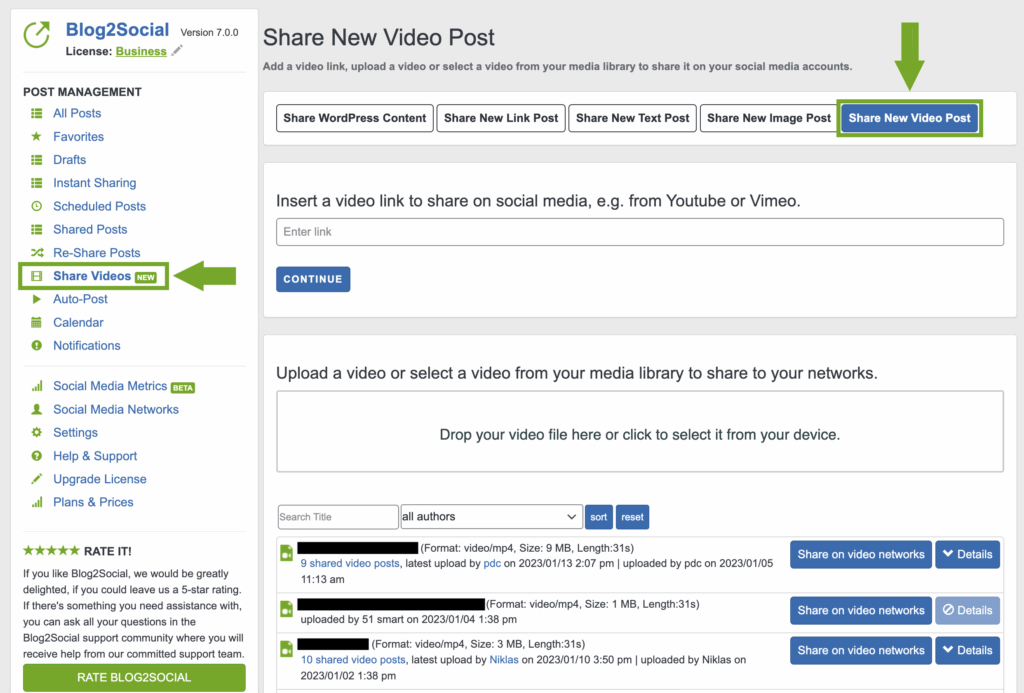
Sharing your video content across multiple social media platforms can be a hassle, especially when you have to do it manually. With Blog2Social, you can easily automate the process and publish your videos across all your social media accounts straight from your WordPress media library. Whether you want to share your videos on YouTube, Vimeo, Instagram, TikTok, Facebook, X (Twitter), Pinterest, Bluesky, Threads, Mastodon, or Discord, Blog2Social has got you covered.
The integrated video feature seamlessly integrates into your social media scheduling and sharing workflow. All you have to do is upload or select a video from your WordPress media library, add a compelling title and description with relevant keywords, and publish it across your chosen social media accounts with just a few clicks. Streamline your workflow and simplify your content sharing process, all in one place.
Blog2Social also imports your video title and description from the metadata in your media gallery and automatically adapts it to the format required by each platform. Plus, you can easily add or customize your title, description, and hashtags for each network individually to ensure your video content is optimized and ready to reach a wider audience.
Get your sneak peek!
Check out our quick tutorial on how to get started with the new video function. Find out how to connect your channels, upload your videos and send them out to your channels to go viral. Make sure to leave your feedback in the comment section and follow for more updates!
https://youtu.be/lfa1rE7uK8U
Learn more and start your free trial today!
Learn more about video-posting and sign up for a free 30-day video trial and experience all the premium features of Blog2Social (no automatic subscription). During your trial, you can upload up to 250 MB of video content per day, with a total limit of 2.5 GB. When you reach the limit, simply choose a premium license and unlock the video add-on.
Social media video content has become a crucial aspect of digital marketing and personal branding. Understanding the video sizes for each social media platform is essential to create content that looks its best and performs well on each platform. By optimizing your videos for each platform, you can increase your organic reach, drive engagement, and ultimately achieve your marketing goals. Remember to keep in mind the aspect ratios, resolutions, and video sizes for each platform, as well as the recommended video length and content type. With this knowledge, you can create high-quality video content that resonates with your audience and helps you stand out on social media.
Melanie Tamblé is co-founder and co-CEO of Adenion GmbH. She is an experienced expert in content marketing and social media. Adenion GmbH specializes in online services and tools for bloggers, businesses and agencies of any size to support their online marketing and content seeding tasks on the web.
Blog2Social as WordPress Plugin and WebApp enable fast and easy auto-posting, scheduling and cross-promotion of blog posts, articles, links, images, videos and documents across multiple social media sites. Social media posts will be automatically turned into a customized format for each social platform and auto-scheduled for the best time. Social media post can be previewed and tailored with individual post formats, images or personal comments – all in one easy step.
When is the best time to post to social media? The answer to this question might easily be considered the Holy Grail of social media knowledge. Good thing is we’re here to share that knowledge with you! So get ready to unlock the potential of perfect timing for your social media success.
Get the best times for your social media posts now!
Thank you!
Why is posting to social media at the best time so important?
Picture this: You worked hard to create a great post. Your copy is near perfect, your hook is a banger and your CTA is irresistible. It’s packed with highly relevant and impactful information for your audience. Excitedly, you post it, and… crickets. People barely engage with it and your post gets lost in the throes of the algorithm. It’s easily one of the most demotivating and disappointing things to happen, right? Right. This is why posting at the best time on social media can significantly impact the success of your posts (and your strategy overall). It should never be just a mere afterthought but a careful consideration and observation. A well-timed post has the potential to reach a larger audience and drive engagement. Many social media algorithms consider early engagement on a new post to decide whether or not it should be pushed to more people. Posting at just the right time ensures that your audience sees and interacts with your content. Early engagement then leads to the algorithms showing your post to even more people. This is why it’s crucial for you to know your target audience’s preferred social networks and the peak hours of their online activity. Getting them to see your content will not only drive engagement and promote your post. It will, ultimately, help you form meaningful connections with your audience, grow brand awareness and loyalty, and convert them from fans to clients.
What is the best time to post on social media?
As convenient as it would be to have a universal best time for all social platforms, the solution isn’t that simple. Each social media site caters to different audiences with different interests, preferences, and active hours. Therefore it’s best to look at each network individually to determine what posting time works best. However, the easiest way to find out what the best time to post on social media is to take a look at your account insights. Every social media network offers business and creator accounts the option of monitoring their engagement. That includes an overview of your audiences’ peak hours and most active days. So to get the best results, study your insights, experiment to see when you get the most engagement, and develop your own schedule. If you’re new to social media and are still growing your account, it’s difficult to determine the best times and the active hours of your audience. On most platforms, you need to hit a certain amount of followers before you get shown data on it. This is why the times below are a good starting point. Now let’s take a look at the best posting times on each network!
The best time to post on Facebook
The best time to post on Facebook is Mondays to Friday, 9 am to 11 am and 4 pm to 5 pm. Those are the hours with peak engagement. Facebook in numbers:
2.11 billion people use Facebook every day. This corresponds to almost 70% of their monthly active user base.
On average, users spend just under 31 minutes a day on Facebook.
The 25-34 age group is the largest on Facebook (30.8%), followed by 18-24 (22.1%) and 35-44 (20.4%). Together, they make up over 70% of Facebook users.
These numbers prove that Facebook provides an immense reach that – with a solid strategy – can boost brand awareness and visibility. With a variety of content formats, including text, images, videos/reels, stories, and live streams, Facebook allows for versatile marketing approaches to build and foster community engagement.
Tip: 1.8 billion people use Facebook groups each month. Consider engaging in a group or even building one up yourself for your community. It can help build a long-lasting relationship with your audience, grow trust, and thus drive revenue. Groups have their own insights helping you to determine when the best times and days are to post.
The best time to post on Instagram
The best time to post on Instagram is Monday to Thursday from 10 am to 2 pm and on Friday from 11 am to 12 pm. Instagram in numbers:
The largest age group on Instagram is 18-24 (31.3%), followed by 25-34 (31.0%). In contrast, the 35-44 age group is only represented around half as often.
The key to success on Instagram is understanding how its algorithm works. Posting at the right time is only one aspect that you need to consider. But don’t worry! Our blog post about the Instagram algorithm will help you set up your strategy and grow your account easily!
Tip: Posting consistently will help your growth. Instagram offers a great variety of content types to engage with your community and draw in more people. But how often should you post these different post types? Here’s a quick overview:
Stories: 2-8 per day
Reels: 1-3 per week
Carousels: 1-2 per week
Single post: 3-5 per week
Like the best posting times, these numbers are relative. Find a schedule that works for you and always keep in mind: quality before quantity! It’s better to post one or two high-quality pieces of content per week than to post inconsistently or a lot of irrelevant information.
The best time to post on Threads
The best time to post on Threads is Tuesday to Thursday from 8 am to 12 pm and Sunday from 7 pm to 9 pm. Threads in numbers:
Threads is predominantly used by men (68%) and 32% by women, based on the Instagram accounts through which users can create a Threads account.
Text posts on Threads can be up to 500 characters long and videos can be up to 5 minutes long.
Threads is a social media platform from Meta that serves as a text-based complement to Instagram. Users with an Instagram account can use Threads and create posts, called “threads,” that contain text, images or videos. The app enables discussions in real time, similar to X (formerly Twitter).
The best time to post on LinkedIn
The best time to post on LinkedIn is Tuesdays through Thursdays from 9 am to 12 pm. Considering that LinkedIn is a business network, the worst days to post are the weekends. So be sure to share your content during weekdays at the peak times. LinkedIn in numbers:
The largest user base of LinkedIn (60%) is between 25 and 34 years old. Another 20% are between 18 and 24 years old and almost 18% are between 35 and 54.
LinkedIn is perfect for business networking, lead generation and industry-specific insights. With its focus on B2B marketing, you can easily reach business professionals, decision-makers and key stakeholders by sharing your expertise and driving engagement with thought leadership. This helps you build trust and credibility.
The best time to post on Pinterest
The best time to post on Pinterest is Sunday to Tuesday between 11 am and 2 pm and from 7 pm to 10 pm. Pinterest in numbers:
Pinterest is a search engine for images and an idea catalog that people often use as a scrapbook (Pinterest boards) to collect inspiring, creative, or helpful content. Therefore, it is the ideal social network for businesses and brands to inspire and engage their audience visually. Through visual storytelling, DIY projects, How-To guides, and lifestyle content you can connect with your audience on a personal level. You can easily use Pinterest to turn inspiration into action and drive engagement.
Tip: Pinterest’s image and video sizes are unique to the social media landscape. Check out our cheat sheet for the different social media image sizes to create the perfect pins for your boards!
The best time to post on Twitter (now X)
The best time to post on Twitter (now X) is Tuesdays through Thursdays from 9 am to 2 pm. Twitter/X in numbers:
Despite recent changes, Twitter/X remains a social network predominantly for short messaging. Due to its dynamic nature, Twitter/X is perfect for quick, concise communication, such as sharing updates, promotions, and otherwise engaging and informative content. Hashtags as well as trending topics help with discoverability and staying up-to-date with niche-specific content. Twitter/X is about real-time engagement and participation which allows you to stay close to your audience and communicate with them immediately. This in turn grows your relationship with them, effectively building your community.
The best time to post on TikTok
The best time to post on TikTok is Wednesday to Thursday from 9 am to 10 am, as well as Tuesday to Friday from 4 pm to 5 pm. TikTok in numbers:
On average, users spend 34 hours per month on TikTok. This makes TikTok the social media app on which users spend the most time.
The largest age group on TikTok is 25-34 (36.1%), closely followed by 18-24 year olds (33.3%).
TikTok has taken the social media world by storm and only keeps gaining traction. With the right strategy, you can easily market to a younger demographic by showcasing products, services, and brand personality with the diverse and creative editing option TikTok offers. Engage, interact with, and reach a wider audience by using the duet and stitch features, participate in popular TikTok challenges, and make use of the template and music integration to craft compelling videos.
The best time to post on YouTube
The best time to post on YouTube is Monday to Friday from 9 pm to 11 pm, and on Saturday to Sunday from 2 pm to 5 pm. YouTube in numbers:
On average, users spend 28 hours and 5 minutes per month on YouTube. In terms of usage time, YouTube is therefore used the second longest per month. Only on TikTok do users spend more time.
The 25-34 age group is the most active on YouTube with a share of 21.5%. This is closely followed by 35 to 44-year-olds with 17.90%, followed by 18 to 24-year-olds, who make up 15.70% of YouTube users.
YouTube is not only one of the most popular social media networks. It’s also the second most popular search engine after Google. The platform acts as a media library, which means that videos remain relevant and visible months and even years after their upload. YouTube’s versatility allows different types of content to thrive. Connect with your audience with videos with immersive storytelling experiences, guide them with tutorials, or introduce them to a new addition in your portfolio with a product showcase, to name a few ideas.
Tip: YouTube takes 2-3 hours to index your video after you’ve uploaded it. Only then will it be suggested to watchers and appear in searches. So upload your video a few hours before peak active hours on YouTube to ensure that your audience sees it.
The best time to post on Telegram
The best time to post on Telegram is Monday to Friday from 1 pm to 4 pm and from 6 pm to 10 pm. Telegram in numbers:
With features like encrypted messaging, large group capacities, and multimedia sharing, Telegram offers a secure and engaging environment for connecting with your audience. Creating and promoting your own channels allows you to get in direct contact with your audience, thus building a dedicated community and growing brand loyalty. Telegram’s file-sharing capabilities make it a great tool for sharing your content. Customizable bots help you to streamline your customer service and engagement strategies.
The best time to post on Reddit
The best time to post on Reddit is Monday to Friday from 7 pm to 9 pm and on Saturday to Sunday from 2 pm to 4 pm. Reddit in numbers:
Reddit is used more frequently by men (63.6%) than by women (35.1%).
Most of the traffic on Reddit comes from the USA (48.3%).
Users on Reddit participate in various niche communities (subreddits) which provides you with the unique chance to tap into specific demographics and interests. Up- and downvotes by users determine which content is shown at the top. This allows you to conduct informal market research while engaging with your audience at the same time. Participating in discussions and building a community on Reddit can help you establish credibility and trust, share your expertise, and create a genuine connection with your audience. Its user-driven nature makes it a great network for user-generated content as well.
The best time to post on Google Business Profile
The best time to post on Google Business Profile is Thursday to Sunday from 9 am to 11 am. Google Business Profile in numbers:
Users are 2.7 times more likely to believe your business is reliable when your Google Business Profile is complete.
A Google Business profile with photos achieves on average 35% more clicks on links that lead to the company website.
87% of people use Google to search for local businesses.
Google is the most visited website worldwide. Having an optimized business profile ensures that people searching for your business online will find all the information they need. More importantly, it helps display your business prominently in the SERPs. Inform users about essential details such as business hours, contact information, reviews, and images. Moreover, share news from your website, update offers, or invite visitors to events. A Google Business Profile helps users find your business quickly and easily while supplying them with enough information to follow up on their inquiries.
Is there a tool that can help me manage and schedule posts at the best times?
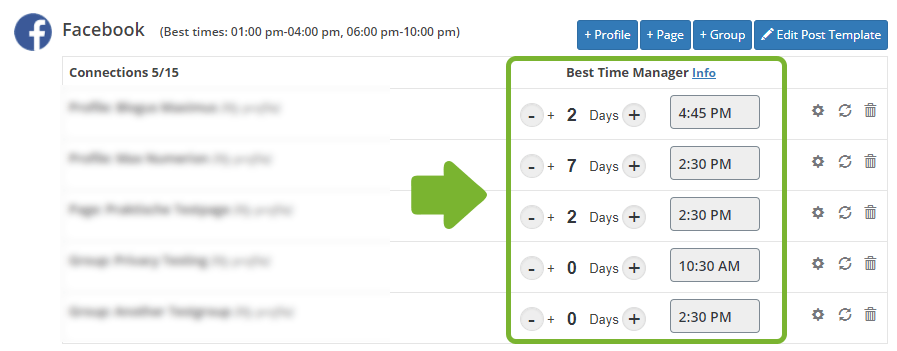
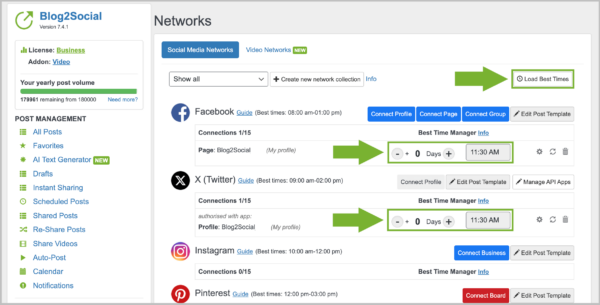
With the variety of best times to post on social media, it can become tricky to keep track of it all. Even with cheat sheets and reminders you still need to pull up the file or document, double check and put it on for every single network you want to share content on. Tedious, isn’t it? Blog2Social’s Best Time Manager can take this painstaking task off your hands and save you not only time but nerves as well. This feature comes pre-programmed with the best times for each social media network. It allows you to schedule your posts for just the right moment with just a few clicks. Better yet: you can edit and save any other times convenient for your audience in the manager to automatically apply for your posts. Why deal with the hassle of manual settings when you can save so much time and energy with Blog2Social?
Wrapping up
On social media, you’re always in competition with others who want your audience’s attention. This makes it all the more important to stand out to stop the user’s scroll and to make them engage with your posts. But it’s not just your content that matters. Timing is another important aspect you have to consider when you want to grow on social media. You can only start growing relationships with your audience when they see you. So posting when they are online is a crucial step toward more awareness, reach, and visibility. Social media automation tools like Blog2Social can help you manage your best times to post on social media. This way, you can save them in one place and simply schedule all your posts for the right time with a single click. Save time and resources by managing your social media schedule in one spot. Keep in mind that fluctuations are normal and that sometimes a post shared at the right time might not get the response you hoped for. Don’t be discouraged by that! Continue sharing high-quality content, engage with your community, keep a close watch on your metrics, and always stay up to date with new developments, and your social media marketing efforts will pay off.
Managing social media used to feel like a full-time job. Between scheduling posts, responding to comments, and tracking performance, it was a lot to juggle. But that’s no longer the case with new technology.
Social media automation is a time saver for marketers or brands managing multiple social media accounts. It helps streamline repetitive tasks like posting content, curating articles, or generating reports so you can focus on strategy, creativity, and real conversations.
In 2025 and beyond, managing social media is all about working smarter, not harder. Here are the key ways social media automation can help your B2B business grow, stay consistent, and keep up with the pace of digital marketing today.
What is Social Media Automation?
Social media automation means using tools to handle the repetitive, time-consuming parts of managing your social media presence. This automation is widely and commonly used for scheduling posts, responding to common messages, tracking analytics, or curating content.
Instead of manually posting every update or checking each platform daily, automation lets your team focus on strategy and creativity while the tools handle the grunt work. B2B businesses can stay active and consistent on platforms without having to log in every few hours.
The goal of using social media automation isn’t to “set it and forget it” but to free up your time so you can engage more meaningfully when it matters. There are more key benefits; here are some we can share:
Time Savings: Streamline repetitive tasks like posting and scheduling.
Consistency: Maintain regular posting even during off-hours.
Improved Analytics: Track engagement and ROI efficiently.
Lead Nurturing: Automate follow-ups and content delivery.
Scalability: Manage more platforms without scaling up the team.
Use Cases for B2B Businesses
Managing social media for a B2B company can feel overwhelming, especially when you manage multiple platforms across time zones and audience segments. Here are essential cases of social media automation that are used by B2B businesses.
#1. Scheduling thought leadership posts.
Thought leadership is one of the most effective ways for B2B companies to build credibility by showcasing and demonstrating expertise. However, consistently sharing insightful content takes time and effort.
With scheduling tools, your marketing team can batch-create posts weeks ahead and schedule them to go live when your audience is most active. This helps maintain a steady flow of valuable content without the pressure of daily posting.
For example, Blog2Social enables you to plan and customize posts across multiple social networks in advance. It allows you to repurpose blog content into various formats and schedule posts at optimal times, ensuring a consistent and engaging presence.
You can mix it up, too: industry insights, explainer videos, repurposed blog snippets, or behind-the-scenes updates from your team. Thought leadership only works if it’s seen, and scheduling ensures that it happens regularly.
#2. Automating responses to FAQs or comments via AI chatbots.
Customer questions don’t always come in during office hours, and even when they do, your team might not have the bandwidth to reply to each one right away. That’s where automated responses and AI chatbots can step in to lighten the load.
Imagine someone asking on your LinkedIn page, “How do I request a demo?” or “Do you offer enterprise pricing?” With automation, you can program smart replies or trigger a chatbot that guides them to the right answer instantly.
These bots can be trained to handle common questions, direct users to resources, and even collect lead information for your to follow up later by your sales team. Reliable interaction helps you meet potential clients where they are without keeping them waiting.
#3. Retargeting cold leads through automated campaign sequences.
Not every lead you generate is ready to talk sales right away. Some just aren’t in the buying stage yet—they need time, information, and reminders.
Rather than letting those leads go cold, you can use automation to bring them back into the conversation through a carefully designed retargeting sequence.
After a lead downloads your content or attends a webinar, they might enter an automated campaign that sends a series of follow-up touchpoints over a few weeks. This could include educational posts, success stories from similar clients, product tips, or an invitation to a live Q&A.
You can do this across channels—email, LinkedIn, or even retargeted ads—without manually sending anything. The goal is to warm up those leads gradually and help them move closer to a buying decision at their own pace.
#4. Monitoring mentions and keywords in your industry.
Staying informed about what people are saying—about your brand, competitors, or key industry trends—used to require manual searching or endless scrolling. Now, automation makes this process way more efficient.
You can automatically track mentions of your company name, product, or specific keywords relevant to your niche. That means you’ll get notified when someone talks about you (good or bad), asks questions about your space, or starts a conversation you should probably be part of.
This kind of listening is incredibly valuable. You can jump in to answer questions, offer insights, or spot potential partnerships or sales opportunities before your competitors do. Plus, it gives you a clearer sense of how your brand is perceived.
#5. Onboarding and educating new leads with an automated content series.
Let’s say someone just signed up for a free trial or downloaded your lead magnet—what happens next? If you’re relying on a manual follow-up process, odds are they’re not getting the consistent, helpful experience they should.
You can set up a sequence that automatically guides new leads through a tailored onboarding journey. It might start with a welcome message, followed by a few emails or social posts introducing key features, success stories, or quick tips.
Where the sales cycle is often longer and more complex, this kind of nurturing builds trust and keeps your brand top-of-mind. Once it’s set up, it runs in the background, consistently educating and moving leads down the funnel without adding work to your team’s plate.
Takeaway
Social media automation tools help your B2B business do things smarter and more effectively. Beyond the day-to-day time savings, automation is reshaping how B2B companies understand and interact with their audiences.
Tools now offer predictive analytics, allowing you to anticipate engagement trends, optimize content formats, and fine-tune campaigns before they even launch. Finally, automation opens the door to personalization at scale—no more generic messages.
This kind of relevance turns a cold prospect into a warm lead—and a one-time buyer into a long-term client. When used well, it’s a strategic layer that can sharpen your marketing, deepen your relationships, and create space for your team to focus on what humans do best.
Andre Oentoro is the founder of Breadnbeyond, an award-winning explainer video company. He helps businesses increase conversion rates, close more sales, and get positive ROI from explainer videos (in that order).
Social media management can be done from home, and that has many benefits. That is why many businesses now prefer remote social media teams over in-premise teams. It is more effective and offers more flexibility. However, some are still doubting if this approach is for them. That is because they are not sure how to manage a remote social media team successfully.
If you are one of these people, this article is for you. Here are some tips and pointers.
Embrace Flexible Schedules for your Team
The typical work hours are from 9:00 am to 5:00 pm. However, sometimes, the best times to post on social media are not within that period. While you can schedule posts, you can’t schedule replies. This is where remote social media teams shine. They are not bound by strict office hours. Their schedules can be more flexible. As such, they can work during the hours when your target audience is active.
That said, one of the first steps in managing remote social media teams is knowing the right timing for posts. Then, give the team members flexible work hours so they can work during these hours and rest when your audience is inactive.
Use Collaboration Tools
One of the challenges in remote work is how to get everyone on the same page. You can do that using collaboration tools. There are many options in the market that allow users to work on the same file simultaneously. For example, Canva allows multiple users to design together. Then, the team can use Google Sheets to create a social media calendar that details when to post the images and the captions that should go with them.
A Social Calendar makes managing a Remote Social Media Team easier
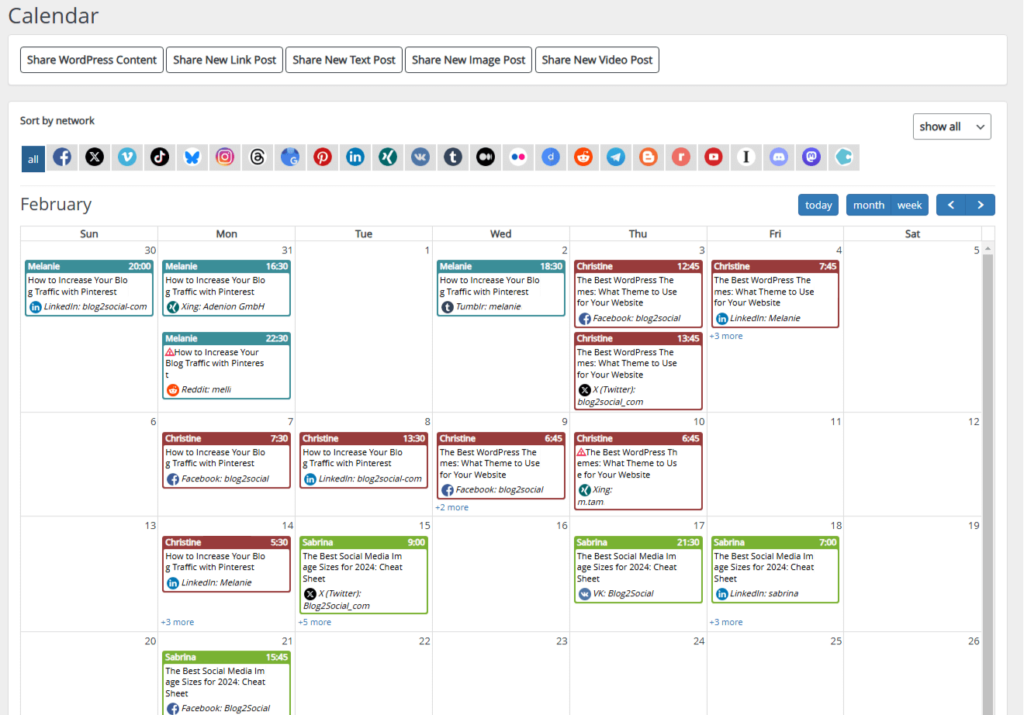
In addition to these basic tools, there are also specialized social media management tools that come with built-in social media calendars. These platforms allow teams to plan, schedule, and collaborate on social media content all in one place. With these tools, you can visualize your entire content plan, drag and drop posts into scheduled slots, and ensure consistency across your social media channels. They also provide analytics and reporting features, helping teams track performance and adjust strategies on the fly. This way, not only are you streamlining your content creation, but you’re also staying organized and proactive in managing your social media presence.
Integrate Optimal Tools
There are many social media platforms. There’s Facebook, Instagram, X – formerly Twitter, TikTok, YouTube, and more. If a team member has to create posts for each platform manually, the task will take a long time to complete. Luckily, there are tools that allow you to schedule posts on different platforms.
Blog2Social is a WordPress plugin that allows you to share posts or blogs from your website to over 20 platforms. It offers automation, reducing the tasks that your remote team members need to do. It will allow them to focus on tasks like outreach or replying to your followers’ comments and messages.
Blog2Social also allows you to edit permissions for users, groups, and pages. This helps keep things organized.
Communicate
For a Remote Social Media Team, utilizing communication tools like Slack is essential for maintaining smooth operations. These platforms allow you to keep every team member informed in real-time, making it easy to assign tasks, receive progress updates, and share important information. With Slack, you can organize conversations into channels specific to projects or teams, which helps ensure that tasks are clearly defined and no one duplicates work that’s already been completed. This structure significantly enhances team efficiency and reduces confusion, which is crucial for remote teams that might be working across different time zones.
Moreover, communication tools facilitate quick problem resolution. If a team member encounters an obstacle, they can immediately reach out to the relevant channel. Fellow team members can provide solutions, suggestions, or workarounds, enabling the team to overcome roadblocks swiftly. Especially where time-sensitive tasks are common, these tools help keep everyone aligned, ensuring that progress continues without unnecessary delays.
Recruit Self-Motivated Marketers
Employers are afraid of remote workers stealing their time. What if the social media team members are doing unrelated tasks during their work hours? What if they aren’t working at all but report that they do? This will cause financial losses for the business and will stunt the growth of the social media channels.
Please know that not all remote workers are like that. Many are trustworthy professionals. So, you should check the background of every candidate when building the social media team. Choose self-motivated candidates. Also, choose ones that already have experience in remote work and have a good reputation.
If you want, you can also require them to use monitoring tools. Look for tools that take screenshots at random times or record keyboard presses and clicks. This will help you ensure that when they are clocked in, they are working on tasks that are beneficial to your social media channels.
Encourage the Use of a VPN
Remote workers are in different places. Many will be at home, while others may be in coffee shops and other workspaces. Home networks can be secure if the homeowners know about cybersecurity. On the other hand, public networks are never secure. This puts your data at risk.
You should protect your data by encouraging the use of a VPN. It encrypts the team member’s connection, preventing cybercriminals from intercepting their data.
Besides that, a VPN can allow a team member from abroad to access a platform that was banned in their country.
If you are looking for a VPN service to recommend, check out Proton VPN. The cybersecurity experts at VPNPro have written a Proton VPN review to inform you about its features, pros, cons, and reliability.
Also, consider cybersecurity training for your remote social media team. It will keep them on top of the new methods of cyberattacks and scams. This is essential in preventing data leaks and account hijacking.
Improve Teamwork
Teamwork makes the dream work. That saying would not be popular if it is not true. Achieving goals is easier if all the members are working together to reach a common goal.
Team members should feel together even if they are not physically in the same place. By improving teamwork and camaraderie, you can improve productivity, efficiency, and performance. You can dedicate time to virtual coffee breaks or play some games. By spending time on enjoyable, non-work tasks, you can improve the bonds between the remote social media team members.
Conclusion
How to manage a remote social media team successfully? First, you should embrace the characteristics of remote work. You should allow team members to work with flexible schedules so that they can work during hours when your target audience is active. On top of that, you need to use tools like collaboration tools and automation tools like Blog2Social. It helps improve efficiency and productivity.
Teamwork is also essential to the success of your campaigns. You should build it through extra activities like virtual coffee sessions or even get-togethers if it is possible.
Managing multiple social media accounts can be time-consuming and complex—especially when you regularly publish content on your website and want to increase your reach efficiently. This is where social media management tools help you manage, organize, and optimize your workflows. They allow you to plan, automate, and coordinate posts across all platforms from one central dashboard.
For WordPress users, the most efficient solution is a socialmedia management plugin, because it integrates scheduling, auto-posting, templates, AI assistance, and media workflows directly into the WordPress dashboard. This eliminates tool switching and helps you maintain a clear, organized publishing system.
In this guide, you’ll learn how social media management tools work, which features matter most, and how WordPress plugins streamline your entire content promotion process.
Quick Summary
Social media management tools help WordPress users centralize, organize, schedule, and automate posts across multiple networks directly from the WordPress dashboard. They simplify workflows, ensure consistent publishing, optimize posting times, and increase reach with automation features such as scheduling, auto-posting, and re-sharing.
Social media management tools are platforms that help you plan, organize, coordinate, and automate your social media activities. Instead of posting manually on each network, you can:
Create and schedule posts in advance
Manage multiple accounts from a single dashboard
Maintain consistent publishing across channels
Optimize posting times for higher reach
Re-share evergreen content automatically
Collaborate with team members
Keep a clear overview of your strategy and workflows
This centralization not only saves time but also makes your social media management more structured and effective.
What Are WordPress Social Media Management Plugins?
Social media management tools also exist as powerful WordPress plugins, allowing you to manage your social media workflows directly inside your WordPress dashboard. With a WordPress social media plugin you can:
Create and publish social media posts from the WordPress dashboard
Maintain a consistent online presence without switching platforms
Modern plugins include advanced features such as intuitive content creation, smart scheduling, drag-and-drop calendars, auto-posting for new blog posts, evergreen re-sharing, templates, native image and video workflows, and AI-assisted text generation.
Many tools now also support emerging networks and formats such as Bluesky, HumHub, TikTok videos and slideshows, and Facebook Stories, helping you keep your social media workflows up to date directly from WordPress.
Why Social Media Management Tools Benefit WordPress Users
Using a social media management tool that integrates with WordPress improves your organization, saves time, and centralizes your entire content workflow. You can:
Plan and manage all posts from your WordPress dashboard
Publish blog posts directly to your social media channels
Coordinate schedules and campaigns with a unified calendar
Automate recurring tasks such as re-sharing evergreen content
Maintain a real-time overview of your social media activities
Ensure consistency across platforms with templates and AI support
In short, you gain full control over your social media workflows—from planning and creation to publishing and optimization—without leaving WordPress.
Key Features of Social Media Management Tools
Social Media Management tools and plugins offer various features for social media automation. Let’s take a look at the most important features to streamline, organize, and optimize your social media management within WordPress.
1. Manage All Social Media Accounts from Your WordPress Dashboard
Control scheduling and re-sharing from a single interface
Maintain a clear overview of your activity and content pipeline
This simplifies daily administration and reduces the time you spend switching between different tools and platforms.
Example: WordPress social media plugin with an overview of all available and connected social platforms
2. Unified Workflow for Texts, Images & Videos
A good social media management tool offers a unified workflow for creating and customizing content for each platform:
Edit and adapt text, images, and videos for all platforms in one step
Adjust formats and aspect ratios for different networks
Maintain consistent branding across all channels
Collaborate efficiently with team members
Many tools support vertical formats such as Stories and TikTok videos and slideshows, making it easier to repurpose and organize your visual content across channels.
Example: social media management plugin for creating text posts, link posts, image, and video posts in one single place
3. Social Media Calendar for Planning & Organization of your posts in WordPress
A visual social media calendar within WordPress helps you to:
Coordinate campaigns and launches
Organize your editorial planning across networks
Use drag-and-drop to move posts to new dates
Ensure a balanced and consistent posting rhythm
This improves your organizational overview and makes it easier to adapt your strategy in real time.
Example: Editorial calendar for content scheduling and auto-posting
4. Smart Scheduling to Automate Publishing Times
Scheduling features allow you to plan your content days, weeks, or even months in advance. You can:
Generate platform-specific captions and descriptions
Suggest hashtags and emojis
Create alternative text versions for testing and personalization
Adapt posts to different tones and audiences
Combined with templates and scheduling, AI support can significantly accelerate your content creation process without sacrificing quality or consistency.
Social Media Tools vs. WordPress Plugins
Both standalone social media tools and WordPress plugins can support your social media organization and automation. The following comparison gives you a quick overview.
Feature
External Tools
WordPress Plugins
Workflow
Requires switching between CMS and tool
Fully integrated into the WordPress dashboard
Content Access
Posts and media must be imported manually
Direct access to posts, pages, and media library
Organization
Separated from editorial planning
Part of your existing editorial workflows
Automation
Automation depends on integrations
Optimized for blog publishing and auto-posting
Learning Curve
New interface and process to learn
Familiar WordPress environment
Costs
Often higher subscription costs
Flexible licensing models for WordPress users
For many bloggers, agencies, and businesses that already work heavily in WordPress, a dedicated plugin is often the more efficient and integrated solution.
How to Choose the Right Social Media Management Tool
When selecting a social media management or automation tool for your WordPress site, consider the following aspects:
Core features: Do you need scheduling, auto-posting, re-sharing, AI assistance, team roles, analytics, or all of the above?
Supported networks: Does the tool support all platforms that are relevant for your business?
Ease of use: Is the interface intuitive, and can your team adopt it quickly?
Integration with WordPress: Can you control everything from your WordPress dashboard?
Pricing and scalability: Does the pricing fit your current needs and future growth?
A social media management plugin for WordPress allows you to manage and automate nearly all aspects of your social media workflows directly where your content lives. With the right social media plugin, you can:
Share blog posts and pages across multiple networks in one go
Customize posts per platform with dedicated captions, images, and hashtags
Plan campaigns with a visual social media calendar
Coordinate your team with roles and approval workflows
Reuse evergreen content with automated re-sharing
Leverage AI to create and optimize social media texts
Schedule and post videos, Stories, and modern formats like Reels or Shorts
In practice, this turns WordPress into a full social media control center for your website or blog.
Checklist: How to Select the Best Social Media Management Tool for Your WordPress Website
Checklist: Social Media Management for WordPress
Use this checklist to evaluate whether a social media automation tool is a good fit for your WordPress website:
✓WordPress integration: Can you control your social media workflows directly from the WordPress dashboard?
✓Supported networks: Does the tool connect to all social platforms that matter for your audience?
✓Scheduling & auto-posting: Can you schedule posts in advance and automatically share new blog articles?
✓Evergreen re-sharing: Is there a way to reuse and re-share your best-performing content on a regular basis?
✓Templates & AI assistance: Does the tool offer templates and AI support to speed up content creation while keeping your brand voice consistent?
✓Media workflows: Can you easily manage images and videos, including modern formats such as Stories, Reels, or Shorts?
✓Team management: Are roles, approvals, and collaboration features available if you work in a team or agency?
✓Analytics & reporting: Can you track performance and optimize your content strategy based on data?
✓Pricing & scalability: Does the pricing model fit your budget and can it grow with your website and team?
✓Support & resources: Are there tutorials, documentation, and responsive support if you need help?
Conclusion
Social media management tools help you streamline, organize, and optimize your social media activities—especially when they are integrated directly into your WordPress workflows. By centralizing content planning, scheduling, publishing, re-sharing, and AI-assisted optimization, you can significantly improve your efficiency and boost your online visibility.
Whether you are a blogger, agency, entrepreneur, or business owner, using a structured social media management system saves time, ensures consistency, and strengthens your brand presence across all major platforms. With the right WordPress social media plugin, your website becomes the central hub for your entire social media strategy.
E-commerce Social media is the key to attracting customers to the store!
Did you know that around 43% of people use their preferred social media platforms to research brands? It serves as an excellent opportunity for online businesses to generate traction and engage the intended audience.
However, having an active presence on all leading social media platforms may be overwhelming. So, you should identify the ones preferred by your target audience and start sharing useful information through them. It may be difficult for you to generate the desired level of traction from your efforts when getting started.That’s why we have come up with a process that will help you ensure success on relevant social media platforms.
So, without further ado, let’s start.
Significance of Having a Social Media Presence
If you own an e-commerce platform, you should consider being active on relevant social media platforms.
Social media has over 5.04 billion users worldwide. So, sharing personalized content through the channels that resonate with the audience segments you target may help you create a buzz around your brand.
It helps you effortlessly promote your products or services to the intended audience and convey your message to the masses.
Social media helps you engage your audience organically or through paid advertising campaigns.
Social media paves the way for you to ensure consistent growth as you can drive relevant traffic to your website.
Furthermore, you can establish a strong bond with your customers by catering to their feedback and offering them an enhanced experience.
How to Set e-commerce Social Media Up for Success
Achieving success on social media and getting the desired results from your efforts may not be as easy as it sounds, especially when you have just gotten started.
The following steps will help maximize your efficiency and enable you to engage your target audience through relevant social media platforms.
Identify Relevant Platforms
Having an active presence on all leading social media platforms may be enticing. You may think that you will be able to convey your message through more channels, thus amplifying your reach.
However, managing multiple social media accounts may end up overwhelming you as you have to consistently share useful information and interact with your audience through all active platforms.
A better strategy here would be to identify the channels that resonate with your niche and with your target audience’s preferences.
For example, as an e-commerce business, staying active on Facebook, Instagram, TikTok, and YouTube would be more fitting than platforms like LinkedIn.
You need to see which platform helps you engage your audience and takes you a step closer to achieving your goals.
Damian Grabarczyk, the co-founder and growth marketer of PetLab Co., says, “Early on, we realized that trying to maintain a presence on every social media platform was spreading ourselves too thin and diluting our message. The real challenge was identifying which platforms aligned with our audience’s habits. For us, Instagram and TikTok were where pet owners actively sought tips, advice, and content about pet care. By honing in on these platforms and collaborating with veterinary doctors and trainers, we were able to focus our resources on creating highly relevant content. This targeted approach helped us grow to over a million followers and establish Instagram and TikTok as primary drivers of our business growth, building a loyal community that consistently returns for more.”
Optimize Your Profiles
Once you have identified relevant social media platforms, the next step is setting up your page or creating a profile.
You have to optimize your page by adding all necessary details to it, such as your website’s URL, a brief description of the solutions you offer, working hours, and address if you have a physical presence.
You can also leverage relevant hashtags to improve your page’s discoverability and make it easier for your target audience to find you.
Stay-Tuned with the Latest Trends
Social media helps you access useful insights that you can use to uncover new growth opportunities and scale your business.
You can keep an eye on your competitors’ strategies and explore the latest trends in your respective industry.
This data enables you to identify the market gap and detect the change in demand representing the intended audience segment.
As a result, you can come up with new products that are capable of helping you generate more revenue.
Furthermore, you learn from the mistakes your competitors made and devise strategies that can amplify your performance.
Design a Social Media Content Calendar
By creating quality content, you can generate traction online and cultivate engagement through relevant social media platforms.
It streamlines the process of content creation and delivery, making it easier for you to convey your message to the right people.
Share Relevant Information
You must ensure that the information you share through social media platforms resonates with the needs and interests of your target audience.
Around 27% of social media marketers say that sharing engaging content is one of the biggest challenges they encounter.
So, if you want to engage your target audience through social media, sharing personalized content is the key to success.
Keeping an eye on the new trends in your respective industry helps you identify relevant topics. Plus, exploring the concerns and queries of your target audience also helps.
Furthermore, you need to ensure that the content you share isn’t always promotional. You should also focus on educating your audience and helping them seek answers to their questions.
With Blog2Social, you can automate social media content sharing and manage all your accounts from a single screen if WordPress powers your e-commerce platform.
Use Visual Content
Leveraging visual content is one of the most effective ways to engage your target audience through social media.
Be it images, videos, or infographics, visual content makes it easier for people to make sense of the information shared with them and understand complex concepts.
So, it’s a no-brainer that leveraging visual content will help you get the desired results from your social media marketing efforts.
Leverage User-Generated Content
People are often reluctant when it comes to trusting unfamiliar brands. They may hesitate to purchase your products if it’s their first time buying something from you.
So, you should leverage social proof and showcase the positive experiences of your happy customers.
People rely on the reviews and recommendations of others when buying things online because they want to make a safe purchase.
Hence, sharing the reviews and testimonials of your customers may help you generate more traction through social media.
Build a Community
To achieve success on social media, just creating a page and sharing meaningful content won’t be enough. You should focus on building a community.
The best way to do this is by interacting with your target audience and ensuring two-way communication.
Whether they comment on your posts or share their feedback with you, you should always thank them and respond to their comments.
Furthermore, you should also consider creating groups on relevant social media platforms, enabling your current and potential customers to interact with one another.
It will give your audience a sense of community, as they will be able to share their experiences and discuss relevant topics.
It will also enable you to cultivate a deeper bond with your target audience and become a relatable brand to them.
Consider Influencer Partnerships
Since people seek recommendations from others when purchasing products online, collaborating with influencers may help you achieve success on social media.
Influencers are like role models to their followers. So, it goes without saying that their recommendations outweigh commoners.
Partnering with influencers who believe in your values may prove to be an efficient strategy to foster engagement and drive more referral traffic through social media.
You may either ask them to promote your products or review them. Either way, it will amplify your reach and enable you to cast a wider net.
If you need help with getting in touch with them, or phrasing your offer, you can always take a look at some influencer outreach email templates. These will help you get the idea of how to best communicate your proposal. Also, consider using a referral tracking tool to monitor and analyze the effectiveness of influencer-driven referrals, ensuring optimized campaigns.
Leverage Paid Advertising
Growing your social media presence and engaging your target audience organically through relevant platforms may take some time.
You may have to consistently share useful information and be patient to see your efforts leading you to the desired results.
There’s no such thing as an overnight success, especially when you are looking to boost your revenue and score more sales through social media.
However, you can give your performance a little boost by leveraging paid advertising. It amplifies your reach and makes it easier for you to engage your target audience quickly compared to organic tactics.
Track Your Performance
It’s essential to track your performance on social media in order to grow consistently and achieve your set goals.
The algorithms of social media platforms keep changing over time. If a particular strategy gave you optimal results in the past, the change in platforms’ dynamics may eventually reduce its effectiveness.
Hence, it’s important to keep an eye on your key performance indicators and see if your deployed strategies are working or not.
It helps you identify the room for improvement and make the necessary refinements to your social media strategies.
Wrap Up
In this article, we shared a process that enables you to ensure success on social media as an e-commerce platform.
An active presence on relevant social media platforms is essential to generate brand awareness and fuel your conversions.
You can convey your message to the masses and engage the intended audience by sharing personalized content.
The process discussed in this article will help you how to do so and get optimal results from your initiatives.
Syed Balkhi is the founder of WPBeginner, the largest free WordPress resource site.
With over 10 years of experience, he’s the leading WordPress expert in the industry. You can learn more about Syed and his portfolio of companies by following him on his social media networks.
A solid plan for social media content is essential for building a purposeful and sustainable presence on social media platforms. But how can content be planned effectively and efficiently? In this article, we’ll show you how small or medium-sized businesses, freelancers, and hobby bloggers can benefit from smart planning and the right tools.
Why is Social Media Content Planning so important?
Social media content planning has evolved far beyond simply posting spontaneously. Strategic planning is the cornerstone of content marketing and the key to a successful social media presence – whether you’re communicating for a brand, a business, or yourself.
The biggest challenge lies in consistently producing high-quality content that resonates with your target audience. It’s not enough to be active occasionally; posts need to be published at the right times, align with your marketing goals, and capable of standing out amidst the daily flood of content. Thoughtful content planning enables you to communicate with your audience consistently, strategically, and effectively, allowing you to focus on the quality and creativity of your content.
Additionally, effective planning ensures greater efficiency by optimizing your use of resources. This is where tools come into play, helping you with idea generation, organization, and the automated posting of your content. Ultimately, this saves you time and allows you to concentrate on what truly matters: creating a strong identity for yourself or your brand and delivering value to your (potential) followers.
The Benefits of Social Media Content Planning at a Glance
Consistency: Regular content strengthens community engagement and boosts brand recognition.
Relevance: Posts are timed for maximum impact and tailored to your audience’s interests.
Efficiency: A clear plan streamlines your efforts, saving time and enabling focused work.
What You Need to Know to Create a Social Media Content Plan
1. Set Clear Goals
Clear goal-setting is the foundation of a well-thought-out social media strategy and content plan. By defining specific, realistic, and measurable marketing goals – or revisiting those of your company – you can align your content systematically with the growth of your account and the achievement of these objectives.
Potential marketing goals include:
Increasing brand awareness
Building an active community
Positioning yourself as an expert
Driving website traffic and conversions
Promoting customer loyalty and engagement
These goals will shape the content of your social media plan (see point 2).
2. Define Content Categories
From your overarching marketing goals, you can derive content categories that provide genuine value to your customers and leads while strengthening your account over time.
Examples of Content Categories:
Tips & Tricks
Tutorials
Inspirations
Lists
Problem-solving content
Products in real-life use
Best practices
Employee spotlights
Behind the scenes / Making-of
Data, stats, and facts
Seasonal content
FAQs
Community posts
Industry news
Polls / Ask Me Anything
Memes
Quotes and excerpts
Curated content
3. Develop Content Series
The categories from Point 2 can also be used to create engaging content series. Give these series unique names or playful titles like “Throwback Thursday” or “Monday Motivation” to make them memorable. Content series not only help you maintain a consistent posting rhythm but also encourage your audience to return regularly, as social media algorithms favor consistent and engaging posts.
4. Use a Mix of Content Types
To create a social media content plan, it’s helpful to be familiar with different types of content. This allows you to systematically organize and utilize existing material from your business. Common content types include:
Snackable Content Short, easy-to-consume content such as quotes, tips, or visual elements that quickly capture attention and are easy to understand. These are particularly well-suited for social media.
Longread Content In-depth pieces such as detailed blog articles or guides that provide a comprehensive introduction to a topic and offer genuine value to your audience. It’s worthwhile to share informative excerpts on social media and link to the full content on your website or blog.
News Content Posts that respond to current happenings and trends, aiming to inform or entertain your audience. These are difficult to plan in advance. However, having a pre-determined content plan gives you the flexibility to incorporate more spontaneous topics when needed.
Evergreen Content Content that remains valuable over time and can be reused regularly, such as tips or tutorials.
Cornerstone Content Content that serves as a central knowledge source and positions you as an expert. This content is often more extensive and well-researched and should be convincing about you or the company. Your cornerstone content should be pinned or fixed at the top of your social media accounts.
A mix of different content types, such as images, carousels, video clips, link posts, and more, ensures variety and appeals to the diverse interests of your audience. This keeps your content fresh and dynamic, reaching your audience on multiple levels.
5. Follow the 80-20 Rule
Before creating your content plan, keep one essential rule in mind: don’t make it too promotional! The 80-20 rule can help: about 80% of your content should provide genuine value, while only 20% should be promotional and directly aim for conversions.
Best Practices for Social Media Content Planning
Use AI for Automated Content Creation
If you’re struggling with the question of what content to create, an AI content generator can be a valuable tool. These generators provide creative ideas and topic suggestions for social media posts in seconds. With an AI content creator like Assistini, you can quickly find inspiration and save hours of brainstorming.The result? Automatically generated post captions and hashtags within a social media post template. For example, we entered an excerpt from our blog article Monthly Active Users in Social Media and received various suggestions for repurposing the content into social media posts.
Use an Editorial Calendar for Social Media Posts
To bring your content ideas to life, a social media content calendar is indispensable. This calendar helps you manage your social media posts in a structured and efficient way. It’s not just about staying organized – a well-maintained editorial calendar also enhances team collaboration and time management. See the Tool Tip for more details.
Utilize a Social Media Scheduling Tool for Automatic Posting
A social media scheduling tool allows you to plan your posts in advance and have them published automatically. This eliminates the need for daily posting, saving you significant time in the long run. Most social media management tools also support multi-platform posting, enabling you to publish across multiple social networks simultaneously or at staggered intervals. See the Tool Tip for more details.
Post at Optimal Times
The right posting frequency is crucial for the success of your social media content. Posting too often can overwhelm your audience, while posting too rarely may cause your content to go unnoticed. Maintaining a consistent posting schedule helps boost engagement and increase your reach. To identify the perfect timing for your posts, social media scheduling tools offer options for customized or optimized time settings.
In the Blog2Social plugin for WordPress, this can be achieved using the Best Time Manager. This feature analyzes the optimal posting times for each platform, enabling you to reach your audience at the perfect moment.
Leverage Content Recycling
To maximize the value of your content, repurpose and present it in varied formats – a practice known as content recycling or content repurposing. You can repeatedly use existing content by redesigning or transforming it into new formats to expand its reach. For instance, sections of a blog post can be repurposed into an informative infographic, a carousel, or a reel.
Tool Tip: Plan and Automatically Post Social Media Content with Blog2Social via WordPress
If you’re looking for an efficient way to organize your social media posts directly within the WordPress backend of your website or blog, Blog2Social is the perfect tool for you. As a WordPress plugin, it not only provides a clear social media content calendar but also simplifies the publishing and scheduling of your posts.
Create a Social Media Editorial Calendar in WordPress
With Blog2Social, you can create a practical social media calendar directly within WordPress. The calendar shows you which posts are scheduled, when, and on which platforms. This helps you keep track of your social media activities and ensures your content is well-distributed. If needed, you can easily edit, delete, or reschedule planned posts using drag-and-drop functionality. This visualization helps you avoid gaps and ensures that important topics or events are not overlooked. Posts can also be sorted by network or author, further streamlining your organization. Thanks to the clear visualization of all scheduled and published content, your social media activities remain transparent and clear across networks and teams.
Post Social Media Content via WordPress
The plugin allows you to create and automatically post social media content directly from your WordPress content or other sources. Blog2Social seamlessly connects your WordPress website with your social media channels, helping you save time on content creation and scheduling while effortlessly delivering your content to your social media audience.
Conclusion
In the dynamic world of social media, a well-thought-out content plan is the foundation of a successful social media strategy. Strategically pre-scheduling posts for platforms like Instagram, Facebook, Pinterest, LinkedIn, and others not only provides more time for creative content creation but also ensures consistent presence and improved post performance. A reliable social media scheduling tool helps optimize content and automate publishing, significantly streamlining workflows.
The combination of planning, automation, and creativity is the key to achieving greater reach and fostering stronger connections with your audience. With these approaches and the right tools, you lay the groundwork for effective and efficient social media content planning.
Anyone who wants to succeed in the dynamic world of social media can no longer avoid automation. Over the past few years, social media automation tools have become indispensable. These automation features help manage social media tasks efficiently and save time.
In this blog post, we explain what social media automation is, what it’s useful for, and demonstrate how to effectively use social media automation for your accounts with the WordPress plugin Blog2Social.
The term “automation” is a buzzword in social media marketing. But what does it actually mean, and why is it considered so crucial for success on social media? While there are now numerous tools for scheduling posts, social media automation goes beyond that. It encompasses a range of functionalities that streamline time-consuming tasks, optimize workflow, and make the entire content distribution process more efficient. This leaves you with much more time for the creative and strategic development of content.
Before we dive deeper into the topic, let’s first clarify what social media automation actually means:
What is Social Media Automation?
Social Media Automation refers to the use of software tools to streamline recurring tasks in Social Media Management.
These tasks primarily include scheduling, publishing, and distributing content on social media. Automating these routine tasks is one of the core functions of social media management tools. With these tools, social media posts can be created and scheduled in advance, and the tool will then automatically publish the posts according to the pre-set conditions.
Use of automation tools for social media marketing
Being responsible for the social media presence of a company or brand, whether for yourself or for clients, requires a great deal of creativity, strategy, and constant attention. From content creation to scheduling and publishing – the challenges are numerous and can be overwhelming.
This is where social media automation tools like Blog2Social come into play. They offer an efficient solution to simplify these recurring tasks. By using automation software like this, workflows can be sped up, and the complexity of social media management can be reduced.
Here’s a look at the biggest challenges social media management consistently poses and how social media automation can help overcome them:
Challenge: Many networks, much effort
At a time when social media marketing plays a central role in addressing customers, companies and freelancers face the challenge of being present across multiple social networks while effectively targeting different audiences. This requires careful consideration of the unique characteristics and focuses of each platform. Every platform has its own specific requirements for the content that can be shared, such as image and video formats, character limits, the use of hashtags, or other typographic nuances. Preparing your content to meet the demands of various social media networks can be very time-consuming. Additionally, successful social media marketing requires that the content meets the expectations of the target audiences on each platform. A proven method to address these complex aspects is known as cross-posting or cross-promotion. Cross-posting or cross-promoting involves the parallel distribution of your own content across different social channels.
How automation can help:
Social media automation tools simplify the process of cross-posting or cross-promoting content significantly. They allow you to automatically publish posts across various platforms with just a few clicks. These tools offer several settings that ensure your content is customized and optimally displayed on each platform.
Solution: Cross-Promoting social media content across different networks
With Blog2Social, you can specifically choose which social media platforms your post should be published on. You can group networks together to select multiple platforms at once or choose them individually for each post. This gives you full control over where each piece of content appears. In the post preview editor, you can then make content and format adjustments to your posts. If you want to tailor your posts for each network individually, Blog2Social allows you to cross-promote your content — such as a new blog post — in just one step.
Challenge: The never-ending demand for new content
Another challenge in social media management is the constant need for fresh content. Every day, creative ideas must be generated, designed, and transformed into engaging posts. This requires a significant amount of time and dedication.
How automation can help:
Automation tools can significantly speed up the content creation process. Instead of editing each post individually in the upload interfaces of various platforms, you can use post templates provided by the automation tool.
Solution: Quickly create social media posts with templates
Blog2Social provides post templates for text posts, image posts, link posts, and video posts. The software can adapt your post to the specifications of over 20 networks and, depending on the settings, even pre-fill it with text and hashtags. Templates can be defined and saved for each network, allowing you to generate titles, content, summaries, hashtags, and even pricing variables for WooCommerce-managed online shops directly from your website content. A post preview lets you see how the final post will look before it’s published, ensuring everything is perfect with just a few clicks. Additionally, the tool allows you to reuse previously created content in different formats across other platforms (content recycling), which reduces the pressure to constantly produce new content.
This is what a post template for Instagram looks like:
Challenge: Maintaining a continuous posting schedule
Consistency is crucial for success on social media. Continuous visibility is necessary to reach and retain the audience. With the multitude of social networks like Facebook, Instagram, LinkedIn, TikTok (and so on), it quickly becomes challenging to maintain a presence and post regularly across different platforms. This constant presence demands a lot from a person.
How automation can help:
Automation software allows you to post your content consistently and at the optimal times. Since people are more active on social media at certain times, you can generate more visibility and reach by strategically scheduling your posts. By automating the publishing of your content, you ensure that your audience receives new updates regularly without needing to be active on your social channels around the clock. Instead of constantly thinking about uploading the next post, you can focus your energy on analyzing campaigns, interacting with the community, and developing new content.
Solution: Publish social media posts at best times
Blog2Social’s Best Time Manager helps you schedule your social media posts for peak times. You can either use Blog2Social’s pre-set best times, which are based on extensive analyses, or create an individual timing setup for each social network to target your posts more precisely to your specific audience. Additionally, staggered posting is possible to extend the lifespan of your content across different platforms. These default settings can be applied to all your posts or adjusted individually as needed.
Challenge: Managing multiple social media accounts simultaneously
With the multitude of topics, individual social media posts, and interactions across various platforms, it’s easy to lose track. Everyone wants to manage their social media accounts individually and purposefully while keeping their overall strategy in mind. Doing this with consistent diligence requires forward-looking content planning and ongoing coordination.
How automation can help:
With a social media management tool, you can keep track of content planning across all your accounts or your clients’ accounts at all times. You can manage and control everything in one place, which significantly simplifies your workflow. An integrated editorial calendar shows you what is planned, when it is planned and who scheduled it, as well as any potential gaps in the schedule. This also allows you to better oversee the work of your team members.
Solution: Plan social media posts in advance
Blog2Social’s social media calendar provides a comprehensive overview of all scheduled and already published posts. Each user has a unique color assigned to their posts in the calendar, which makes team organization easier. For even greater insight, you can sort postings by network. Additionally, you can edit or delete posts directly in the calendar or move them to another date using drag-and-drop to flexibly adapt your plans at any time.
How to automatically publish posts from WordPress on social media
Good automation tools like Blog2Social offer a quick solution if you want to manage your social media accounts more time-efficiently and effectively. What sets Blog2Social apart? It is a social media automation tool that integrates seamlessly with your website as a WordPress plugin. It allows you to automatically create social media posts from your website content and publish them across 20+ social media networks. With Blog2Social, you save the time and effort of manual sharing, as you can manage all social media activities conveniently through your WordPress dashboard. Additionally, the plugin provides the ability to generate and share social media posts from other types of content, such as images, videos or links as well.
Automatically publish social media posts
Blog2Social’s autoposting feature allows you to automatically publish new or updated posts from your WordPress website to your social media channels. This feature saves time and ensures that your content is always shared right away. The autoposting function works not only for self-created posts but also for imported content, such as from RSS feeds. This enables you to continuously and automatically provide your community with fresh, relevant content from various sources.
You can learn how to set up the autoposting feature in this short video tutorial:
Conclusion
Automation in social media management is no longer a luxury but a necessity. It saves time, makes repetitive tasks more efficient, and ensures a consistent presence across social platforms. This allows you to focus more on what matters most: the creative and strategic development of your brand.
Manage Consent
To provide the best experiences, we use technologies like cookies to store and/or access device information. Consenting to these technologies will allow us to process data such as browsing behavior or unique IDs on this site. Not consenting or withdrawing consent, may adversely affect certain features and functions.
Functional Always active
The technical storage or access is strictly necessary for the legitimate purpose of enabling the use of a specific service explicitly requested by the subscriber or user, or for the sole purpose of carrying out the transmission of a communication over an electronic communications network.
Preferences
The technical storage or access is necessary for the legitimate purpose of storing preferences that are not requested by the subscriber or user.
Statistics
The technical storage or access that is used exclusively for statistical purposes.The technical storage or access that is used exclusively for anonymous statistical purposes. Without a subpoena, voluntary compliance on the part of your Internet Service Provider, or additional records from a third party, information stored or retrieved for this purpose alone cannot usually be used to identify you.
Marketing
The technical storage or access is required to create user profiles to send advertising, or to track the user on a website or across several websites for similar marketing purposes.



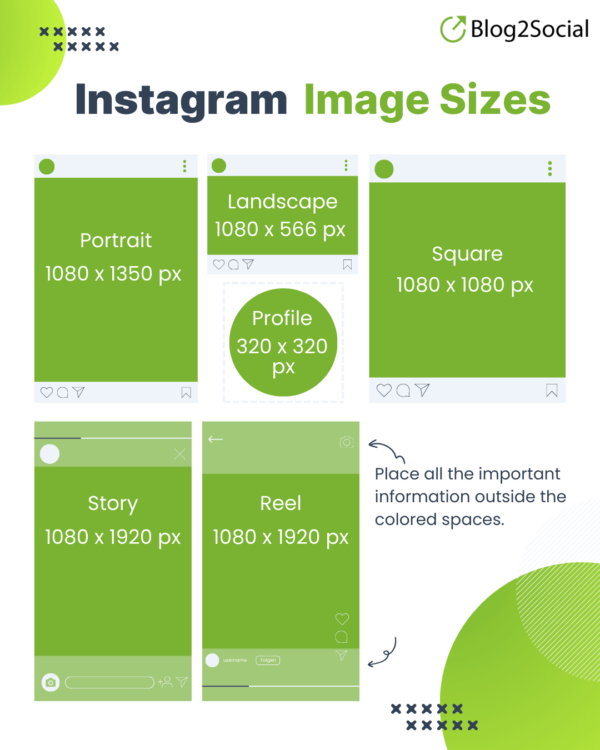

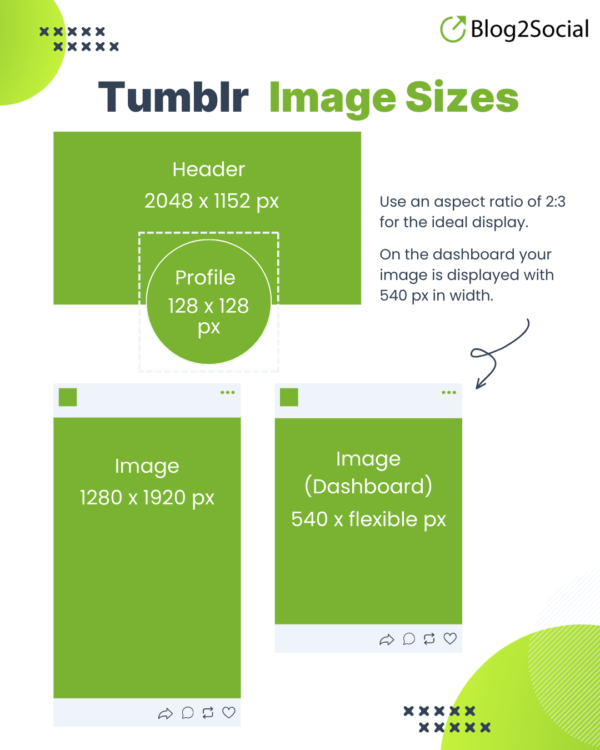





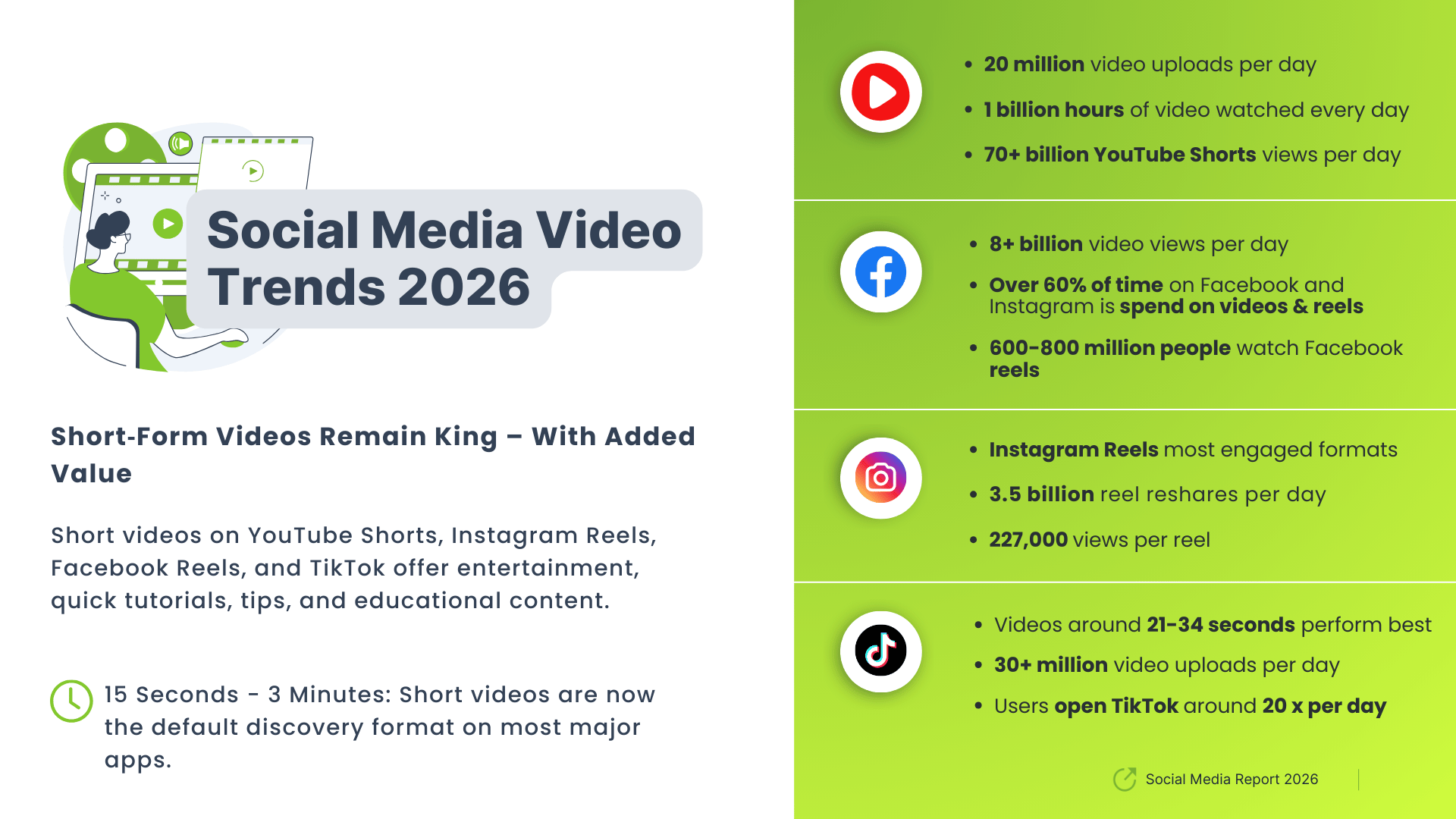


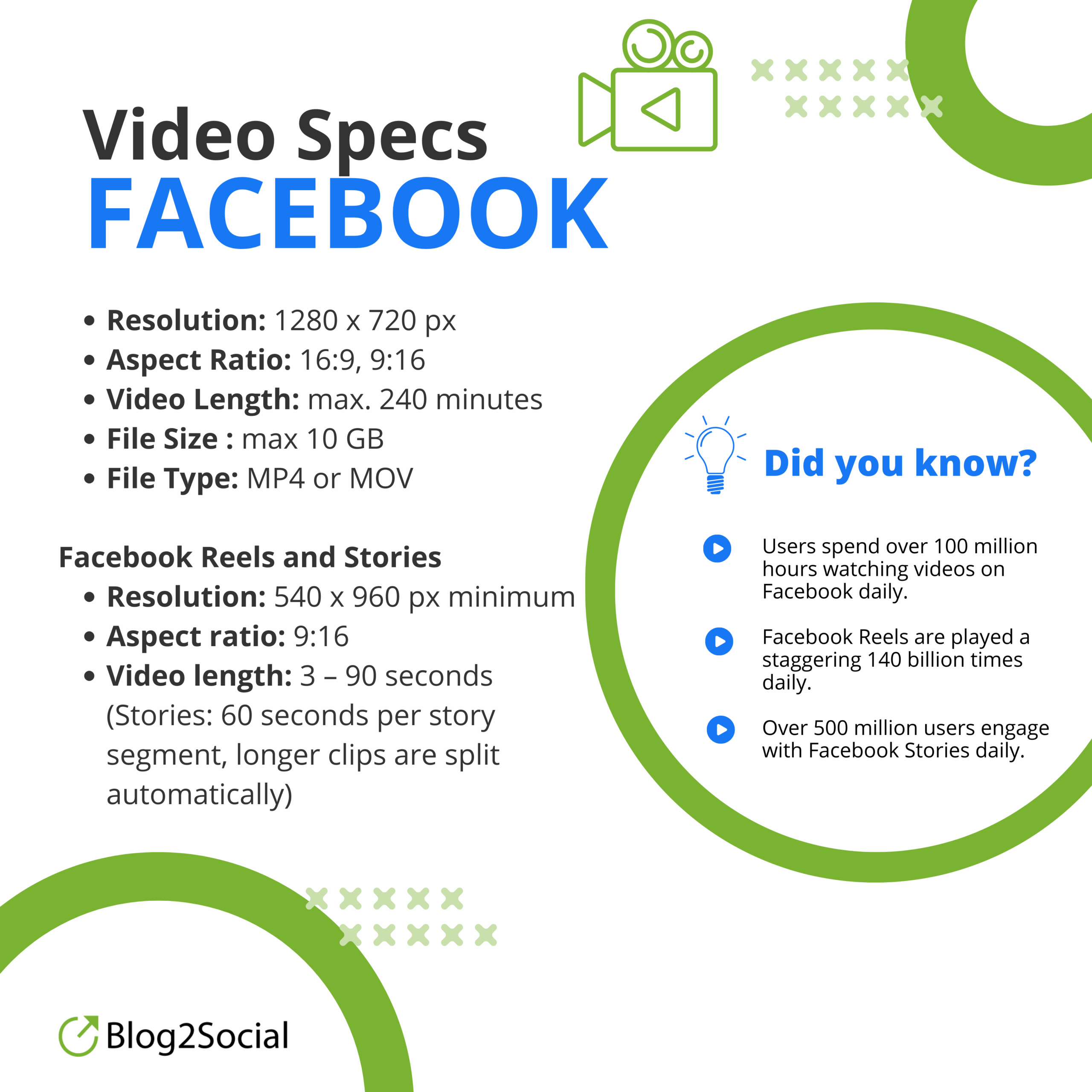


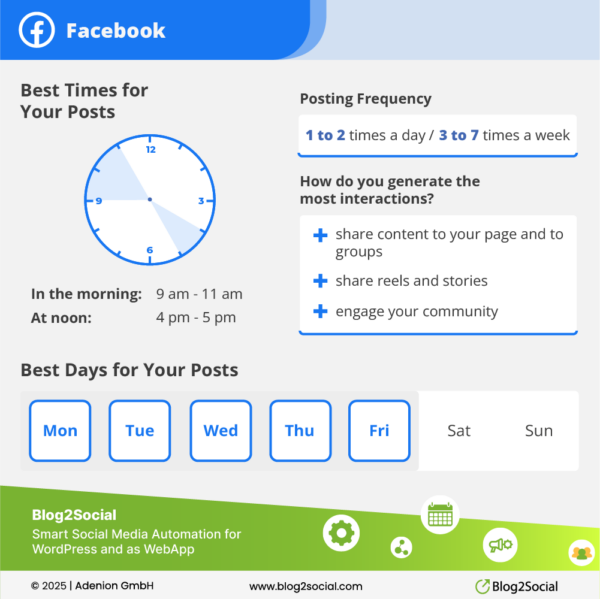 Facebook in numbers:
 TikTok in numbers:
 Telegram in numbers: